
TL;DR
Mouseflow and LogRocket both record user sessions and help teams understand what happens inside digital experiences, but they solve different operational problems.
Mouseflow focuses on behavioral analytics and conversion optimization. It helps teams uncover friction, analyze journeys, understand drop-offs, and improve conversion performance through tools like session replay, funnels, heatmaps, form analytics, friction detection, and AI-powered analysis. Paid plans starts at €39/month (or €25/month annually).
LogRocket focuses more heavily on frontend debugging and technical telemetry. It combines session replay with console logs, network requests, JavaScript errors, and application state monitoring to help engineering and support teams diagnose production issues. Their paid plans starts at $99/month for web (or $69/month annually) for the Team plan, but the full analytics suite requires the Professional plan at $350/month (web, monthly) or $295/month (web, annual).
Both platforms now offer AI-powered workflows and MCP support, but they differ significantly in how those capabilities scale, how accessible they are across plans, and what kinds of analysis they prioritize.
The right choice depends less on company size and more on the type of investigation your team runs every day.
Comparing Mouseflow and LogRocket
| Mouseflow | LogRocket | |
| Core positioning | Conversion optimization & behavior analytics | Product analytics & frontend debugging |
| Investigation style | Friction patterns across journeys | Technical failures inside sessions |
| Primary users | Marketing, CRO, Growth, Product, UX | Engineering, Product, Support |
| Free plan | 500 sessions/month, 1 funnel, 1 month retention, unlimited users | 1,000 sessions/month, 1 month retention, 3 users |
| Entry paid plan | Transparent tiered plans starting at €39/mo (€25/mo annual) | Team: $99/mo web (€69/mo annual) · $199/mo mobile ($139/mo annual) |
| Full analytics suite | Advanced: €149/mo (€109/mo annual) | Professional: $350/mo web ($295/mo annual) · $420/mo mobile ($350/mo annual) with annual commitment required |
| Session replay | All plans | All plans |
| Console & network logs | Not captured | All plans |
| Click, scroll & geo heatmaps | Available from Free + side-by-side comparison | Professional only |
| Attention & movement heatmaps | Available from Advanced | Professional only |
| AI layer | Mina AI for behavioral analysis, summaries, and insight surfacing (available from Essential | Galileo AI from Professional only |
| Conversion funnels | Included in all plans | Professional only |
| Friction detection | Available from Free (basic); full friction insights from Advanced | Rage & dead clicks from Professional only |
| MCP integration | Available with high API limits (Standard API access includes 75,000 calls per month and Extended API access includes 250,000 calls per month) | Professional only (200 calls/month included) |
| Form analytics | Available on the platform and connect with Session Replay and Funnels | Not a dedicated feature |
| Journey analytics | Available on Enterprise plans | Path analysis available on Professional |
| Feedback surveys | Available on Advanced plans where you can choose from 6 different question types and integrate with your Session Replay | Add-on on Professional |
| Billing commitment | Monthly or annual (save up to 35%) | Plans that are Professional and higher has an annual commitment required |
What is LogRocket?
LogRocket is a developer tool that shows exactly what a user experienced when something broke, complete with the console errors, network failures, and JavaScript exceptions that caused it.
It’s at its best when your team is asking: What JavaScript error caused this session to fail? Which API call returned a 500 that triggered this drop-off? What was the application state when the user hit this bug?
Who uses LogRocket?
- Engineering teams debugging frontend issues in production
- Product managers correlating session behavior with technical error data
- Support teams reproducing user-reported issues without screenshots or guesswork
- Development teams working on complex single-page applications or native mobile apps
If your team is primarily marketing or CRO, a significant portion of what LogRocket charges for on its higher tiers is data your developers, not your growth team, will get the most value from.
What is Mouseflow?
Mouseflow is built around a different question: Why aren’t visitors converting, and what’s getting in their way? Instead of only showing what users do, Mouseflow helps teams understand why they hesitate, abandon, or drop off and how to improve the journey.
To answer that, Mouseflow combines both quantitative and qualitative insights in one platform, including:
- Session replay
- Heatmaps
- Friction detection
- Form analytics
- Conversion funnels
- Feedback surveys
- Journey analytics
- AI-generated behavioral summaries
- UTM and data layer capture
Mouseflow is designed for:
- CRO teams
- Growth and performance marketing teams
- Digital marketing teams optimizing paid, SEO, and lifecycle funnels
- Product and UX teams
- Mid-market and Enterprise companies running continuous experimentation
Where Mouseflow stands out is speed to insight. Teams can move from identifying friction to testing improvements without relying heavily on engineering resources. Funnels are retroactive, heatmaps require no setup, and most teams can start exploring recordings, heatmaps, and funnels shortly after installation. You also get access to Form Analytics so you can track how users interact with forms on your site by showing drop-offs, hesitation, and completion rates for each field.
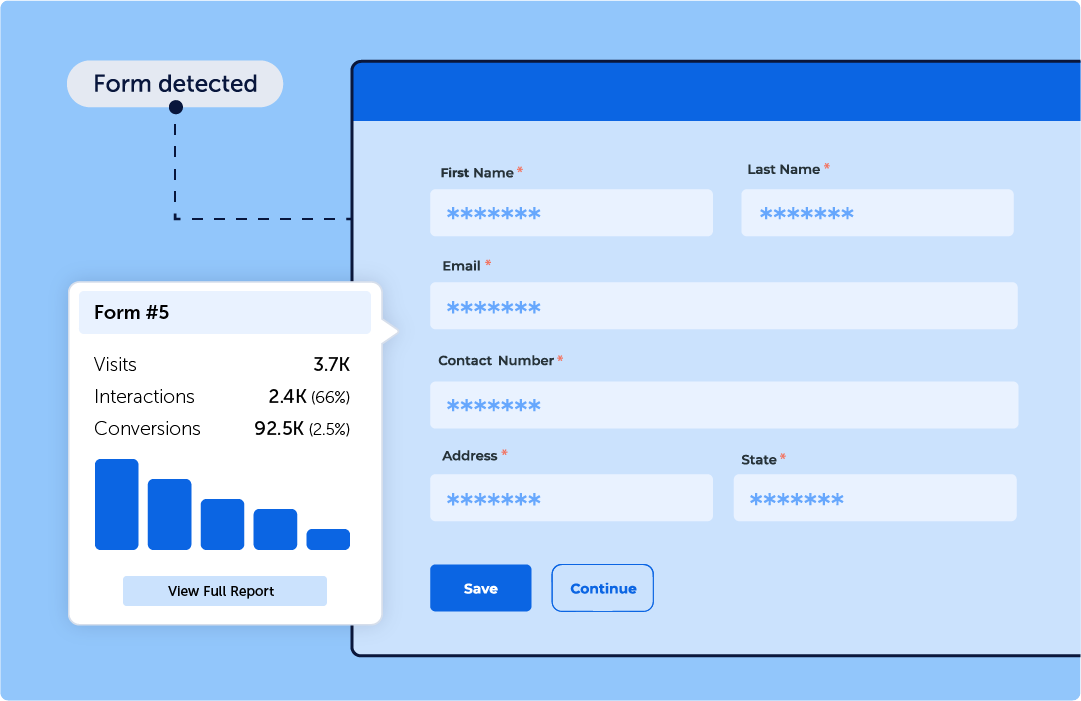
Form Analytics helps dealerships identify exactly where shoppers abandon lead forms, hesitate on specific fields, or drop off before completing a financing or contact request.
For organizations operating in Europe, Mouseflow also offers a practical compliance advantage. The company is headquartered in Copenhagen, and all data is stored on EU infrastructure by default, helping support GDPR and data residency requirements.
Mouseflow vs LogRocket: Core differences that matter
1. Built for different teams
The most fundamental difference is who each tool was designed to serve and it shapes everything downstream.
Mouseflow is built so that marketing, CRO, and growth teams can work independently. Heatmaps, funnels, and friction detection don’t require developer involvement. Funnels are retroactive, define one today and immediately see historical drop-off data. Most teams start generating actionable insights within hours of pasting the script. The platform’s language is conversion-focused: drop-offs, friction scores, form abandonment, revenue impact.
LogRocket is built for engineers and product managers who think in terms of errors, stack traces, and API responses. Its most powerful differentiators: console logs synchronized with sessions, network request monitoring, JavaScript error correlation, require someone who can interpret technical telemetry meaningfully. Non-developers can watch sessions, but the depth that justifies LogRocket’s Professional price is most useful to engineering teams doing root-cause analysis in production.
2. Conversion analytics vs. technical debugging
Both tools record sessions. The difference is what surrounds the session and what questions that data helps answer.
Mouseflow is strongest when teams need to understand:
- Where visitors abandon conversion flows
- Which pages create friction
- Which form fields create hesitation
- Whether users are reaching important CTAs
- How campaign traffic behaves differently
- Which UX changes improve conversion performance
- What behavioral patterns correlate with revenue impact?
LogRocket is strongest when teams need to understand:
- Which JavaScript error caused a failure
- Which API call returned an unexpected response
- What application state existed before a crash
- How a frontend regression affected production users
- Which issues have the highest technical severity
- How to reproduce reported bugs quickly
These are genuinely different questions. Mouseflow’s value is in behavioral patterns across sessions: aggregate heatmaps, funnel comparisons, friction scores, form drop-off trends. LogRocket’s value is in individual session forensics: the exact technical state of an application at the moment a problem occurred. Understanding your needs is the key to making the right choice.
3. Feature access and pricing
This is the biggest distinction between Mouseflow and LogRocket, and it influences everything from feature access to pricing.
Mouseflow is designed for teams that want to analyze user behavior and improve conversions without relying heavily on developers. Features like session replay, heatmaps, conversion funnels, friction detection, journey and form analytics are accessible directly inside the platform with minimal setup so you can start identifying friction points within hours of installation.
LogRocket is built primarily for engineers and product teams focused on technical debugging. Its capabilities center around console logs, API failures, Redux actions, network monitoring, and application state analysis, features that typically require engineering involvement to fully utilize.
That difference also impacts pricing and feature availability.
Mouseflow includes conversion-focused tools like heatmaps, funnels, and behavioral analytics across its pricing tiers, with plans starting at €25/month and a free plan available.
LogRocket’s entry-level plans focus more heavily on replay and debugging workflows, while features like heatmaps, funnels, and Galileo AI require higher-tier plans starting around $295/month with annual commitments.
Additionally, data retention on LogRocket’s Team plan is capped at 1 month. Extended retention (60, 90, or 180 days) is available as a paid add-on, typically increasing annual costs by 10–25%. For teams doing quarterly trend analysis or A/B test comparisons over time, this is a real operational constraint.
On sampling: Both platforms record 100% of sessions within purchased plan limits, no traffic-based sampling on either side. Mouseflow gives teams additional flexibility to set a custom recording percentage if they want to manage volume intentionally.
The practical difference:
- Mouseflow is optimized for conversion optimization and behavioral analysis. It provides strong mobile web tracking, responsive session replay, and device-level segmentation for teams optimizing primarily on web experiences.
- LogRocket is optimized for technical diagnostics and frontend debugging. It offers native mobile app analytics for iOS and Android across all plans.
4. AI: Mina AI vs Galileo AI
Both platforms have invested meaningfully in AI, and both offer a Model Context Protocol (MCP) server. That means AI agents like Claude Desktop or ChatGPT can connect directly to your data and interact with it in natural language, whether that’s querying session recordings, analyzing behavior patterns, or surfacing friction trends.
Where Mouseflow stands out is the scale and accessibility of that data. LogRocket includes 200 Galileo AI API/MCP calls per month on eligible plans, while Mouseflow includes 75,000 API calls per month. That difference matters because AI workflows rely on frequent access to behavioral data. Higher API limits make it easier to run continuous analysis, power internal dashboards, automate reporting, and let AI agents explore larger volumes of user behavior without quickly hitting usage limits.
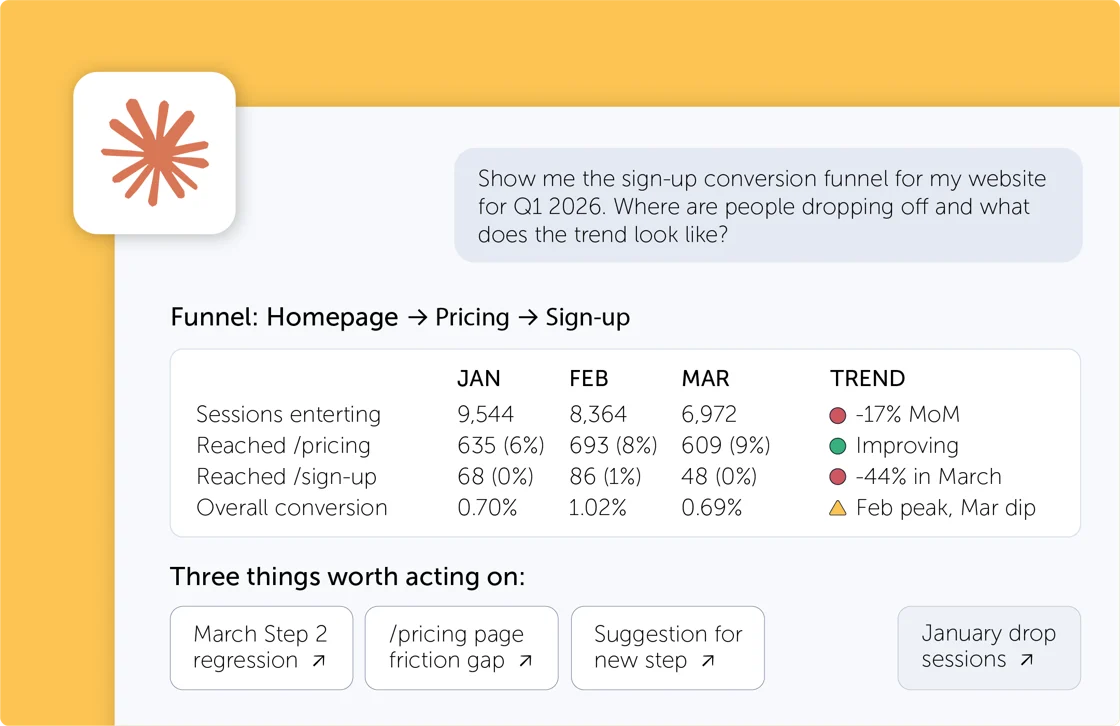
Example of insights you get from connecting Mouseflow data with Claude
Mina AI (Mouseflow) is oriented around behavioral and conversion intelligence. It analyzes session data, summarizes what’s happening across groups of recordings, and surfaces friction patterns that would take hours to find manually, helping CRO and marketing teams identify what to test and why. Mouseflow’s MCP server is available from the Premium plan.
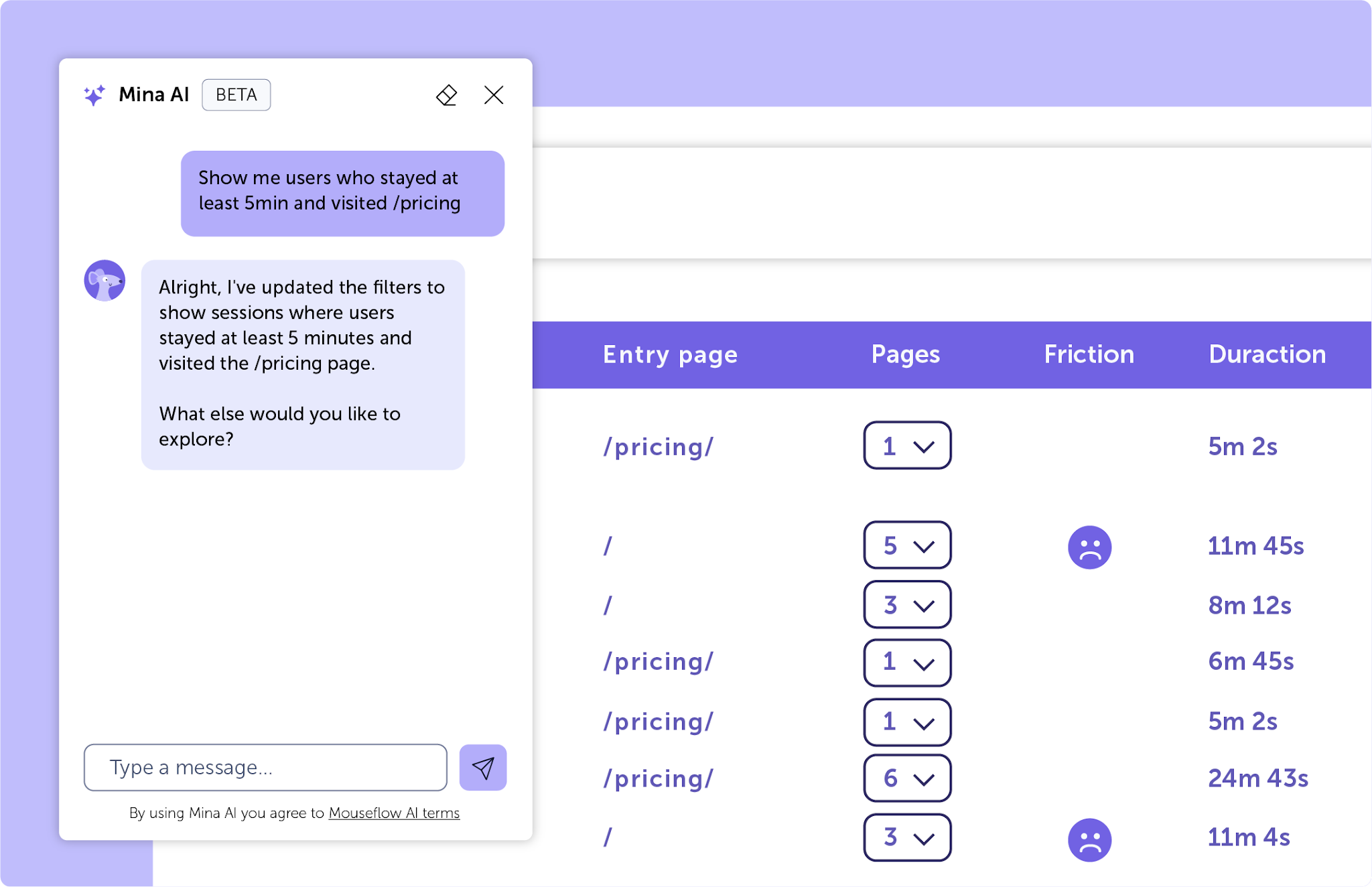
Galileo AI (LogRocket) is oriented around technical issue prioritization. It watches every session, ranks issues by impact and frequency, and produces natural language summaries of what went wrong. Ask Galileo adds a conversational interface that synthesizes data from sessions, support tickets, customer calls, and product changes across your entire toolstack, answering product questions without manual data wrangling. LogRocket’s MCP and Galileo AI require the Professional plan.
When Mouseflow is strongest
Choose Mouseflow if:
- Your primary use case is improving conversion rates, diagnosing funnel drop-offs, or understanding page-level behavior
- Your marketing, CRO, or UX team needs to operate without requiring ongoing engineering support for day-to-day analysis
- You want heatmaps, friction detection, and AI accessible from €25/month without locking into an annual contract to reach core features
- You’re running paid campaigns and need UTM-level session filtering
- EU data hosting matters for compliance or data residency reasons
- You want to quantify the revenue impact of conversion improvements before and after tests
- You need form analytics with field-level behavioral data
- You want strong mobile web visibility without implementing a full enterprise suite
Mouseflow is particularly effective for SaaS, eCommerce, and marketing-driven organizations running paid acquisition, SEO, and lifecycle campaigns where speed of insight directly impacts revenue performance.
Why marketing teams choose Mouseflow
Marketing teams choose Mouseflow when they need to:
- Diagnose underperforming landing pages and campaign traffic quickly
- Understand why paid traffic is not converting, not just that it isn’t
- Connect behavioral friction to funnel drop-offs and revenue opportunity
- Validate messaging, UX changes, and A/B test performance with session-level evidence
- Move from insight to optimization without waiting for cross-team analytics implementation

When LogRocket may be the better choice
Choose LogRocket if:
- Your primary use case is debugging frontend errors and performance issues in production
- Your engineering team needs console logs, network requests, and JS errors correlated with sessions
- You’re running native iOS or Android apps and need in-app session recording
- You require self-hosted deployment for full data control (Enterprise)
Pros and Cons
| Mouseflow Pros | Mouseflow Cons |
|
|
| LogRocket Pros | LogRocket Cons |
|
|
Common Evaluation Questions

They overlap in session replay, but serve different primary audiences. Mouseflow is built for conversion optimization and marketing-driven teams; LogRocket is built for engineering and product teams that need technical debugging alongside behavioral data. Many organizations use both, because different teams within the same company have genuinely different needs.
Yes. Mouseflow’s Revenue Insights feature lets teams assign conversion values to funnel steps, then automatically calculates generated revenue, potential revenue, and annualized opportunity. The Revenue Calculator estimates the monetary impact of specific conversion rate improvements, making it practical to prioritize optimization work by expected revenue gain.
For most marketing, CRO, and growth teams, yes. For engineering teams that depend on console logs, network monitoring, and error tracking in production, LogRocket has capabilities Mouseflow doesn’t replicate. The right answer depends on your primary use case.
LogRocket offers native iOS and Android session recording, an advantage over Mouseflow for teams running native apps. Mouseflow provides comprehensive mobile web tracking, which covers the needs of most marketing and eCommerce teams.
Mouseflow is typically faster to implement and activate. Mouseflow generates heatmaps and session data immediately with no additional configuration. LogRocket’s session replay setup is similarly fast, but getting full value from its technical features such as their error tracking, network monitoring, Redux integration requires more developer involvement.
Mina AI surfaces behavioral and conversion intelligence – friction patterns, session summaries, and optimization signals for CRO and marketing teams. Galileo AI surfaces technical issue prioritization and cross-source product insights via Ask Galileo, synthesizing sessions, support tickets, customer calls, and product changes. Both platforms offer MCP server integration. Mina AI is available from Essential (€25/month annual); Galileo AI requires Professional ($295/month annual).
Yes. Both Mouseflow and LogRocket provide a Model Context Protocol server, allowing AI agents like Claude Desktop or Cursor to query your analytics data and interact with it in natural language. Mouseflow’s MCP is available from the Premium plan; LogRocket’s requires Professional.

Summary
Mouseflow is a behavior analytics platform designed for CRO, growth, and product teams that need fast, actionable insights tied directly to conversion performance. It emphasizes unsampled visibility within plan limits, friction detection, form-level behavioral analysis, and rapid execution – with transparent pricing, EU data hosting, and every core feature accessible without an enterprise contract.
LogRocket is a product and engineering analytics platform built around session replay as a debugging tool. Its strength is correlating user experience with application state – console logs, network data, and JavaScript errors all in the same timeline. It has expanded into product analytics, but its deepest value is in engineering and product workflows.
Mouseflow prioritizes speed, clarity, and operator-level impact. LogRocket prioritizes technical depth, error context, and developer-native workflows.

Final takeaway
The decision between Mouseflow and LogRocket depends on your operating model.
- If you are optimizing conversion performance, running growth experiments, and need fast insight-to-action cycles – Mouseflow provides a focused, execution-ready platform with a pricing model that scales predictably and a feature set built for the teams closest to revenue.
- If you are implementing application-level debugging, need full technical telemetry alongside sessions, or are supporting engineering teams that require console and network context to do their jobs – LogRocket is built for that mandate.
For most marketing and growth-driven teams, competitive advantage comes from speed of insight and clarity of action. That is where Mouseflow is strongest.