
Website heatmap tools all visualize user behavior, but they do not all help you answer the same questions.
A free tool may be enough to see where visitors click, which sections hold their attention, and how far they scroll. But CRO, ecommerce, and UX teams may also need to compare audience segments, analyze dynamic elements, identify friction, and connect aggregated patterns with individual user sessions.
This review compares five of the leading website heatmap tools in 2026 based on their heatmap capabilities, filtering and segmentation, comparison features, friction detection, privacy controls, ease of analysis, and overall value.
For a broader overview of how heatmaps work and how to interpret them, see our complete guide to website heatmaps. To explore Mouseflow’s heatmap capabilities in more detail, visit the Website Heatmap Tool.

The Best Heatmap Tools at a Glance
The best website heatmap tool depends on what you need heatmaps to do. Some platforms provide free access to the core analysis most websites need. Others help optimization teams compare segments, analyze interactive content, investigate friction, or connect heatmap patterns with broader journey and conversion data.
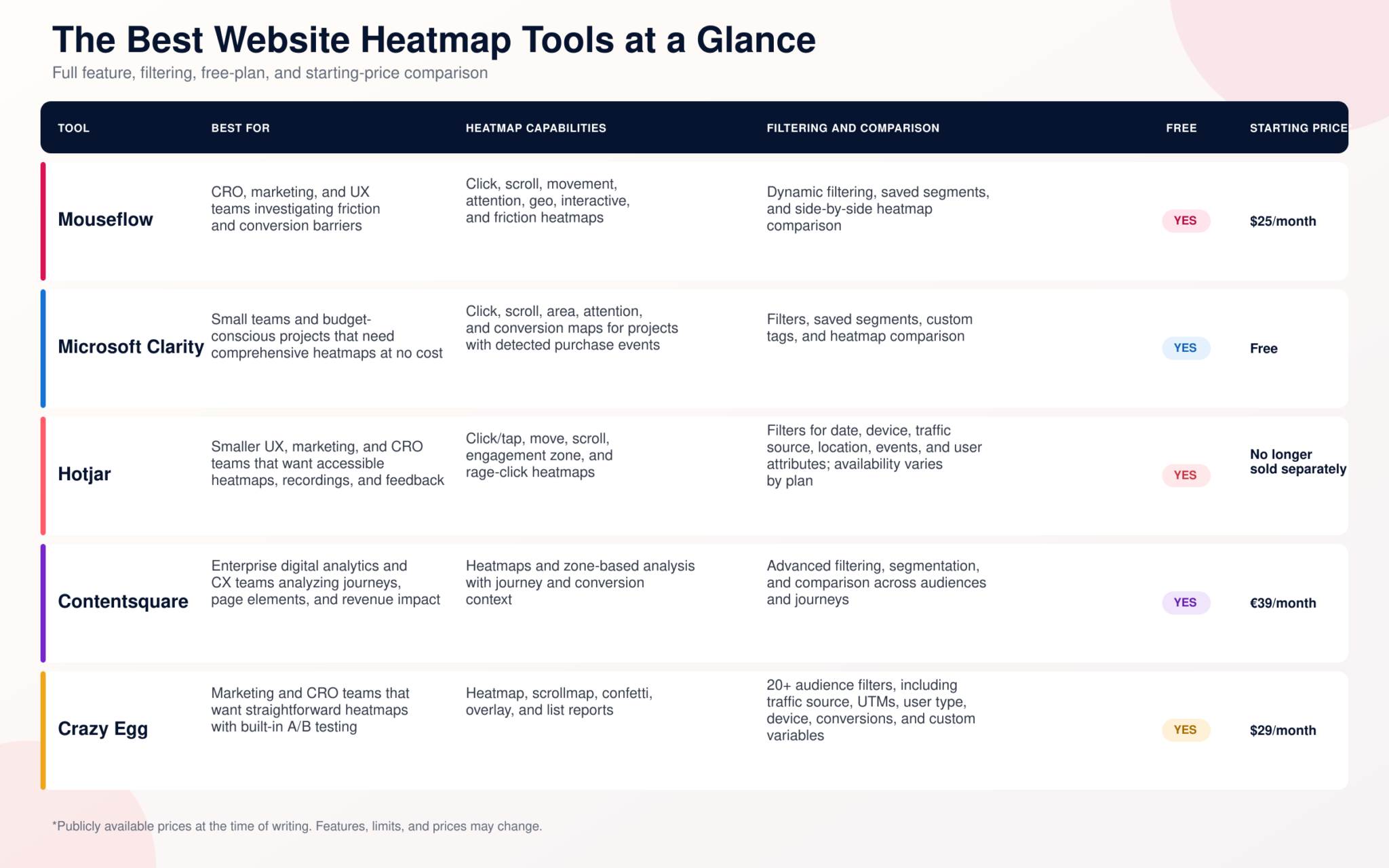
*Prices reflect publicly available information at the time of writing. Mouseflow and Crazy Egg prices are shown in US dollars, while Contentsquare lists its Growth plan from €39 per month when billed annually. Hotjar’s pricing page now directs new customers to Contentsquare’s pricing. Features, limits, and prices may change.
The main difference between these tools is not whether they offer heatmaps, but how far teams can take the analysis. Microsoft Clarity provides broad heatmap coverage without a subscription, but teams requiring stricter data governance should assess its terms carefully, including its independent-controller model, permitted data uses, consent requirements, and restrictions on content involving healthcare, financial services, or government-related information. Crazy Egg offers a practical path from page-level analysis to A/B testing, although it provides less depth in friction detection and journey analysis. Hotjar remains a familiar workflow for existing customers, while new buyers are directed to Contentsquare. Contentsquare extends the analysis across enterprise journeys, revenue, and governance. Mouseflow focuses on heatmap-led investigation, connecting segmentation, interactive analysis, comparison, and friction detection with session replay.
The individual reviews below examine the strengths, limitations, pricing, and best-fit use cases of each platform.
How We Evaluated the Heatmap Tools
The “best” heatmap software depends on what you are trying to learn. A content team checking whether readers reach the bottom of an article has different requirements from an ecommerce team investigating checkout abandonment.
To make the comparison consistent, Mouseflow, Microsoft Clarity, Hotjar, Contentsquare, and Crazy Egg were assessed against the same criteria.
- Heatmap Coverage and Analytical Depth
Click and scroll maps are the baseline: every tool in this comparison can show which elements attract clicks and how far visitors travel down a page.
The evaluation also considered movement, attention, geo, conversion, and friction heatmaps. More map types do not automatically make a product better, but they expand the questions it can answer. An attention map can show where visitors spend time, while a friction map can reveal where rage clicks, dead clicks, or interaction errors cluster on a page.
The level of detail available within each map was also considered. Element-level metrics can be more actionable than colors alone because they help distinguish meaningful engagement from repeated or unsuccessful interactions
- Dynamic and Interactive Element Support
Modern websites rarely remain in the state captured by an initial screenshot. Navigation menus expand, product filters update results, modal windows appear, and single-page applications change without loading a new URL.
Each platform was assessed on its ability to capture and analyze these changing states. Without dynamic or interactive support, clicks from multiple page states may be combined on one static image, making the heatmap difficult to interpret.
- Segmentation, Filtering, and Comparison
An aggregate heatmap can hide meaningful differences between visitors. Mobile and desktop users may see different layouts, paid traffic may behave differently from organic visitors, and customers who convert may interact with a page differently from those who leave.
The evaluation considered the filters available, how easily they can be changed, whether segments can be saved, and whether heatmaps can be compared directly. Dedicated comparison is particularly valuable for CRO teams assessing behavior before and after a redesign, across devices, or between experiment variants.
- Friction and Problem Identification
A hotspot is not always a positive signal. Repeated clicks may indicate interest, but they may also reveal a broken button, a misleading image, or an element visitors incorrectly assume is clickable.
Each platform was assessed on whether it identifies behaviors such as rage clicks, dead clicks, click errors, JavaScript errors, and form problems. The evaluation also considered whether these signals can be visualized directly on a heatmap and connected with the sessions in which they occurred.
- Connection With Session Replay
Heatmaps show aggregated patterns, while session replay provides the sequence and context behind those patterns.
All five tools offer session recordings, so availability alone was not a useful differentiator. Instead, the evaluation considered how easily analysts can move from a heatmap element, segment, or friction signal to recordings from the same group of visitors
- Ease of Analysis and Integrations
The evaluation considered installation, navigation, reporting, data exports, and the amount of configuration required before a useful heatmap becomes available.
Automatically generated heatmaps can reduce setup for marketing and UX teams, while platforms with more advanced configuration options may provide greater analytical control but require additional expertise.
Integrations with analytics platforms, A/B testing tools, ecommerce systems, tag managers, and collaboration tools were also considered because heatmap findings rarely remain inside one product.
- Privacy, Compliance, and Data Governance
Behavior analytics tools can capture sensitive interactions if they are not configured correctly. The evaluation therefore considered masking and exclusion controls, consent requirements, data residency, retention, individual deletion options, account access, and restrictions on the types of websites or information that can be tracked.
Public terms and privacy documentation were reviewed alongside product pages. This distinction matters because a platform may provide GDPR-supporting controls while its terms establish additional conditions around data ownership, permitted data use, international transfers, or sensitive information.
No analytics tool makes a website compliant automatically. The website operator remains responsible for establishing an appropriate legal basis, collecting consent when required, preventing sensitive information from being recorded, and documenting how visitor data is processed.
- Pricing and Value
The comparison considered free plans, trials, public starting prices, traffic allowances, data retention, and the capabilities reserved for higher-tier plans.
Pricing models vary significantly. Some platforms charge according to recorded sessions, others use pageviews, and enterprise plans may require custom quotes. Value was therefore assessed based on the capabilities available for a relevant volume of traffic, not simply the lowest advertised price.
The evaluation is based on publicly available product documentation, pricing pages, privacy information, and terms of use. It is not a hands-on benchmark conducted under identical test conditions. Features, limits, and prices may change, so critical requirements should be confirmed directly with the provider before purchasing.
The Best Website Heatmap Tools Compared
1. Mouseflow
Best for: CRO, ecommerce, marketing, and UX teams that need to compare behavior, identify friction, and investigate conversion barriers.
Mouseflow offers seven automatically generated heatmap types: click, scroll, movement, attention, geo, interactive, and friction heatmaps. Together, they cover basic engagement questions as well as more specific analysis of hesitation, dynamic elements, and user frustration.
The platform’s side-by-side heatmap comparison can be used to examine two periods, pages, devices, segments, or heatmap types in one view. Filters can isolate behavior by dimensions such as device, traffic source, campaign, location, browser, operating system, and custom tags.
Mouseflow’s friction detection identifies signals such as rage clicks, click errors, dead clicks, and form problems. Friction can be visualized at page and element level, then investigated in the relevant session recordings. Beyond heatmaps and replay, the platform includes funnels, form analytics, journey analytics, and feedback surveys.
Privacy and compliance: Mouseflow provides automatic IP masking, configurable content exclusions, consent integrations, a Data Processing Agreement, and EU storage for EU customer data. These controls support GDPR compliance, but customers must still configure tracking correctly and collect consent where required.
Strengths
- Seven heatmap types, including interactive and friction heatmaps
- Dynamic filtering and saved segments
- Side-by-side heatmap comparison
- Direct connection between friction signals, heatmaps, and recordings
- EU data residency and configurable privacy controls
Limitations
- Advanced heatmap types require a paid plan
- Teams that only need occasional click or scroll data may not use the broader platform
- The range of analysis options can require more onboarding than a basic free tool
Pricing: Mouseflow offers a free plan with 500 monthly sessions. Paid plans start at $25 per month when billed annually, and a 14-day trial provides access to premium capabilities.
Who should choose it? Choose Mouseflow if heatmaps are central to your CRO or UX workflow and you need to move from seeing an aggregated pattern to identifying friction, comparing audiences, and investigating the sessions behind it. For a direct feature comparison, see Mouseflow versus Microsoft Clarity or Mouseflow versus Hotjar.
2. Microsoft Clarity
Best for: Small teams and budget-conscious projects that need heatmaps and session recordings without traffic limits or subscription costs.
Microsoft Clarity is a free behavior analytics platform offering click, scroll, area, attention, and conversion heatmaps. Conversion maps are available for projects where Clarity detects purchase events and show which page areas contribute to purchases.
Heatmap filters include device, browser, location, traffic source, campaign, user actions, and custom tags. Filters can be saved as segments, and teams can compare heatmaps across audiences, devices, pages, or time periods.
Beyond heatmaps, Clarity includes session recordings, funnels, rage-click and dead-click detection, JavaScript error tracking, and AI-generated summaries. It also integrates with platforms including Google Analytics and Shopify.
Privacy and compliance: Microsoft states that Clarity is GDPR-compliant as a data controller and provides consent and content-masking controls. However, its terms establish Microsoft and the website operator as independent controllers and allow Microsoft to use collected personal data for purposes including product improvement and advertising profiles. A valid consent signal is required for full functionality for visitors in the EEA, UK, and Switzerland. The terms also prohibit using Clarity on content that may contain sensitive user information, citing healthcare, financial services, and government-related information as examples.
Strengths
- Free with no traffic or website limits
- Five heatmap types, including attention and conversion maps
- Heatmap comparison and saved segments
- Session replay and frustration signals
- Integrations with Google Analytics and Shopify
Limitations
- Fewer specialized options for interactive-element and friction analysis than Mouseflow
- Individual user data cannot be deleted without deleting the entire project
- Clarity does not respond to browser Do Not Track signals
- Microsoft is not obligated under its terms to provide support services
- Its data-use terms may not meet the requirements of every organization
Pricing: Microsoft Clarity is free, with no paid plan or traffic-based upgrade.
Who should choose it? Choose Clarity if you need a free way to analyze clicks, attention, scrolling, purchases, and individual sessions. Organizations with strict data-governance requirements or websites containing sensitive user information should review Microsoft’s terms and intended data use carefully before implementation.
3. Hotjar
Best for: Smaller UX, marketing, and CRO teams that want an accessible combination of heatmaps, session recordings, and user feedback.
Hotjar is known for a straightforward visual workflow. Its heatmaps include click or tap, move, scroll, engagement zone, and rage-click views. Engagement zones combine click, move, and scroll data to highlight the sections attracting the most interaction, while rage-click maps focus on potential frustration.
Teams can filter heatmaps using criteria such as date, device, traffic source, location, landing and exit pages, events, and user attributes, although availability depends on the plan. Hotjar builds its heatmaps from the same session data collected for recordings, so the amount of behavior represented depends on the session coverage available under the selected plan. Users can also refresh or manually capture a screenshot when they need to analyze a dropdown or another dynamic page state.
Hotjar also connects behavioral observation with surveys and feedback widgets. This makes it useful when a team wants to see where users struggle and ask them about the experience within the same workflow.
Privacy and compliance: Hotjar provides suppression and masking controls, consent integrations, and documentation intended to support GDPR and other privacy requirements. As with every tool in this comparison, customers remain responsible for configuring collection appropriately.
Strengths
- Approachable interface for UX and marketing teams
- Five heatmap views, including engagement zones and rage clicks
- Session recordings and feedback tools in the same workflow
- Useful filtering for common research and CRO questions
Limitations
- Advanced filters and insights depend on the selected plan
- Dynamic states may require manually capturing or updating the heatmap screenshot
- Fewer specialized heatmap types and comparison options than Mouseflow
- The transition into Contentsquare can make current product and pricing information less straightforward for new buyers
Pricing: Hotjar remains available to existing customers, but its public pricing page now directs new buyers to Contentsquare’s current Free, Growth, Pro, and Enterprise plans.
Who should choose it? Hotjar remains relevant for existing customers and teams that value its familiar combination of heatmaps, recordings, and feedback. New buyers should compare that workflow with the current Contentsquare plans before deciding.
4. Contentsquare
Best for: Large organizations that need digital experience analytics across multiple teams, journeys, markets, and high-traffic properties.
Contentsquare combines heatmaps and session replay with journey analysis, error and performance monitoring, surveys, AI-generated insights, and broader product and experience analytics. Its standard heatmaps help teams see clicks, hovers, scrolling, and attention, while zone-based heatmaps connect individual page elements with engagement and conversion outcomes.
The Growth plan adds zone-based heatmaps, journey analysis, impact quantification, and AI summaries. Pro extends the platform with retroactive precision filtering, revenue goals, and multi-session replay summaries. Enterprise adds unlimited projects, experience monitoring, data feeds, dedicated support, and service-level agreements.
Privacy and compliance: Contentsquare provides enterprise privacy, security, and governance capabilities, including masking, access controls, and contractual documentation. The precise controls, support level, and data arrangements depend on the selected plan and should be reviewed during procurement.
Strengths
- Heatmaps connected with journey and revenue analysis
- Zone-based analysis for page elements
- Error, performance, and experience monitoring
- Advanced enterprise governance and support
- AI summaries and analysis across multiple capabilities
Limitations
- Many advanced capabilities require Growth, Pro, or Enterprise
- Implementation and adoption may require more organizational resources
- Pro and Enterprise pricing is not publicly listed
- The broader platform may exceed the needs of teams seeking only page-level heatmaps
Pricing: Contentsquare offers a Free plan. Growth starts from €39 per month in the EU pricing displayed at the time of writing when billed annually. Pro and Enterprise require a custom quote.
Who should choose it? Choose Contentsquare when heatmaps need to support a larger digital experience program involving journey analysis, revenue prioritization, monitoring, and governance across several teams. See the detailed Mouseflow versus Contentsquare comparison for a closer look at the differences.
5. Crazy Egg
Best for: Marketing and CRO teams that want straightforward visual reports and the ability to run website A/B tests within the same product.
Crazy Egg’s visual reports include heatmaps, scrollmaps, confetti, overlays, and list reports. The confetti report separates individual clicks using audience dimensions, while overlays and lists add numerical context to the elements displayed on the page.
Heatmap data can be segmented and exported using more than 20 audience filters, including date range, traffic source, UTM parameters, user type, device, conversion goals, and custom variables. Crazy Egg also includes session recordings, web analytics, conversion tracking, funnels, surveys, and AI-assisted analysis.
Its clearest differentiator is built-in A/B testing. Teams can identify a page-level opportunity in a heatmap, create a variation, and measure the outcome without adopting a separate testing tool. More advanced experiment targeting is reserved for higher plans.
Privacy and compliance: Crazy Egg states that it provides GDPR and CCPA support, masking controls, IP anonymization, encryption, and a Data Processing Agreement. Customers should confirm the configuration and contractual requirements relevant to their region and industry.
Strengths
- Accessible visual reports with numerical detail
- More than 20 audience filters
- Built-in A/B testing on eligible plans
- Unlimited domains and team members on paid plans
- Funnels, surveys, and conversion tracking included
Limitations
- Heatmap report and recording allowances vary by plan
- Advanced A/B test targeting requires a higher-tier plan
- Less specialized friction and journey analysis than broader platforms
Pricing: A free plan is available. Paid plans start at $29 per month when billed annually, with a 30-day trial for paid subscriptions.
Who should choose it? Choose Crazy Egg if your team wants a simple path from finding a page-level opportunity to testing a design or content change in the same platform.
How to Choose the Right Heatmap Software
Choosing heatmap software starts with the decision you need to make. The right tool should isolate the relevant visitors, represent their behavior accurately, and help your team determine what to investigate or change next.
If You Only Need Basic Click and Scroll Data
Start with Microsoft Clarity. Its free plan can answer directional questions such as whether visitors see the primary CTA, which navigation items receive clicks, and where engagement drops as users move down the page.
A free Mouseflow plan is another option if you want to test click, scroll, and geo heatmaps within a platform that can later expand into more advanced CRO analysis.
If You Need to Understand Where Users Struggle
Look beyond click density. A useful tool should distinguish engagement from frustration, identify errors or repeated unsuccessful interactions, and lead directly to the sessions behind the pattern.
Mouseflow is particularly suited to this use case because its friction heatmaps visualize frustration signals on the page and connect them with broader friction analysis and recordings. Hotjar also provides rage-click maps for teams that need a simpler view of repeated clicking.
If You Use Heatmaps for CRO or A/B Testing
Prioritize segmentation and comparison. CRO teams should be able to examine mobile and desktop behavior, purchasers and non-purchasers, different traffic sources, or experiment variants without rebuilding the analysis manually.
Mouseflow provides dedicated side-by-side heatmap comparison and dynamic filtering. Crazy Egg may be preferable when creating and running the A/B test inside the same platform is more important than advanced heatmap depth. Contentsquare becomes relevant when experimentation is part of a larger enterprise optimization program.
If You Need to Analyze Dynamic Website Elements
Confirm that the platform can represent dropdowns, menus, pop-ups, carousels, filters, and other content that changes after the initial page load. Static screenshots can combine clicks from different page states and make the heatmap misleading.
Mouseflow’s interactive heatmaps layer behavioral data onto the live website so analysts can open and inspect changing elements. Hotjar allows teams to update or manually capture screenshots of particular states, but this may require more preparation.
If You Need Heatmaps Alongside Session Replay
All five platforms provide recordings, but the connection between the tools matters more than the presence of replay itself. Check whether you can move directly from a heatmap element, segment, conversion, or friction signal to recordings from the same visitors.
Mouseflow, Clarity, Hotjar, Contentsquare, and Crazy Egg all support this workflow to different degrees. Evaluate how much filtering or setup is required to reach the right recordings rather than comparing only whether replay appears on the feature list.
If You Want Heatmaps and Direct User Feedback
Hotjar is a familiar option for smaller UX teams that want to pair heatmaps and recordings with surveys or feedback widgets. Mouseflow also includes feedback surveys and can connect responses with recordings, while Contentsquare offers Voice of Customer capabilities that can scale across larger programs.
If You Work With Ecommerce
Look beyond clicks on the product page. Ecommerce teams benefit from checkout funnels, form analysis, purchase-based segmentation, friction detection, and support for product filters, menus, carts, and other dynamic elements.
Mouseflow fits teams that need structured conversion and friction analysis across the shopping journey. Clarity provides free conversion maps for projects with detected purchases. Crazy Egg offers built-in testing, while Contentsquare serves larger ecommerce organizations that need revenue and journey analysis across markets.
If You Need an Enterprise-Wide Analytics Platform
Contentsquare is designed for organizations that need experience analysis, revenue prioritization, monitoring, governance, and dedicated support across teams and digital properties. Before committing, confirm that the organization has the resources and use cases needed to adopt the broader platform rather than heatmaps alone.
If Your Organization Has Strict Data Governance Requirements
Evaluate privacy requirements before comparing features. Review each provider’s masking and exclusion controls, consent support, data residency options, retention settings, access controls, and contractual role under applicable privacy laws.
This is particularly important for Microsoft Clarity. Its terms state that Microsoft and the website operator act as independent controllers, allow Microsoft to use collected personal data for purposes described in its Privacy Statement, and prohibit using Clarity with content involving healthcare, financial services, or government-related information. Organizations in regulated industries or with strict internal data policies should review these terms with their privacy or legal teams before implementation.
Mouseflow provides input-field masking, page exclusions, IP anonymization, consent controls, and regional data hosting to support compliance requirements. However, no tool makes a website automatically GDPR compliant: the organization must still establish a lawful basis, configure consent where required, and prevent unnecessary personal data from being collected.
Free vs. Paid Heatmap Tools: What Do You Actually Need?
Free heatmap tools can be good enough when the goal is to answer a focused, directional question:
- Are visitors seeing the primary CTA?
- Which navigation items receive the most clicks?
- How far down the page do most visitors scroll?
- Are users repeatedly clicking an element that does not respond?
Microsoft Clarity is a credible free option for these use cases, particularly when traffic limits would make a session-based plan restrictive. Mouseflow and Contentsquare also offer free plans that can help teams evaluate their workflows before adopting more advanced capabilities.
A paid tool becomes more valuable when the next question is not simply “What happened?” but “Which visitors experienced it, what else happened in their journey, and what should we investigate next?”
Consider a paid heatmap tool when you need:
- More detailed filtering and saved segments
- Dynamic or interactive-element analysis
- Heatmap comparison across devices, periods, audiences, or page versions
- Friction and error detection
- Longer data retention or greater traffic capacity
- Form, funnel, journey, or revenue context
- Stronger privacy, access, and governance controls
- Integrations with experimentation, analytics, ecommerce, or collaboration tools
Price should be compared alongside the usage model. One provider may count sessions, another pageviews, and another may bundle heatmaps into a broader enterprise package. A low headline price provides limited value if collection stops before the team has enough representative data or if the required analysis is only available on a higher plan.
Privacy should also influence the free-versus-paid decision. A free platform may provide masking and consent features, but its contractual role, permitted data uses, deletion controls, and support commitments may differ from those of a paid vendor. Teams handling sensitive data or operating in regulated industries should review these conditions before implementation.
Which Heatmap Tool Should You Choose?
The strongest choice depends on how central heatmaps are to your workflow, the depth of analysis your team needs, and how findings connect with the rest of your optimization process.
- Choose Mouseflow when heatmaps are central to CRO or UX analysis. Its seven map types, dynamic filtering, interactive-element support, side-by-side comparison, and friction visualization help teams investigate conversion barriers rather than only observe click and scroll patterns.
- Choose Microsoft Clarity when cost and unrestricted traffic coverage are the priorities. It provides five heatmap types and session replay for free, but organizations should assess its data-use terms, consent requirements, and restrictions around sensitive content.
- Choose Hotjar when a smaller UX or marketing team values a familiar workflow combining heatmaps, recordings, and feedback. Hotjar was acquired by Contentsquare in 2021 and its capabilities are now part of Contentsquare’s platform. Existing customers can continue using Hotjar as before, but new buyers will be directed to Contentsquare’s current plans. It is worth comparing what Hotjar offered with the Contentsquare plan that most closely matches your team’s needs before deciding.
- Choose Contentsquare when heatmaps support an enterprise-wide digital experience program. It is most relevant when multiple teams need journey, zone, revenue, monitoring, and governance capabilities across high-traffic digital properties.
- Choose Crazy Egg when your marketing team wants heatmaps and built-in A/B testing in the same tool. It provides a straightforward workflow for identifying page-level opportunities and testing design or content changes.
Whichever platform you choose, begin with a specific question, segment the relevant visitors, and use session replay or wider journey data to investigate the patterns revealed by the heatmap.
Explore Mouseflow’s Website Heatmap Tool or start a free trial.