Every marketing team is looking at the same chart right now: traffic climbing, sessions up. Especially since 2026, a lot of teams have genuinely seen that number move. Similarweb report puts a figure on part of it: AI platforms drove an average of 770.7 million referral visits to websites every month between June 2025 and May 2026, more than double the year before. Traffic is genuinely climbing. Whether it is landing anywhere useful is a different question entirely.
And if you’re staring at your own chart and asking yourself, “then why aren’t my conversions or leads going up too?”, you’re not alone, and you’re asking the right question.
We asked ourselves that exact question about our own site this quarter. Then we went digging.

The number that didn't add up
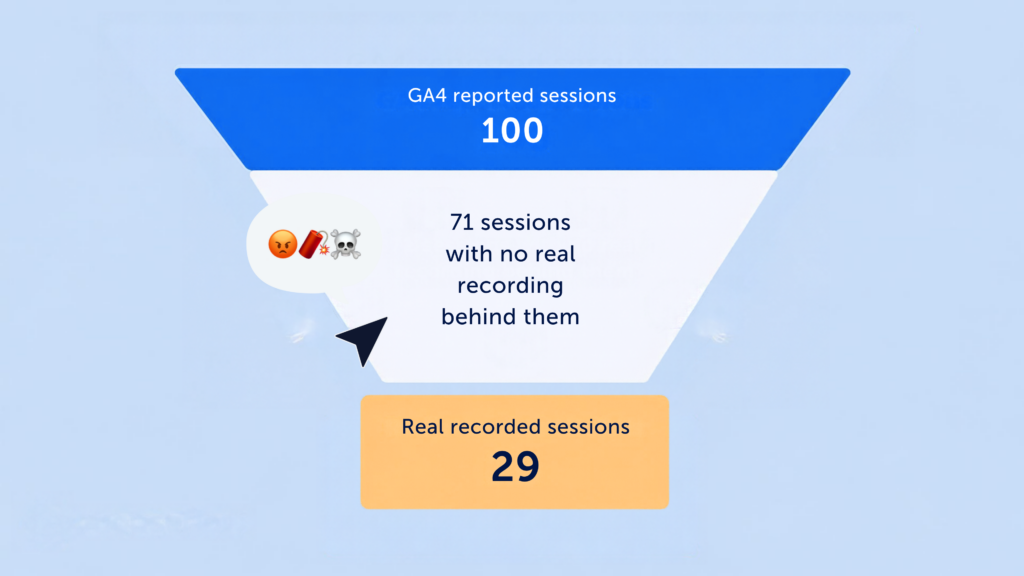
We lined up our Q1 numbers in Google Analytics 4 against what Mouseflow actually recorded on the same site, same dates, same everything. GA4 confidently reported roughly three times more sessions and nearly three times more users than we could find actual, playable recordings for*.
Three times. Not “off by a little.” Somewhere between GA4’s dashboard and reality, a lot of “visitors” went missing, or more accurately, never existed in the first place.

Where the ghosts are hiding
Once we split it out by channel, the problem became obvious. Our real, attributable channels were being perfectly boring. Organic held steady. Paid dipped a touch.
Almost all the “growth” was hiding in two suspiciously vague buckets: unassigned traffic and direct traffic, GA4’s version of a shrug emoji for anything it can’t figure out where it came from.
Unassigned traffic alone shot up over 500% year over year. And the behavior attached to a good chunk of it was a dead giveaway: bounce rate of 90%, average time on page under 15 seconds. That’s not someone reading a page. That’s something showing up, blinking once, and leaving before the page has even finished loading.
Why does AI traffic even land in "Unassigned" or "Direct?
It’s not GA4 being lazy, it’s a structural blind spot. AI platforms often strip referrer data before a click happens, rarely attach UTM tags to links they generate, and a lot of “AI traffic” isn’t even a click at all, it’s someone reading an answer and typing your URL in manually. GA4 has no channel built for “arrived because ChatGPT mentioned you,” so it defaults to Direct or Unassigned. That means real, high-intent AI-referred visitors and bot noise end up dumped in the exact same bucket, indistinguishable from a traffic report alone.
Which is the uncomfortable part: some of that Unassigned spike really might be legitimate visitors who found you through an AI platform. But so might a bot. The traffic report can’t tell the two apart, and it isn’t designed to.
Meanwhile, our own session-level data was over here being the responsible adult in the room. Mouseflow only counts a session if there’s an actual recording attached, something a real browser rendered and a real human poked at. Once we looked through that lens, most of the “growth” simply wasn’t there, and the sessions that remained were worth actually watching.
Why this is a bigger deal than just "traffic is inflated"
Marketing has already spent years side-eyeing vanity metrics. Traffic, leads, MQLs: we know these have always been rough proxies for real buyer intent, and they’ve caused enough marketing-versus-sales squabbles to fill a therapy session.
But this is a different flavor of problem. It’s not just that the old metrics were fuzzy. It’s that the exact same attribution blind spot that hides your genuine AI-referred visitors is also where bot and junk traffic goes to hide. You can’t tell them apart from a dashboard. If your traffic report is quietly padded with both, everything downstream, your MQLs, your conversion rate, your cost per lead, inherits the confusion. You’re not just measuring the wrong thing. You’re measuring a mix of something real and something that isn’t there at all, lumped into one number.

So no, lead gen isn’t dead. But treating your top-of-funnel number as gospel truth might be the most expensive mistake happening in marketing right now.
What to trust instead: the stuff that can't fake it
This is where behavioral data gets to be the hero of the story. A bot can rack up a session count. What it can’t do is fake a hover, a hesitation right before checkout, a scroll-back-up-to-double-check, or a genuine second visit from someone who actually remembers you. Since your traffic report can’t tell a real AI-referred visitor from a bot hiding in the same bucket, the only way to actually know is to go watch what happened once someone landed.
Here’s how we’re playing detective inside Mouseflow to separate the real visitors from the vibes:
1. Put visit duration and friction score next to the traffic trend and watch for a breakup. If sessions are climbing while engagement is quietly falling apart, that’s your first plot twist. Use Compare to and put this period side by side with the last one to see whether the two lines are still holding hands or have gone their separate ways.
2. Check the first-time versus returning visitor split. Real growth usually brings some returning visitors along for the ride. If it’s almost entirely one-and-done first-timers who ghost immediately, that’s less “expanding audience” and more “spam filter needed.”
3. Break sessions down by UTM source and stare directly at “Unknown.” If your biggest single bucket is unassigned or unknown, that’s the same blind spot haunting your GA4 report, and it’s likely a mix of real AI-referred visitors and junk traffic tangled together. Pull it out, look at it on its own, and don’t let it hide inside your averages anymore.
4. Filter for real engagement before you let yourself celebrate. Use Filters to isolate sessions with actual visit duration or interaction, then rerun your growth comparison on that cleaner set. This is usually the fastest way to find your real, human growth number hiding under the inflated one.

5. Actually watch a few recordings from the sketchy segments. Numbers can only gossip so much. Pull a handful of session recordings from your unassigned or direct traffic and just watch them. Real people scroll, pause, click, get distracted. Bots tend to be suspiciously efficient, or suspiciously nonexistent.
6. Use Site analysis to see where the real attention is going. Once the noise is filtered out, heatmaps and site analysis show you where your genuinely engaged visitors are actually spending their time. That’s the data worth building a campaign around, not the raw session count that just doubled overnight for no good reason.
The takeaway
Lead gen isn’t dead. But blindly trusting every number in your traffic report might be. The marketers who come out ahead from here won’t be the ones with the tallest chart. They’ll be the ones who can tell the difference between a visitor and a ghost, and who build their next move around the ones who were actually, genuinely there.
*A quick note on methodology: GA4 and Mouseflow don’t define a “session” the same way, and consent settings or recording rules can affect what Mouseflow is able to capture in the first place, so some gap between the two tools is normal and expected. A gap this large, though, is still worth investigating, which is exactly what we did here.