
The Feedback Response Analyzer is a pre-built Claude Project: a workspace where your setup and Mouseflow connection are saved once and carry over to every future session. After connecting Claude to your Mouseflow account via the MCP connector, it reads your live survey data directly, no exports, no manual tagging, no spreadsheets.
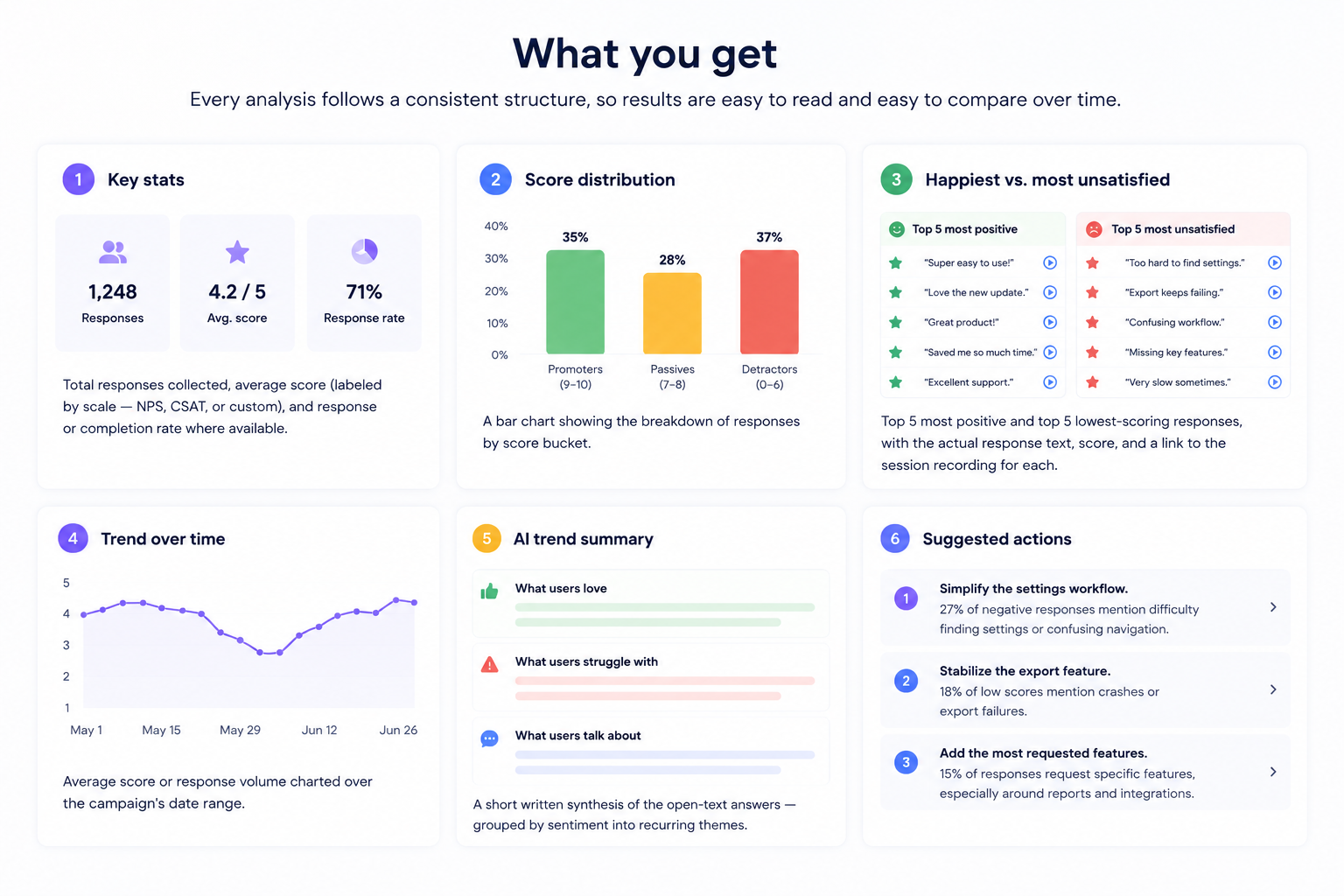
Ask things like “Analyze our NPS responses from last month” or “What are users saying about the checkout flow?” and Claude produces a complete analysis: score distribution, sentiment themes, happiest and most frustrated responses, trends over time, and a prioritized list of actions, all from your actual data.

From Feedback Survey response to Session Replay in one click
One of the most useful features of the analyzer is the direct link from individual feedback responses to their corresponding Session Replay in Mouseflow.
Every response in the happiest and most unsatisfied panels includes a play button click it and you go straight to the full recording of that user’s session.
This closes the loop between what users say in a survey and what they actually did on your site. A frustrated response about the checkout flow is useful; watching the exact session where it happened is actionable.
Why this matters for product and CS teams
Reading survey responses one by one, copying quotes into a doc, and trying to spot patterns manually takes time your team rarely has.
The Feedback Response Analyzer handles that layer automatically, so you spend your time on decisions, not data prep.
 No more manual reading: Claude reads every open-text response and you get the synthesis without going through replies one by one.
 Evidence-backed actions: Every recommendation is driven by what users actually say and do, not assumptions.

Straight to the session: Jump from any individual response directly to the Mouseflow recording for that session, no manual searching required.
 Always up to date: The analyzer fetches live data every time you run it, so you always see the latest responses
How to set it up
Setup takes about five minutes and you only do it once.
1 – Connect the Mouseflow MCP in Claude
In Claude, go to Settings → Integrations and connect the Mouseflow MCP connector.
This gives Claude live access to your Mouseflow data, including your feedback campaigns and survey responses.
2 – Create a new Claude Project
In Claude, click New Project. Name it something like “Mouseflow Feedback” or “Survey Analysis.” Projects save your instructions across every conversation in that workspace, so the setup carries over automatically.
3 – Paste the project instructions
Open the Project Instructions field and paste the full Feedback Response Analyzer block from the setup article.
It starts with the heading “Feedback Response Analyzer – Project Instructions.”
The instructions are long by design, don’t trim them.
4 – Run your first analysis
Start a conversation inside the project and ask Claude to analyze a campaign.
If you’re not sure of the campaign name, Claude will call list_feedback to show you what’s available and ask you to confirm before proceeding.
How to use the analyzer
Once the project is set up, using it is straightforward. You ask in plain language, Claude handles the rest.
- Asking for an analysis: You can ask in plain language, Claude identifies the relevant campaign and website automatically.
If anything is ambiguous, it asks before proceeding.Example prompts:
“Analyze our NPS responses from last month”
“What are users saying about the checkout flow?”
“Show me the latest feedback from the pricing page survey”
“Which responses mention the mobile experience?” - Going deeper with segmentation: The standard report covers all responses for a campaign. If you need more focus, you can ask for specific segmentations – by device type, traffic source, date range, or score range – and Claude will add the relevant charts and breakdowns without removing any of the default sections.
Quick recap
- Connect the Mouseflow MCP in Claude Settings
- Create a Claude Project and paste the Feedback Response Analyzer instructions from the setup article
- Ask Claude to analyze any feedback campaign by name, or let it list available campaigns for you
- Every analysis includes score distribution, sentiment themes, top and bottom responses, trends, and prioritized actions
- Click the play button on any response to go directly to that session recording in Mouseflow
- Ask for custom segmentations (device, source, date range) and Claude adds them to the standard report