
To analyze user behavior on your website effectively, you need two types of data working together: quantitative analytics that show where users drop off, and behavioral tools that show why. Start by identifying drop-off points in Google Analytics 4. Then, use session replay, heatmaps, and friction detection to observe what users actually experience. Fix the friction you find. Measure the result. Repeat. That’s the playbook. Let’s break down exactly how to execute it, which tools to use, which metrics to track, and how to turn observations into improvements that actually move your conversion needle.

The “What” vs. the “Why”. Why you need both
Most analytics setups are built around one type of data: numbers. Sessions, pageviews, bounce rates, conversion rates. This is quantitative data, and it’s essential. But it only tells you half the story.
Quantitative data tells you what happened. Behavioral data tells you why it happened.
Here’s the difference in practice:
- Google Analytics 4 tells you that 68% of users abandon your checkout page on mobile. That’s a real problem, but you can’t fix it from that information alone.
- Behavioral tools show you that users on mobile are rage-clicking a payment button that isn’t responding because a JavaScript error is silently breaking the interaction on iOS Safari. Now you can fix it in an afternoon.
- The gap between identifying a problem and solving it is context. Behavioral analytics provides that context.
🔗 Read more about why traditional web analytics isn’t enough.
The Complete Toolkit for Analyzing User Behavior
Here is every tool category you need, what each one does, and how to use it.
 Session Replay
Session replay records real user sessions and plays them back as video. You can watch every click, scroll, hesitation, and exit, from the user’s exact point of view. This is how you move from data to diagnosis.
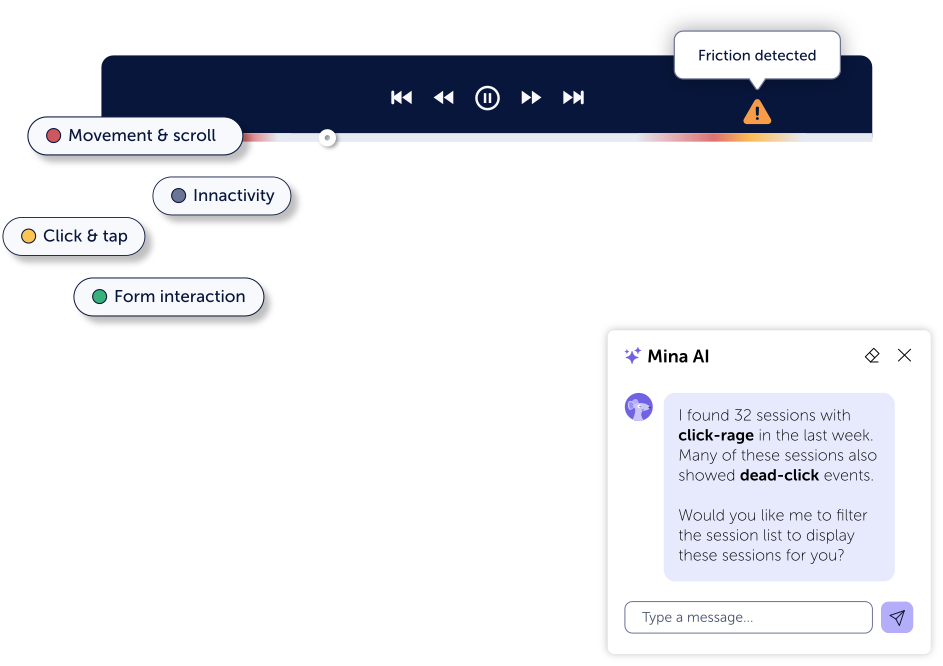
What to look for:
- Rage clicks: rapid repeated clicking on an unresponsive element
- Dead clicks: clicking something that does nothing
- U-turns: landing on a page and immediately navigating back
- Exits that follow specific interactions
 Website Heatmaps
Heatmaps aggregate behavior from thousands of sessions into a single visual map. They show where users click, how far they scroll, what content gets attention, and what gets ignored.
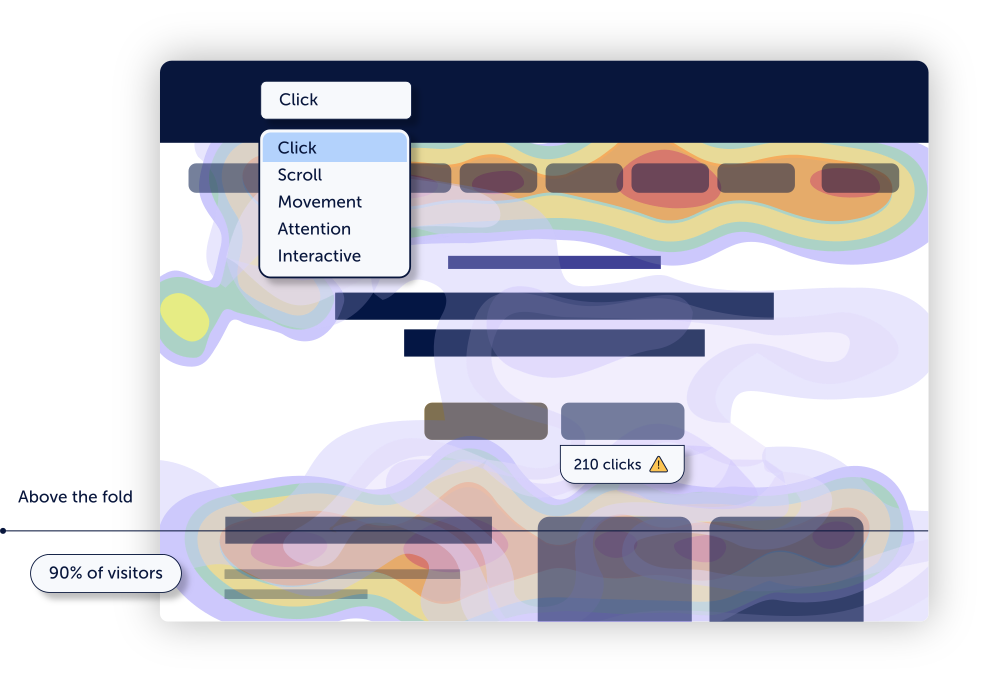
Key heatmap types:
- Click maps: where users actually click, including elements that aren’t clickable
- Scroll maps: how far down the page users read before losing interest
- Attention maps: which areas absorb the most focus
- Friction maps: where frustration signals cluster
Practical use: if your primary CTA sits below the fold and scroll maps show 65% of users never reach it, you do not need an A/B test to decide to move it.
 Friction Detection
This is the capability most behavior analytics tools skip and one of the most valuable. Friction detection automatically surfaces signals of user struggle across all sessions without requiring manual review.
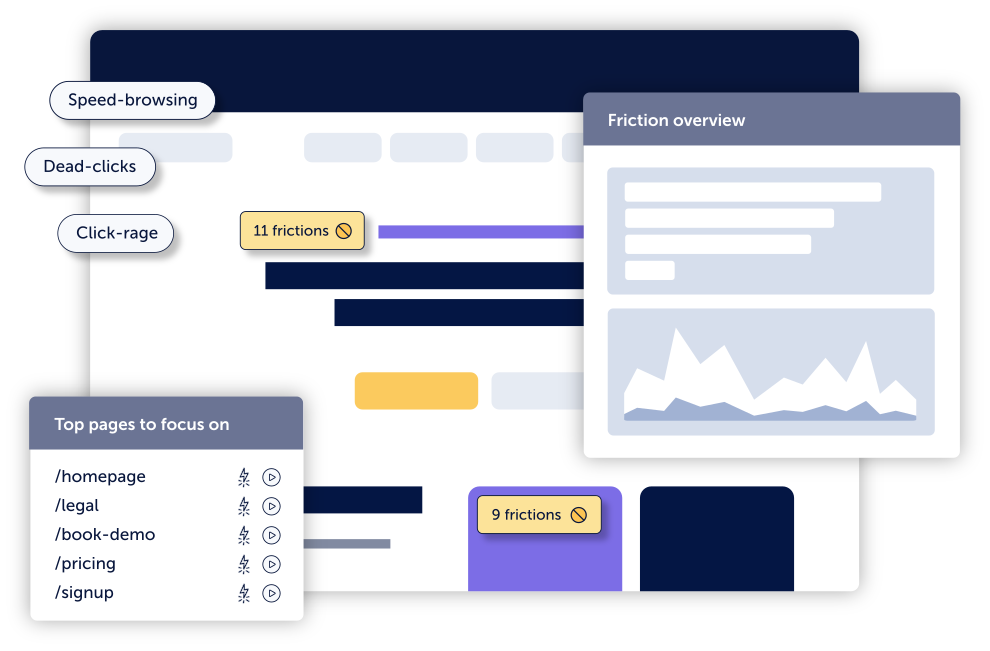
Friction signals include:
- Rage clicks: rapid repeated clicking, indicating frustration
- Dead clicks: interaction with non-functional elements
- U-turns: immediate navigation back after landing on a page
- Repeated form inputs: users entering data multiple times, suggesting validation failures
- JavaScript errors: silent technical failures breaking functionality
Without friction detection, finding these issues requires watching dozens of recordings manually. With it, they surface automatically, so your team can spend time fixing problems, not searching for them.
 Conversion Funnels
Funnels break down key user journeys step by step and show exactly how many users drop off at each stage. They quantify the business impact of friction, turning behavioral insights into prioritized action.
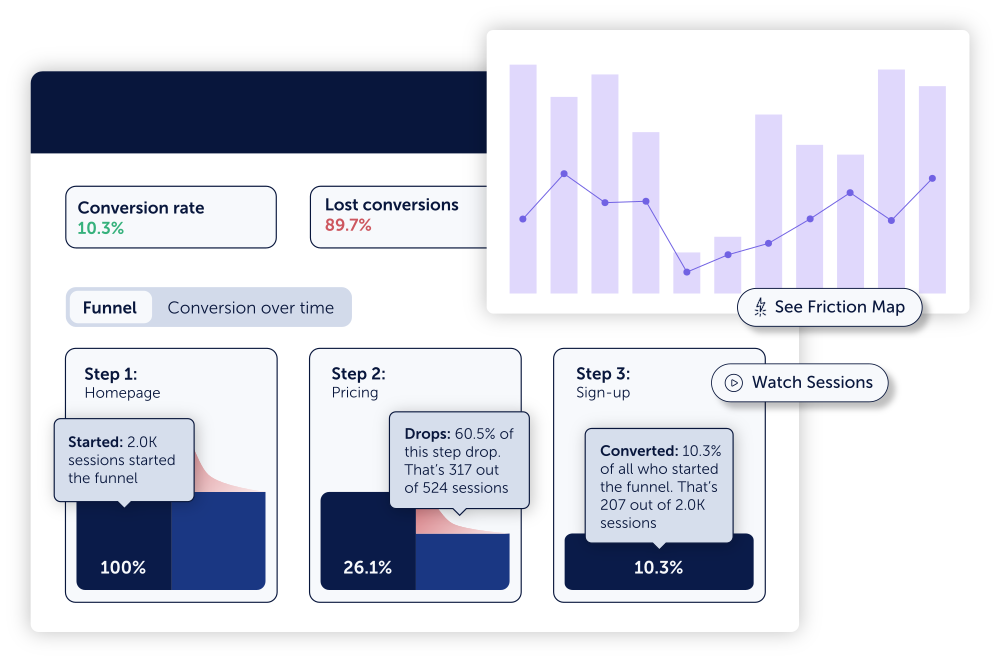
Revenue Insights (new in 2026): Funnel analytics can now calculate how much potential revenue is lost at each drop-off point, and simulate how much would be recovered by fixing it. This turns optimization from a UX conversation into a business case.
 Form Analytics
Forms are the highest-friction touchpoints on most websites, and most tools do not analyze them at the field level. Form analytics shows you which fields cause the most drop-offs, how long users spend on each one, and where validation errors are quietly killing your conversion rate.
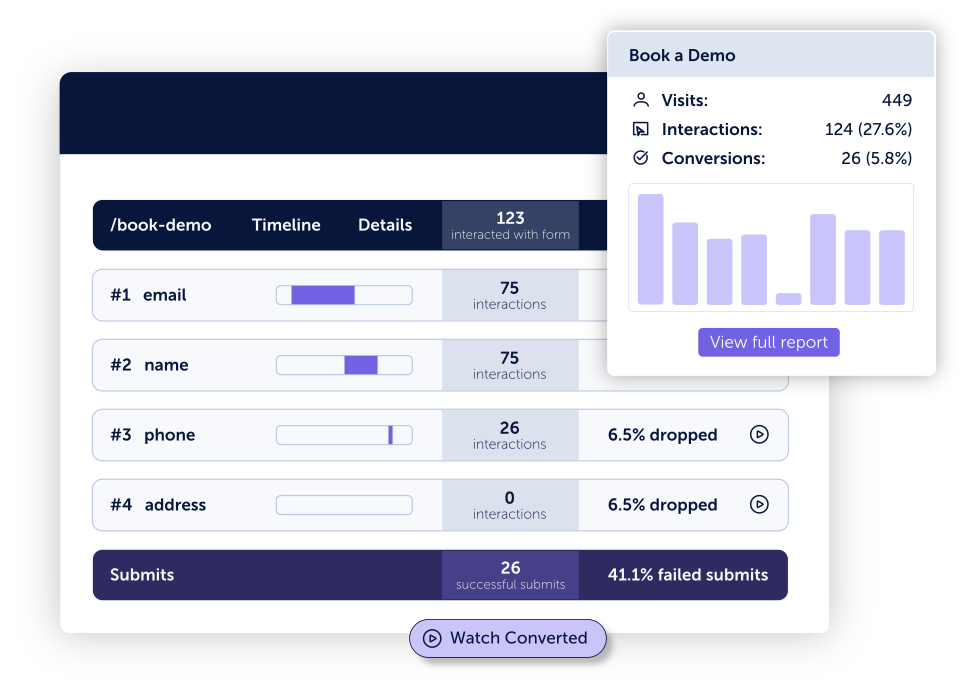
Even removing one unnecessary field or clarifying one error message can lift form completion rates by 15-20%.
 Feedback Surveys
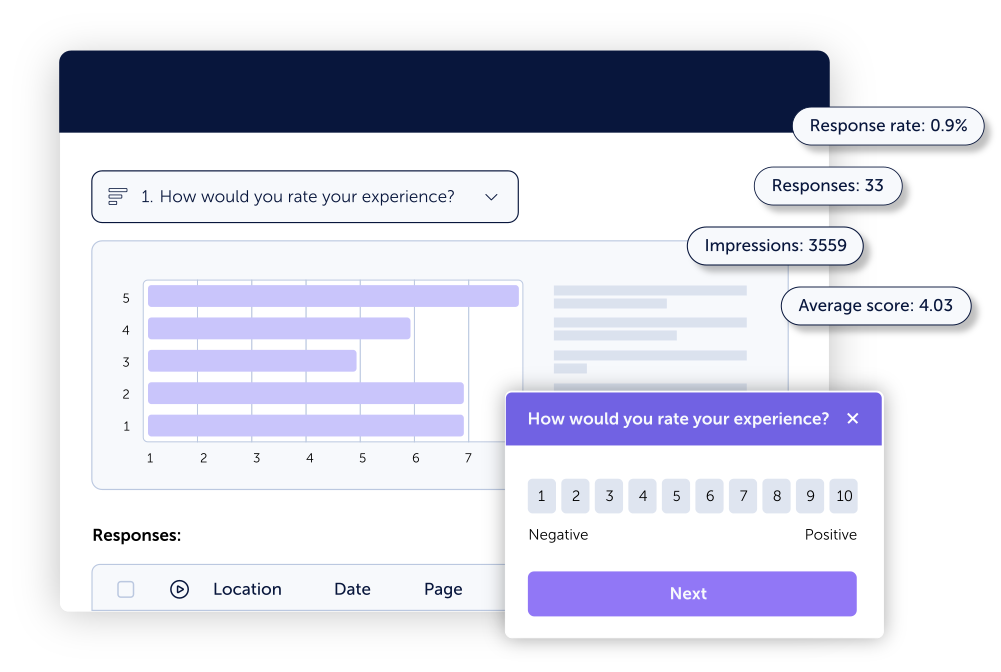
Automated tools capture what users do. Surveys capture what users think. Exit-intent surveys, on-page polls, and post-conversion feedback add the voice-of-customer layer that behavioral data alone cannot provide.
Tool Comparison: Which platform should you use?
| Tool | Best For | Key Strength | Limitation |
| Mouseflow | All-in-one behavior analytics | Combines session replay, heatmaps, friction detection, funnels, form analytics, and AI into one GDPR-compliant platform. Rated 4.6/5 on G2. | |
| Google Analytics 4 | Traffic & conversion tracking | Deep integration with Google Ads and SEO; strong funnel and audience segmentation | No behavioral or qualitative layer |
| Hotjar | UX research | Good heatmaps and recordings; accessible for small teams | No automatic friction detection; separate tools needed for funnels and forms |
| Microsoft Clarity | Budget / entry-level | Free; basic heatmaps and session recordings | Limited filtering; no form analytics or funnel analysis |
| FullStory | Enterprise dev & UX teams | High-fidelity session capture; strong search for bug-related sessions | High cost; complex setup |
| Mixpanel | Product analytics | Excellent event-based tracking and retention analysis | No visual behavior layer — no heatmaps or session replay |
The case for all-in-one: Running GA4 + Hotjar + Mixpanel + a form analytics tool means four data sources with different definitions, separate contracts, and context that never connects. The most effective teams consolidate behavioral analysis into a single platform, so session replays link directly to funnel data, friction signals connect to specific user segments, and insight is never lost between tools. Mouseflow combines every behavioral capability listed above in one platform, rated 4.6/5 on G2, higher than Hotjar, FullStory, and Microsoft Clarity.
How to Analyze User Behavior: A 5-Step Framework
Once you have the right tools, the process is straightforward. Here is the framework that high-performing teams use.
 Step 1: Identify Where Users Are Dropping Off
Open GA4 and build a picture of where performance is weakest: high exit-rate pages, funnel abandonment steps, and segments (mobile vs desktop, traffic source, geography) that underperform. You are not diagnosing at this stage. You are building a list of problem areas to investigate.
Example: Your checkout funnel shows 55% drop-off at the payment step. Mobile users are abandoning at twice the rate of desktop.
 Step 2: Watch Real Sessions
In Mouseflow, filter session replays for the specific segment you identified. Watch 15-20 sessions of users in that problem area. Look for: hesitation before key actions, repeated interactions with the same element, u-turns, unexpected navigation, and exits that happen after a specific moment.
Example: In 12 of 15 mobile sessions at the payment step, users tap “Pay Now” multiple times and nothing happens. A silent JavaScript error is breaking the button on iOS.
 Step 3: Validate the Pattern at Scale
One session is anecdotal. Open Mouseflow’s friction detection to see whether rage clicks are flagged on that element across a wider audience. Check heatmaps for the page to confirm the pattern appears across a large sample. For form issues, use form analytics to see field-level drop-off data.
Example: Friction detection confirms rage clicks on the payment button in 34% of all mobile sessions. Click heatmap confirms the pattern.
 Step 4: Quantify the Business Impact
Before fixing anything, understand what it is costing you. Use Mouseflow’s funnel analytics and Revenue Insights to calculate the conversion and revenue impact. This step turns behavioral insight into stakeholder alignment and prioritization.
Example: If 50,000 mobile users hit checkout per month, 34% are hitting this bug, and average order value is £80, the revenue loss is large enough to justify immediate prioritization.
 Step 5: Fix the Friction, Then Measure
Implement the fix. Return to your funnel data the following week to confirm the improvement. Use session replay to verify the broken interaction no longer appears. This closes the loop and builds the evidence base for your next round of optimization.
Example: Fixing the mobile payment bug reduces checkout drop-off at that step from 55% to 31% within two weeks.
Most conversion gains do not come from adding new features. They come from removing friction that already exists.
Three mistakes that slow teams down
1. Jumping to solutions before diagnosing.
Seeing a drop-off and immediately launching an A/B test without understanding the root cause is expensive and often wrong. Always diagnose before you test.
2. Collecting data without prioritizing it.
You will always find more friction than you can fix in one sprint. Score issues by how many users are affected and how directly the issue impacts conversion, fix the highest-impact problems first.
3. Treating behavior analysis as a one-time project.
User behavior changes as your product, traffic mix, and market evolve. The highest-performing teams run this framework continuously, not just when something breaks.
FAQ

The best tool depends on your needs. For small teams with limited budgets, Microsoft Clarity is free and covers basic heatmaps and recordings. But be aware that Microsoft use your data to improve Microsoft products and services, including reporting and performance analysis.
For teams that need a complete behavioral analytics capability: session replay, heatmaps, friction detection, funnels, and form analytics in one place, Mouseflow is the top-rated all-in-one option on G2.
No. Google Analytics 4 is excellent for quantitative tracking, sessions, conversions, funnel drop-offs but it does not show you why users behave the way they do. You need a behavioral analytics tool alongside GA4 to get the full picture.
Both offer heatmaps and session recordings. Mouseflow additionally includes automatic friction detection (which surfaces rage clicks, dead clicks, and u-turns without manual review), built-in conversion funnels with Revenue Insights, field-level form analytics, and feedback surveys, all in one platform. Hotjar requires separate integrations or upgrades to cover the same ground. Mouseflow is also rated higher on G2.
Beyond standard traffic metrics, focus on: rage click rate, scroll depth, funnel drop-off by step, form field abandonment rate, u-turn rate (users who immediately bounce back from a page), and session duration by device and segment.
Use a tool with automatic friction detection. Mouseflow scores every user session and surfaces friction signals, rage clicks, dead clicks, u-turns, JavaScript errors, without requiring manual review. You can filter sessions by friction score to immediately identify the most problematic experiences.
No. Modern behavioral analytics tools use asynchronous loading, meaning the tracking script loads independently of your page content and does not affect page speed or Core Web Vitals scores.
It can be. Look for platforms with automatic sensitive data masking, consent management integration, first-party data collection, and configurable data retention. Mouseflow is GDPR and CCPA compliant by design, with full masking capabilities for sensitive fields.
A conversion funnel tracks a specific, predefined sequence of steps (e.g. homepage → product page → cart → checkout). A user journey maps every path users actually take across your site, including unexpected routes. Funnels tell you how a specific flow performs; journey analytics shows the full range of how users navigate.
The Bottom Line
Analyzing user behavior effectively means combining quantitative data with behavioral context. GA4 tells you where users drop off. Behavioral tools show you why. The teams that improve conversion fastest are not the ones who collect the most data, they are the ones who move most efficiently from observation to action.
That process starts with the right tools, a repeatable framework, and a habit of fixing friction before adding features.