
- What is A/B testing in eCommerce?
- What are the benefits of A/B testing in eCommerce?
- What to A/B test in your eCommerce store
- How behavior data can tell you what to test first
- How to run an A/B test that teaches you something
- Common mistakes eCommerce managers make when A/B testing
- Improve your A/B testing with Mouseflow

Key takeaways
A/B testing lets you grow eCommerce revenue without increasing traffic or ad spend. The highest-impact areas to test are product pages, collection pages, checkout flows, and social proof placement. Every test should start with a data-backed hypothesis, not a hunch. And before you decide what to test, behavior analytics tools like Mouseflow help you identify exactly where your shoppers are struggling, so you prioritize the right experiments from the start. This makes A/B testing a critical part of any ecommerce website optimization strategy.
If you are managing an online store, you already have the most valuable research tool available: real shoppers behaving in real time. A/B testing is how you put that to work.
What is A/B testing in eCommerce?
A/B testing in eCommerce means running controlled experiments on your online store to find out which version of a page, layout, or element drives more revenue or even engagement. You create 2 versions, split your shopper traffic between them, and measure which one hits your goal more often, whether that is an add-to-cart, a checkout completion, or a sign-up.
The key difference between A/B testing in eCommerce and other contexts is the stakes. A product page is not just a content asset. It is a sales conversation. Every element on it, the imagery, the copy, the button, the social proof, is either helping or hurting that conversation. Testing lets you find out which is which, one change at a time.
It is also worth distinguishing A/B testing from multivariate testing. A/B testing compares 2 complete versions of a page or one specific change. Multivariate testing runs several smaller variable changes simultaneously to see how they interact. For most eCommerce teams, A/B testing is the right place to start. It is simpler to run, easier to interpret, and faster to act on.
What are the benefits of A/B testing in eCommerce?
- It grows revenue without growing your traffic. Most eCommerce growth strategies focus on acquiring more visitors. A/B testing focuses on converting the ones you already have. A meaningful lift in conversion rate on your product pages can have the same revenue impact as a significant increase in paid traffic, at a fraction of the cost.
- It reduces the risk of big changes. Launching a full redesign based on opinion is expensive and risky. A/B testing lets you validate changes incrementally, so you know what works before you commit development resources to it permanently.
- It replaces internal debate with data. When the design team and the marketing team disagree on a layout, a test settles it. The data decides the winner and the team moves forward faster, without bruised egos or long approval chains.
- It builds a compounding knowledge base. Every test you run teaches you something about how your specific shoppers behave. Over time, that knowledge compounds into a clearer picture of what your audience responds to, which makes every future test sharper and faster to design.
A/B testing sits within the broader discipline of conversion rate optimization. If you want to understand how it fits into a full CRO strategy, that guide covers the wider picture.
What to A/B test in your eCommerce store
Focus on the pages and elements that sit closest to your revenue. Here is where to start:
- Product pages. Your product page is where purchase decisions are made. Test your main product image, the placement and wording of your add-to-cart button, and how you present pricing, especially if you offer discounts or payment plans. Front and back imagery is worth testing specifically. Shoppers who can evaluate a product from multiple angles without clicking through are more likely to add it to their cart.
- Collection and category pages. Test your filter layout, the number of products shown per row, and how you display product thumbnails. Full outfit or context shots often outperform isolated product images, particularly on mobile where they fill more screen space and give shoppers a clearer sense of how items look in real life.
- Checkout flow. Test the number of steps in your checkout, whether a guest checkout option increases completions, and how you present shipping costs. Unexpected fees at checkout are one of the leading causes of cart abandonment, so test when and how you surface them.
- Homepage and navigation. Test your hero banner copy and imagery, the order of your navigation categories, and whether a promotional banner increases clicks or creates noise. Small changes here affect every page downstream.
- Social proof placement. Reviews and trust signals work, but placement matters. Test whether moving star ratings above the fold on product pages increases add-to-cart rates, or whether a trust badge near the checkout button reduces drop-off. Payment trust is worth testing separately too. Displaying recognised payment brand logos like Visa, Mastercard, or PayPal near the checkout button reassures shoppers at the exact moment they are deciding whether to complete their purchase. Our guide on using social proof for conversion rate optimization has real examples of how much placement and format can shift results.
Always test one major element at a time so you know exactly what caused the shift in behavior.
How behavior data can tell you what to test first
Knowing what to test is half the battle. Two examples show how behavior data from Mouseflow pointed eCommerce teams directly to the right experiments.
Mos Mosh, the Danish fashion brand, discovered through session recordings and heatmaps that shoppers who used the product filters had a significantly higher conversion rate. The insight was simple but powerful: if you can get a shopper to filter, they are far more likely to buy. That finding shaped a concrete decision to invest heavily in the filter experience, adding more relevant attributes and reordering filter options based on what shoppers actually clicked most.
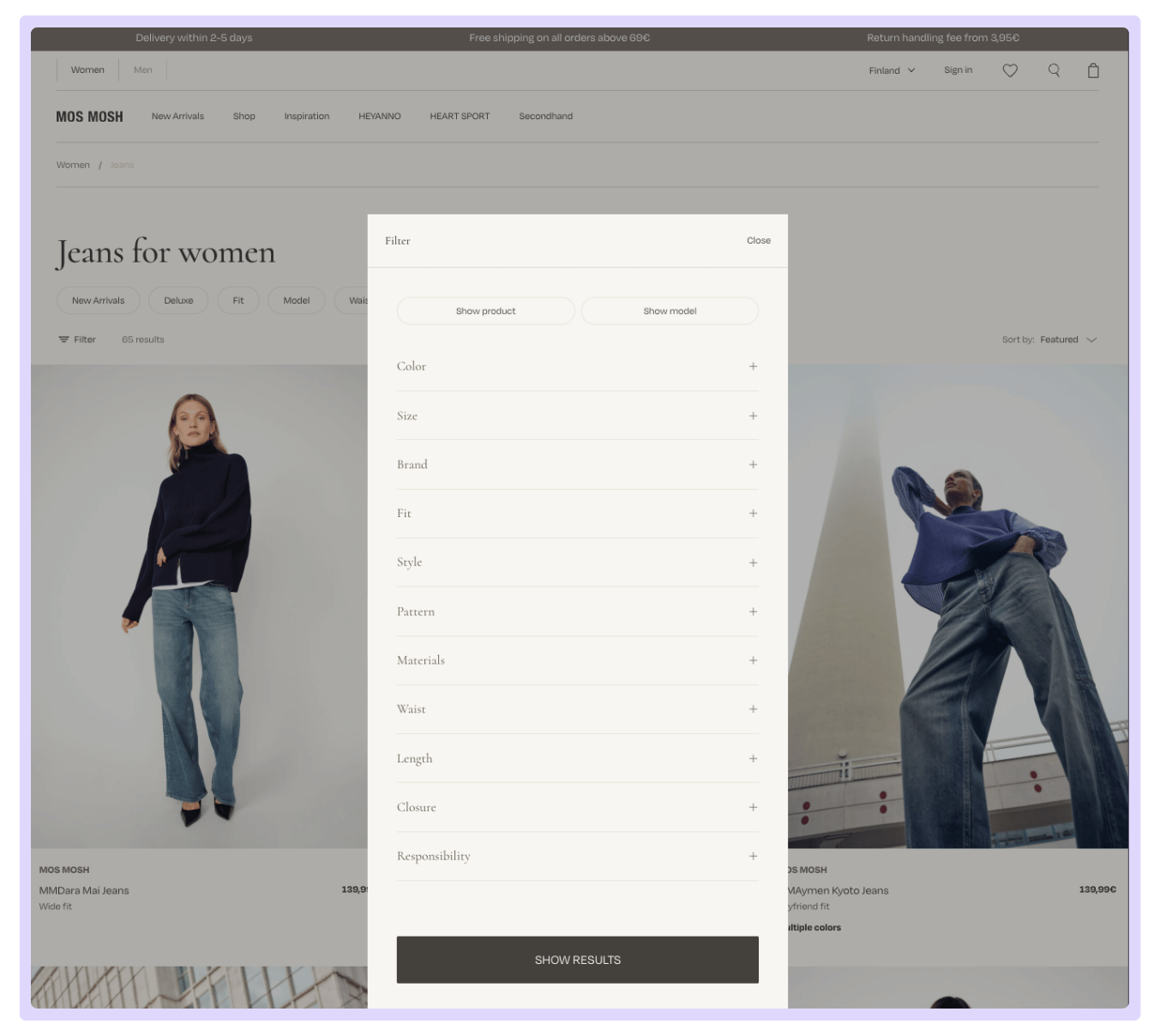
Active Filter Overlay on Mos Mosh’s Product Listing Page
They also found that content spots, full outfit displays spanning the width of the screen, drove more engagement on mobile. Women shoppers in particular responded to styling cues. Products shown with both front and back imagery got more clicks because shoppers could evaluate details without having to navigate away. As Erik Holflod Jeppesen, Founder and Partner at Grafikr, put it: “Instead of debating, we were watching real sessions together. It helped everyone understand what was working and what needed fixing.”
Scotts Miracle-Gro, one of the most recognised names in lawn and garden, faced a different challenge. With a house of brands running large-scale campaigns year-round, their landing pages needed to be consistently high-converting. But their existing analytics only told them what was happening, not why. Using Mouseflow’s conversion funnels, their team tracked exactly where users were dropping off between the product page and checkout, identified specific form fields causing abandonment, and made targeted fixes to the checkout flow. The result was a 5% boost in conversion rate, alongside improved landing page engagement across their campaigns.
Neither of these outcomes came from debate or assumption. They came from watching real users and acting on what the data showed. That is exactly what good behavior analytics does for an A/B testing program. It removes the guesswork from deciding what to test in the first place.

“Focusing on the product page to the checkout flow and keeping a close eye on form fields that fall out within the checkout helps us understand where to drill deeper and drive optimizations.”
How to run an A/B test that teaches you something
Running a test is straightforward. Running a test you can learn from takes a bit more structure.
- Start with a hypothesis. Before you change anything, write down what you are testing, what you expect to happen, and why. A good hypothesis looks like this: if we show full outfit imagery on the collection page, add-to-cart rates will increase, because session recordings show shoppers spending more time on pages with contextual images. That last part, the because, is what makes it useful. It connects the test to real observed behavior rather than a guess. Our blog on how CRO experts design hypotheses for experimenting goes deep on how to build this properly.
- Test one thing at a time. It is tempting to bundle changes together to save time. Resist it. If you change the image, the button color, and the copy all at once and conversions go up, you have no idea which change drove the result.
- Run it long enough. Give your test at least two full weeks to account for weekday and weekend shopping patterns. Calling a winner after three days based on a spike in Friday traffic is how teams end up with false positives.
- Segment your results by device. Shoppers behave differently on mobile and desktop. A change that lifts conversions on desktop can hurt them on mobile. Always check both before calling a winner.
- Use behavior data to understand the result. When the test ends, the conversion number tells you what happened. Behavior analytics tells you why. Filter your session recordings and heatmaps by variant to watch how shoppers actually interacted with each version. Did the winning variant get more scroll depth? Did users on the losing variant hesitate at a specific point? Our article on how to analyze user behavior on your website walks through exactly how to do this.
Common mistakes eCommerce managers make when A/B testing
- Ending tests too early. Statistical significance takes time. A result that looks clear after five days often reverses by day fourteen.
- Testing low-traffic pages. If a page only gets 300 visits a month, it will take months to reach a meaningful result. Prioritize pages with volume.
- Ignoring mobile and desktop separately. Your shoppers behave differently on different devices. A change that lifts conversions on desktop can hurt them on mobile. Segment your results and check both.
- Testing without a clear goal. “Let’s see what happens” is not a testing strategy. Define your primary metric before the test starts and do not change it halfway through.
Improve your A/B testing with Mouseflow
Most A/B testing tools give you a conversion rate. Mouseflow gives you the story behind it.
By integrating Mouseflow with your testing platform, you can filter session recordings and heatmaps by specific test variants, so you can watch exactly how shoppers interacted with Version A versus Version B. Did users on the losing variant scroll past the CTA without noticing it? Did they hesitate on the pricing section? Did they drop off at a specific point in the checkout? Session replays show you the moment it happened.
That level of insight turns a single test result into a learning that shapes every experiment that follows. Pair your A/B tests with Mouseflow and stop collecting results. Start collecting answers.

FAQs

You can run multiple tests simultaneously as long as they are on different pages and the traffic does not overlap. Running two tests on the same page at the same time will contaminate your results.
There is no universal benchmark. A 2% lift on a high-revenue page can be worth far more than a 20% lift on a low-traffic one. Focus on absolute revenue impact rather than percentage lift in isolation.
You need enough traffic to reach statistical significance in a reasonable timeframe. If your store gets fewer than a few thousand visits a month, focus on your highest-traffic pages and be patient with your test duration.
Yes. Most A/B testing tools integrate directly with Shopify. Pair them with Mouseflow to get behavior data alongside your conversion metrics.
A/B testing compares two versions of a page or one specific element. Multivariate testing runs multiple smaller changes simultaneously to see how they interact. Start with A/B testing and move to multivariate once you have a solid baseline to build on.