Session Replay is GDPR compliant when implemented correctly. It does not record video of users, capture webcam footage, or store screenshots. What it captures is behavioral data: mouse movements, clicks, scrolls, and page interactions, reconstructed as a replay of how the page appeared during that session. Sensitive fields like passwords and payment details are masked by default or can be configured to be excluded entirely. Whether your use of Session Replay is compliant depends on how you configure it, what data you collect, and whether you have the appropriate consent and data processing agreements in place.
This article covers what Session Replay actually records, how sensitive data is handled, what GDPR compliance looks like in practice, and the privacy features that help you implement it responsibly. It also addresses the most common misconceptions that cause unnecessary concern about the technology.
For a broader overview of the technology, benefits, and use cases, explore our Session Replay guide.
Note: This article provides general information about Session Replay and privacy. It is not legal advice. For guidance specific to your organization and jurisdiction, consult a qualified legal professional.

What Session Replay actually records
One of the most common sources of concern about Session Replay is a misunderstanding of what it actually captures. It is not a screen recording tool and it does not record video. Understanding the distinction matters both for privacy assessments and for setting realistic expectations about what the data will show.
Session Replay works by capturing DOM events, the interactions a user has with the page structure, and reconstructing the session as a replay. To understand the full mechanics of how this works, this article on how Session Replay works covers it in detail.
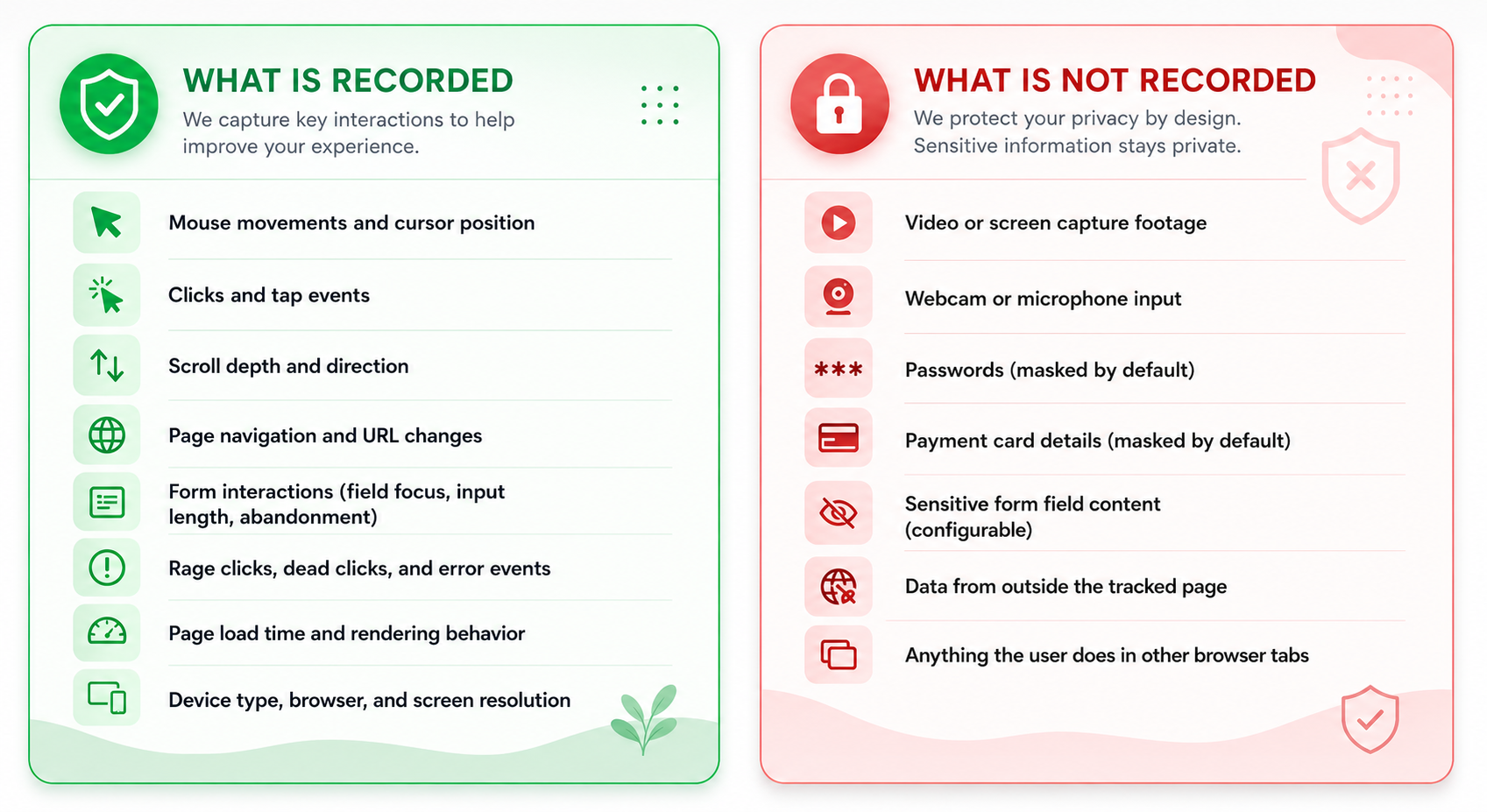
The result is a behavioral record of how a user navigated and interacted with your site, not a recording of the user themselves or of data they entered into sensitive fields. For a practical look at the kinds of insights this data can produce, 7 things you can learn by recording your website visitors covers a range of real examples.
Does Session Replay record sensitive information?
This is the question most teams and legal teams care about most. The short answer is: not by default, and not if you configure it correctly. Session Replay tools are designed with the assumption that sensitive data must be protected, and most implementations include automatic masking of common sensitive field types.
Passwords
Password fields are masked by default in Mouseflow. The field interaction is captured, meaning you can see that a user focused on the field and typed something, but the content is never recorded. What you see in the replay is a masked placeholder, not the actual input.
Payment details
Credit card numbers, CVV codes, and other payment fields are masked by default. If your payment form is hosted on a third-party payment page (which is common for PCI compliance), that page is typically outside the scope of Session Replay tracking entirely.
Personal information
Fields containing names, email addresses, phone numbers, and similar personal data can be configured for masking. Mouseflow allows you to mask specific fields, entire sections of a page, or all text inputs across the site depending on your privacy requirements. For a full overview of GDPR-related considerations for analytics tools, our GDPR FAQ covers the most common questions.
💡Best practice: Apply masking proactively rather than reactively. Configure it for any field where users might enter personal data, even if that field is not the primary focus of your analysis. Review your masking settings regularly to ensure sensitive information remains protected.
Is Session Replay GDPR compliant?
GDPR compliance is not a property of the tool itself. It is a property of how the tool is implemented and used. Session Replay can be implemented in a fully GDPR-compliant way. It can also be implemented poorly. The difference lies in a few key areas.
Lawful basis for processing
The appropriate lawful basis depends on the data collected, the purpose of processing, and applicable privacy laws. Consent may be required for session replay tracking under cookie and ePrivacy rules, even where legitimate interests could otherwise apply under GDPR. Organizations should assess their specific implementation and ensure that any required consent is obtained before tracking begins.
Consent management
If your lawful basis is consent, your cookie banner or consent management platform needs to cover Session Replay tracking. Users who decline analytics tracking should not have their sessions recorded. Mouseflow supports integration with consent management platforms so that recording only starts after consent is granted.
Data processing agreements
If you are using a third-party Session Replay tool, you are sharing data with a data processor. GDPR requires a Data Processing Agreement (DPA) to be in place with any third-party processor. Mouseflow provides a DPA as part of its standard service terms.
Data residency
GDPR requires that personal data transferred outside the EU is subject to adequate protections. Mouseflow offers EU-based data storage, which simplifies compliance for organizations operating in the European Economic Area. If data residency is a requirement for your organization, confirm where your Session Replay provider stores data before implementation.
Data retention
GDPR’s storage limitation principle requires that personal data is not kept longer than necessary. Apply a retention policy to your Session Replay data that reflects how long you realistically need it for analysis purposes. Most teams do not need recordings older than 90 days for operational purposes.
Privacy features that help protect user data
A well-implemented Session Replay setup uses the privacy controls available in the tool to minimize data collection to what is actually needed for analysis. Mouseflow includes several features specifically designed to support responsible implementation.
 Field-level masking: Mask specific input fields so their content is never captured. Applies automatically to password fields and can be configured for any other field type, including names, emails, and custom data inputs.
 Page and element exclusions: Exclude entire pages or specific page sections from recording. Useful for pages that handle sensitive transactions, personal account information, or any content that should not be part of behavioral analysis.
 IP anonymization: Anonymize IP addresses before they are stored, reducing the identifiability of session data and simplifying compliance with data minimization requirements.
 User and IP filtering: Exclude specific users or IP address ranges from recording entirely. Commonly used to exclude internal team members, known bots, or users who have opted out of tracking. See the guide on excluding users and IP addresses for setup details.
 Consent integration: Connect Mouseflow to your consent management platform so that Session Replay only activates after a user has granted consent for analytics tracking. Sessions from users who decline are not recorded.
 EU data storage: Choose EU-based data storage to keep session data within the European Economic Area, simplifying compliance for organizations subject to GDPR data residency requirements.
Do you need to notify users individually?
You do not need to send an individual notification to every user whose session is recorded. You need to inform users about behavioral analytics in your privacy policy and, depending on your lawful basis, obtain consent via your cookie or consent management platform. Standard consent flows that cover analytics tracking are typically sufficient.
Using Session Replay responsibly
Session Replay is not inherently invasive or non-compliant. Like most analytics technologies, what matters is how it is configured, what data is collected, and what safeguards are in place. Understanding what Session Replay records, and what it should never record, is the foundation of responsible implementation.
The teams that use Session Replay most effectively tend to approach privacy not as a constraint but as a configuration decision. Mask what does not need to be captured. Exclude pages that handle sensitive data. Apply a realistic retention policy. Integrate with consent management. These steps protect your users and simplify compliance, while leaving the behavioral data you actually need for analysis fully intact.
For a practical guide on how to use Session Replay as an analytical tool once you have it set up, how to analyze Session Replays covers the methodology step by step. And if you are evaluating Session Replay tools, this overview of the best Session Replay and Heatmap tools compares the leading options.
Key takeaways
- Session Replay captures behavioral data, not video. It records mouse movements, clicks, scrolls, and page interactions, not screen footage or webcam input
- Sensitive fields like passwords and payment details are masked by default and never stored
- GDPR compliance depends on implementation: consent management, data masking, a Data Processing Agreement, and a retention policy
- Privacy features including field masking, page exclusions, IP anonymization, and consent integration give you full control over what is and is not captured
- The most common misconceptions about Session Replay, that it records video, captures everything, or is automatically non-compliant, are not accurate