- What is Mouseflow MCP Server?
- What you can actually ask
- Product teams: Investigating funnel drop-offs
- CRO teams: Diagnosing form friction
- UX teams: Tracing frustration signals
- Support & Success teams: Investigating customer issues faster
- Marketing teams: Understanding landing page behavior
- From reporting to understanding to action
- FAQ
Behavioral analytics helps teams understand what users actually experience across websites and products through session replays, funnels, heatmaps, form analytics, and friction detection.
Mouseflow MCP Server brings that behavioral data directly into AI tools like Claude, ChatGPT, and Gemini, making it possible to investigate user behavior through natural language conversations connected to your Mouseflow workspace.
Instead of analyzing one report at a time, teams can ask questions, explore patterns, follow behavioral signals, and quickly move from insight to evidence using the data already available inside Mouseflow.
In this post, we’ll show how Product, CRO, UX, Marketing, and Support teams can use Mouseflow MCP Server in practice.

What is Mouseflow MCP Server?
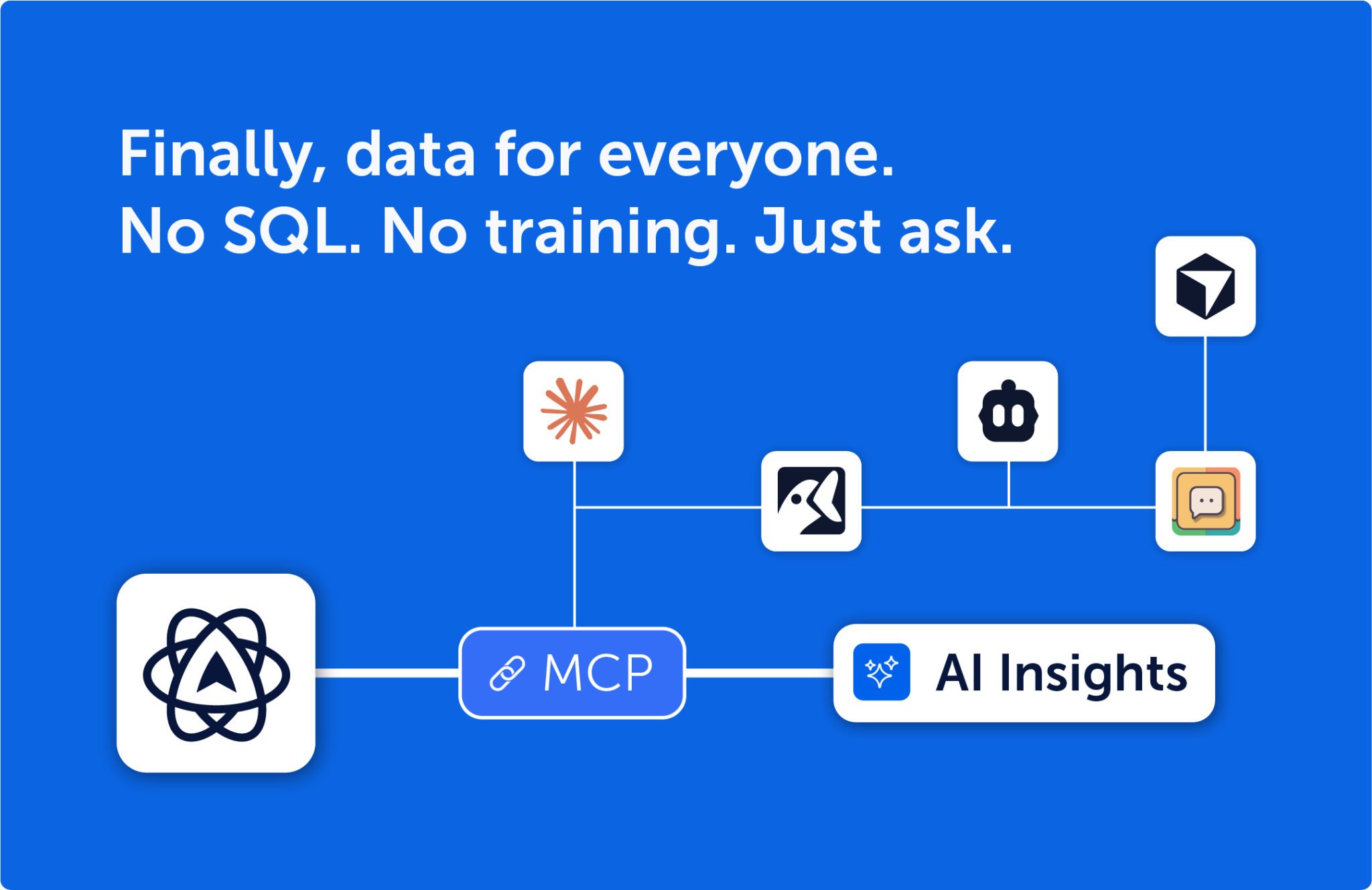
Mouseflow MCP Server is built on the Model Context Protocol (MCP), an open standard that lets LLMs connect securely to external tools and data sources in real time.
Instead of relying on fragmented custom integrations, MCP creates a standardized, scalable way for AI to access the context it needs. For teams, this means simpler integrations, better control over data access, and less engineering overhead.
In practice: you ask a question in your AI assistant, and the LLM pulls live data directly from your Mouseflow account to answer it. No exports. No SQL. No dashboard navigation. The numbers are always exactly what’s in your account, no hallucinations, no stale data.
What you can actually ask
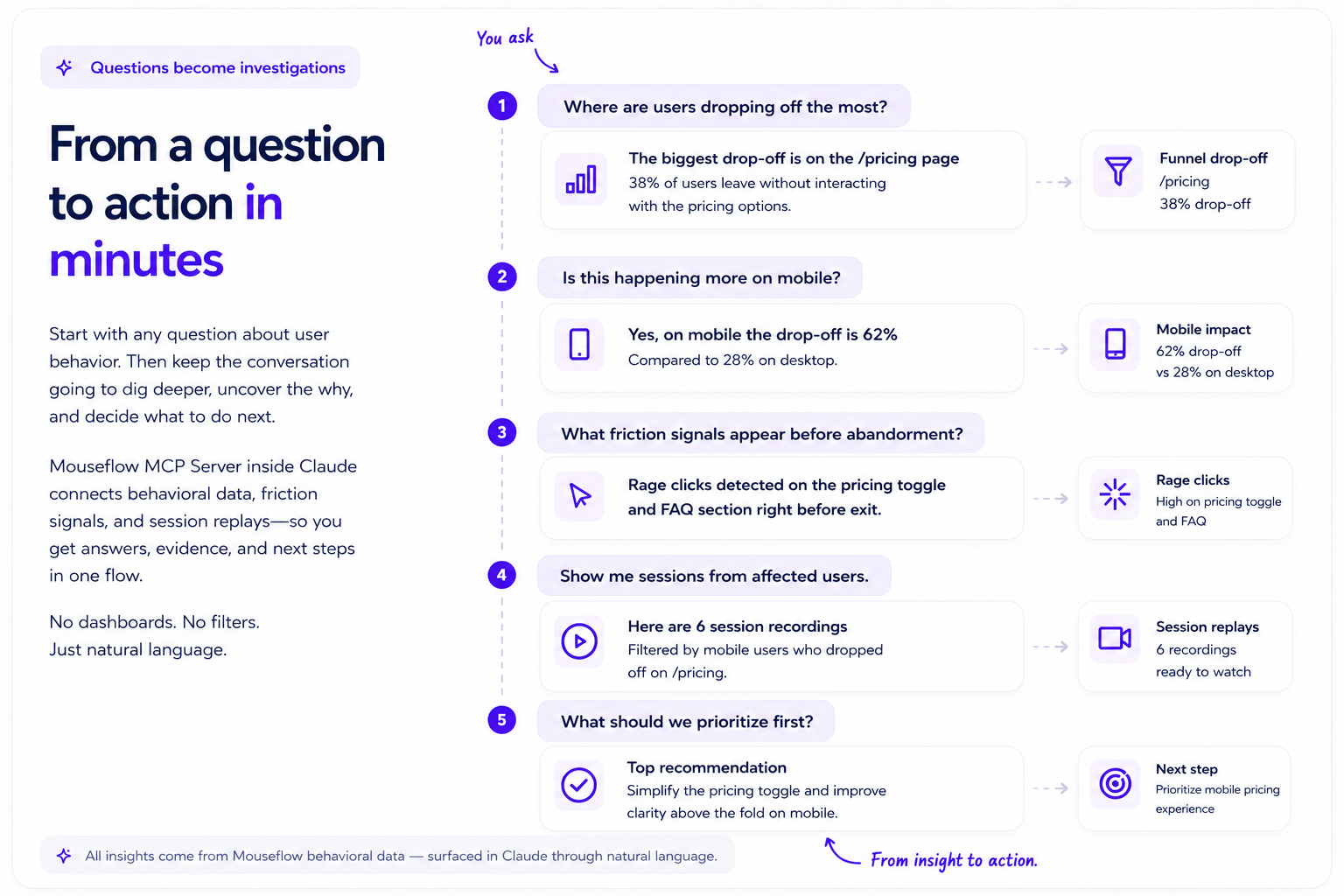
Mouseflow MCP Server is not limited to dashboards or predefined reports. Instead of navigating between filters, sessions, funnels, and heatmaps manually, teams can investigate user behavior conversationally, using natural language to explore patterns, friction, and intent in real time.
The process usually starts with a simple question:
- “Where are users dropping off the most?”
- “Which pages have the most rage clicks?”
- “Why are users abandoning this form?”
But the real value comes from what happens next.
Each answer naturally leads to deeper follow-up questions. Teams can move from high-level metrics to behavioral evidence in a continuous investigation flow, uncovering friction patterns, isolating affected segments, surfacing relevant session recordings, and identifying what to prioritize next.
Instead of spending hours building reports and correlating data across tools, the investigation evolves through conversation: from question, to insight, to action.
Product teams: Investigating funnel drop-offs
Product teams use Mouseflow MCP Server to understand where users abandon critical flows and why.
Instead of manually building funnel reports, filtering recordings, and comparing segments, they can ask direct questions and continue investigating conversationally.
- Example prompts:
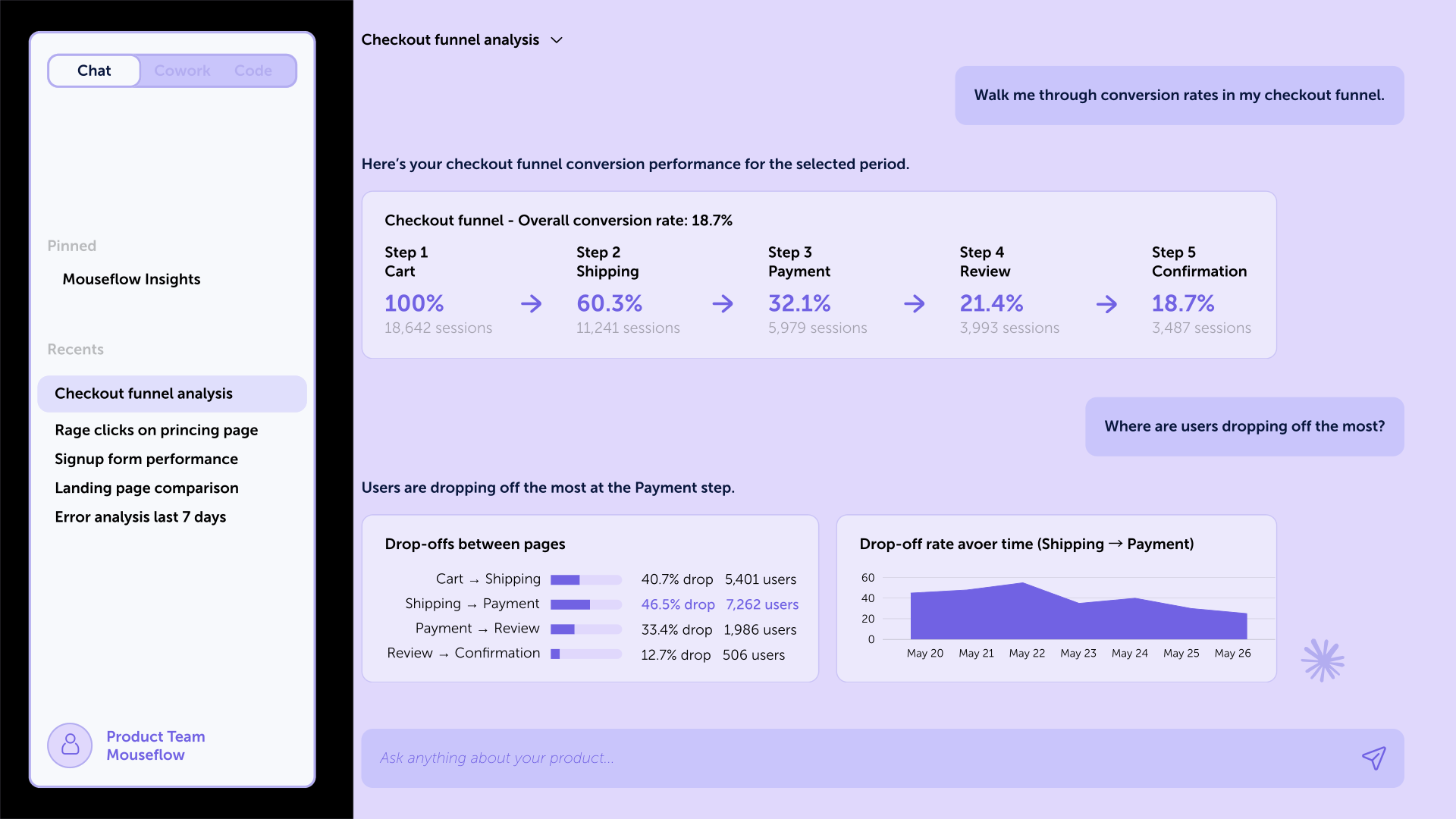
Questions like “Walk me through conversion rates in my checkout funnel” help teams quickly understand how users progress through critical flows and where the biggest drop-offs happen.
From there, follow-up prompts such as “Where are users dropping off the most?” and “What friction signals appear most often before abandonment?” uncover behavioral patterns behind the numbers, including rage clicks, hesitation, rapid clicks, or broken interactions.
And because the conversation is connected directly to Mouseflow data, prompts like “Show me session recordings from users who abandoned at that step” immediately surface the relevant sessions for deeper investigation, without manually filtering dashboards or replay lists.
Fictional example of how teams can use Mouseflow MCP Server inside Claude
- Next step in Mouseflow:
Once the conversation surfaces the biggest drop-off points and friction patterns, product teams can jump directly into the relevant Session Replays already connected to that investigation.
Instead of manually building funnel reports, filtering recordings, and trying to correlate behavior across tools, the analysis already points to the sessions that matter most. Teams can quickly validate whether users are encountering UX friction, broken interactions, confusing flows, or technical issues, using real behavioral evidence to prioritize fixes and roadmap decisions.
CRO teams: Diagnosing form friction
CRO teams use Mouseflow MCP Server to understand where users hesitate, abandon, or struggle during the conversion journey.
Instead of manually comparing segments, filtering sessions, and analyzing form reports separately, they can investigate conversion issues conversationally and continue drilling deeper with follow-up questions.
- Example prompts:
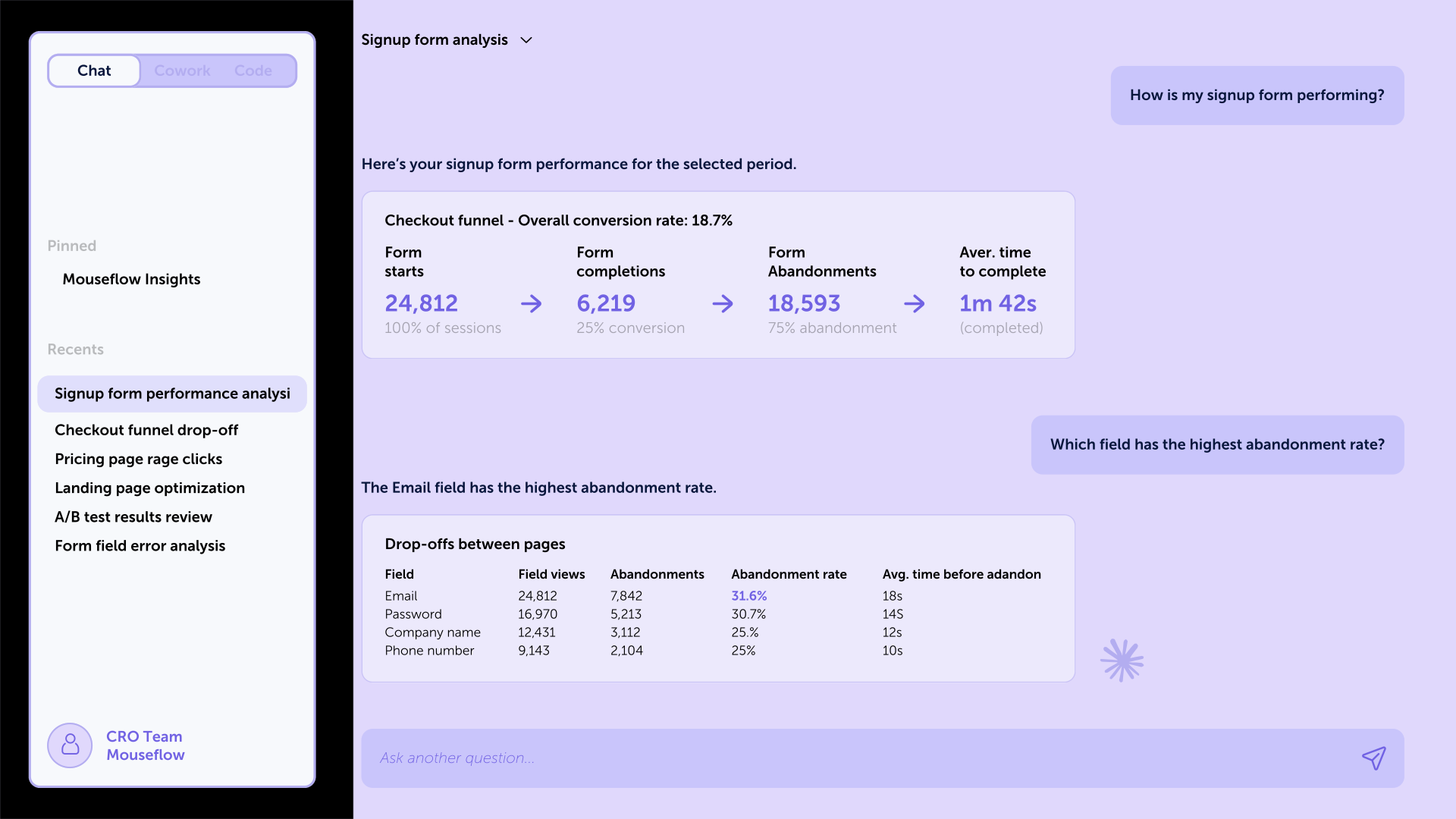
Questions like “How is my signup form performing?” help teams quickly understand completion rates, abandonment trends, and which forms create the most friction.
From there, prompts such as “Which field has the highest abandonment rate?” and “Are users struggling more on mobile or desktop?” help uncover behavioral patterns behind poor conversion performance, including hesitation time, repeated corrections, rage clicks, validation errors, or mobile usability issues.
By connecting conversational prompts to Mouseflow insights, prompts like “What happens right before users abandon the form?” can surface the exact sessions, devices, and interaction patterns associated with abandonment, without manually filtering dashboards or replay lists.
- Next step in Mouseflow:
Once the conversation identifies where users struggle most, CRO teams can jump directly into Form Analytics to validate which fields generate hesitation, abandonment, corrections, or validation errors.
From there, teams can open Session Replay filtered by affected users, devices, or traffic sources to watch how users interact with the form in real conditions. This makes it easier to identify whether the friction comes from confusing copy, unnecessary fields, broken validation, mobile usability issues, or slow-loading experiences.
Instead of relying only on aggregate metrics, teams can use behavioral evidence to prioritize optimizations that improve form completion and conversion rates.
UX teams: Tracing frustration signals
UX teams use Mouseflow MCP Server to uncover where users experience confusion, hesitation, or frustration across the product experience.
Instead of manually jumping between Heatmaps, recordings, and event filters, researchers can investigate behavioral patterns conversationally and quickly connect friction signals to real user interactions.
- Example prompts:
Questions like “Which pages have the most rage clicks this month?” help identify where users repeatedly click out of frustration, often signaling broken expectations, unclear interactions, or usability problems.
From there, prompts such as “What elements are users clicking that aren’t interactive?” and “Are users repeatedly struggling with the same UI pattern?” help uncover recurring design issues across pages, devices, or user segments. These conversations can reveal patterns like misleading UI elements, hidden actions, confusing navigation, or layouts that create repeated friction.
Since the conversation has access to real Mouseflow session data, prompts like “Show me heatmaps for those sessions” can immediately surface the relevant Heatmaps and Session Replays for deeper investigation, without manually filtering recordings or building behavioral segments.
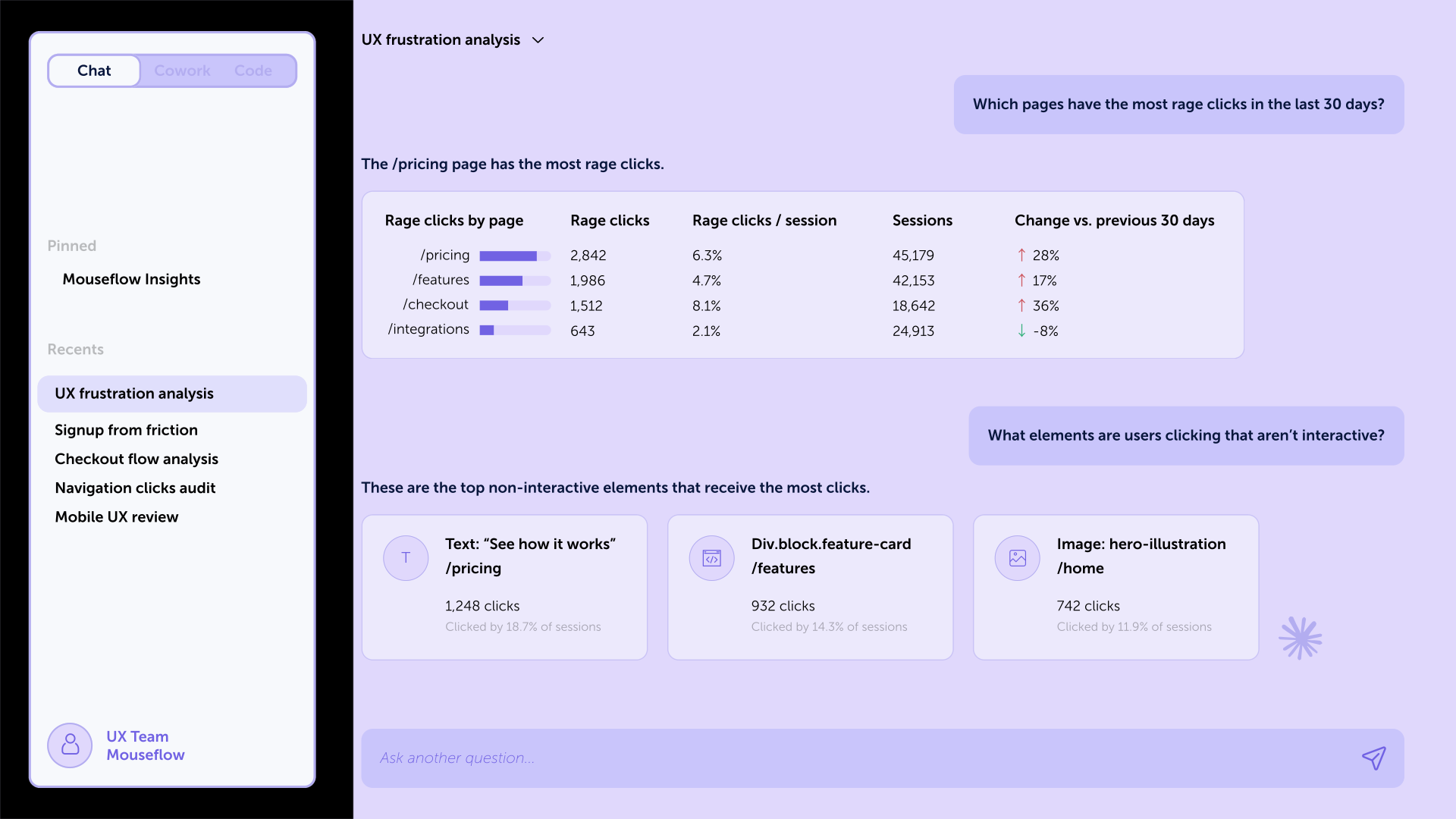
Fictional example of how teams can use Mouseflow MCP Server inside Claude
- Next step in Mouseflow:
Once frustration patterns are identified, UX teams can open Heatmaps to visualize where users click, hesitate, scroll, or repeatedly interact with non-clickable elements.
From there, researchers can use Session Replay connected to those frustration signals to observe the full behavioral context behind the issue. This helps teams understand whether users are struggling because of unclear affordances, misleading layouts, navigation confusion, broken interactions, or inconsistent UI patterns.
Instead of relying only on assumptions or isolated feedback, UX teams can use real behavioral evidence to validate usability issues and prioritize design improvements with confidence.
Support & Success teams: Investigating customer issues faster
Support and Success teams use Mouseflow MCP Server to quickly understand what users experienced before reporting an issue, abandoning onboarding, or failing to complete an action.
Instead of relying only on screenshots, tickets, or long back-and-forth debugging conversations, teams can investigate customer problems conversationally and immediately connect complaints to real behavioral data.
- Example prompts:
Questions like “Find sessions where users encountered errors on the signup form” help teams quickly identify affected users and understand how widespread an issue may be.
From there, prompts such as “How many users were affected in the last 7 days?” and “Is this isolated to a specific browser or device?” help uncover whether the problem is systemic, device-specific, browser-related, or tied to a recent release.
Prompts like “Show me recordings from users who failed to complete onboarding” can immediately surface the relevant Session Replays for investgation, without manually filtering dashboards, sessions, or error reports.

Fictional example of how teams can use Mouseflow MCP Server inside Claude
- Next step in Mouseflow:
Once the issue is identified, teams can open Session Replay already filtered by affected users, devices, browsers, or error events to watch exactly what happened before the failure occurred.
From there, Support teams can validate whether users are encountering broken flows, frontend errors, failed validations, loading issues, or confusing onboarding steps. They can also use Funnels and Form Analytics to understand how the issue impacts conversion and where users abandon the journey.
Instead of sending vague bug reports to engineering, teams can share direct session evidence connected to the exact friction point, making troubleshooting and prioritization significantly faster.
Marketing teams: Understanding landing page behavior
Marketing teams use Mouseflow MCP Server to connect campaign performance with real user behavior, without manually comparing segments, building reports, or waiting for analyst support.
Instead of looking only at top-level metrics like bounce rate or conversions, teams can investigate how users actually interact with landing pages, where attention drops, and which traffic sources drive the most engaged behavior.
- Example prompts:
Questions like “How are users interacting with our landing page?” help teams quickly understand engagement patterns, scrolling behavior, clicks, and interaction depth across the page experience.
From there, prompts such as “Where are users losing interest?” and “Which traffic source shows the highest engagement?” help uncover behavioral differences between audiences, campaigns, and acquisition channels. These conversations can reveal whether friction comes from weak messaging, poor audience targeting, confusing layouts, or content that fails to keep attention.
With direct access to Mouseflow analytics and session data, prompts like “Compare behavior between paid and organic traffic” can immediately surface segmented Heatmaps, scrolling patterns, and Session Replays for deeper investigation, without manually building filters or traffic comparisons.

Fictional example of how teams can use Mouseflow MCP Server inside Claude
- Next step in Mouseflow:
Once engagement patterns and friction points are identified, marketing teams can open Heatmaps segmented by traffic source, campaign, or device type to visualize where users click, scroll, pause, or abandon the page.
From there, teams can use Session Replay to observe how different audiences interact with messaging, CTAs, forms, and page structure in real browsing sessions. This helps identify whether low conversion comes from audience quality, weak positioning, confusing navigation, or content hierarchy problems.
Instead of optimizing campaigns based only on surface-level metrics, teams can use behavioral evidence to improve landing pages, refine targeting, and make faster campaign decisions with greater confidence.
From reporting to understanding to action
When conversion drops, metrics do their job, they surface the change and quantify the impact. But they stop there. A lower conversion rate, a higher bounce rate, rising cart abandonment: these are signals. Useful, but incomplete. They describe the outcome, not the experience that led to it.
That’s the gap many teams operate in. Without understanding user behavior, you’re still guessing what to fix.
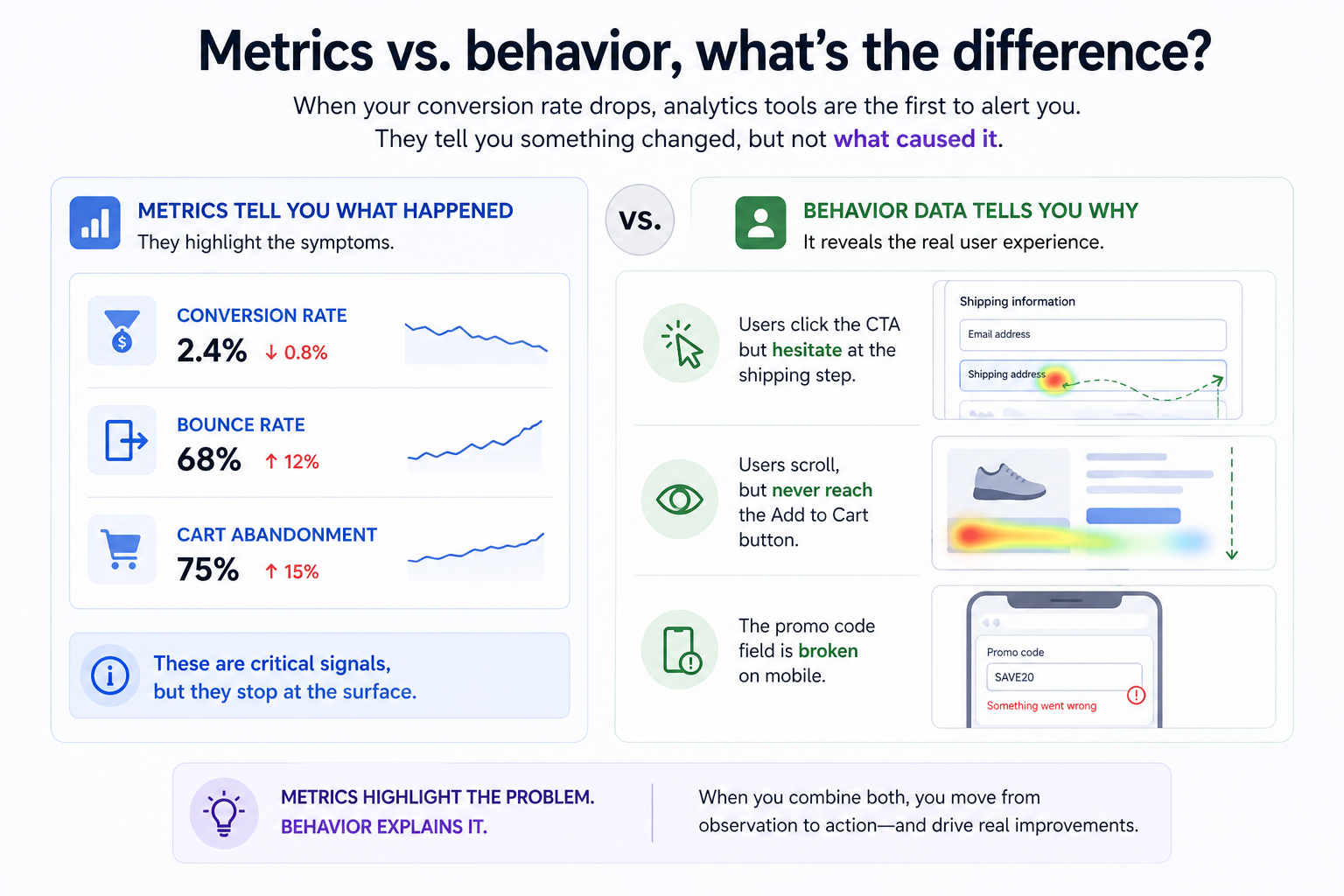
Behavioral data shifts that perspective. It shows where users hesitate, where they drop off, what they ignore, and what breaks their journey, not as abstract numbers, but as actual experiences.
The real opportunity isn’t choosing between metrics and behavior. It’s combining both to move from reporting → understanding → action.
But most of those investigations never happen, not because the data isn’t there, but because the cost of doing them is too high for an ad-hoc question mid-meeting.
Conversational analytics with an LLM lowers that cost to almost zero. You don’t need to know which report to build. You just need to know what you’re trying to understand. Mouseflow MCP Server fills the gap between having behavioral data and actually using it to make decisions.
Want to see what that looks like in practice? Here are three tutorials that show you exactly what’s possible:
– How to build a Mouseflow dashboard with Claude
– How to analyze Mouseflow feedback surveys with Claude
– How to use custom skills with Mouseflow MCP
FAQ

No. Mouseflow MCP Server is designed for natural language, anyone on the team can investigate user behavior conversationally, without writing queries or building reports.
Mouseflow MCP Server works with Claude Desktop today, and any MCP-compatible AI client including ChatGPT and Gemini CLI. MCP is an open standard, it’s not tied to a single provider.
No. Unlike AI tools that work from training data or stale exports, Mouseflow MCP Server pulls live data directly from Mouseflow’s API on every query. The numbers are exactly what’s in your account, in real time.
No. Access is read-only. Mouseflow MCP Server is for analysis and exploration only, nothing in your account can be changed through the integration.
Yes. The MCP server uses your existing Mouseflow API credentials, it only has access to what your account already permits. Your credentials stay with you. No data is stored or used for AI training.
Yes, dashboards remain the right tool for monitoring known KPIs and recurring reporting. Mouseflow MCP Server is especially valuable for investigation, exploration, debugging, and fast ad-hoc answers. They complement each other.
Node.js v18 or later, a Mouseflow API key, and about 10 minutes. No coding required. The full setup guide walks through every step.
Mouseflow MCP Server is included in your existing Mouseflow plan at no additional charge. You’ll need an AI assistant subscription (such as Claude Pro or Team), but you may already have one.