
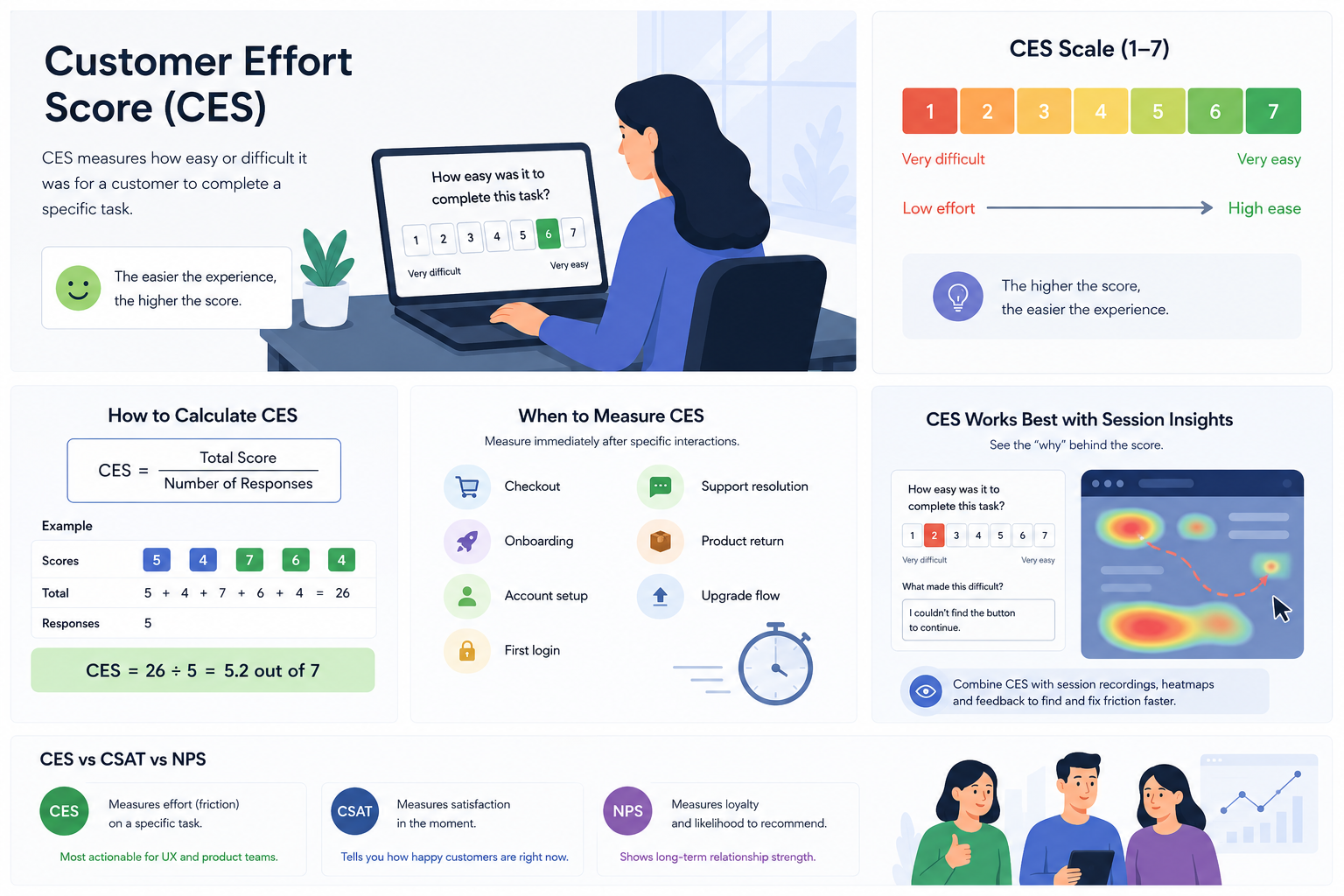
Customer Effort Score (CES) is a customer experience metric that measures how easy or difficult it was for a user to complete a specific task, such as checking out, resolving a support issue, or onboarding into a product. The lower the effort required, the better the experience tends to be.
CES helps teams identify friction points inside the customer journey before they turn into churn, abandoned flows, or support tickets. Instead of measuring general satisfaction, CES focuses on a single interaction, making it one of the most actionable metrics for UX and product teams.
Your customers do not want to work hard to use your product. They do not want to repeat themselves to support agents, click through confusing onboarding steps, or spend ten minutes trying to complete a simple checkout. And when an experience feels frustrating, users rarely complain first. They leave.
That is why more product and UX teams are paying attention to Customer Effort Score (CES).
Unlike broader satisfaction metrics, CES focuses on one thing only: how easy or difficult an interaction felt. It helps teams identify friction at the exact moment it happens, before frustration turns into churn, abandoned flows, or support tickets.
For companies optimizing digital experiences, CES is often one of the most actionable customer metrics available.
If you want to understand how CES fits into a broader user feedback strategy, explore Mouseflow’s user feedback page.

Why CES Matters
Many companies already track CSAT (Customer Satisfaction Score) or NPS (Net Promoter Score). Those metrics are valuable, but they do not always explain why users struggle.
Someone can report being satisfied overall while still abandoning a confusing checkout flow. A customer might recommend your product to others and still encounter daily friction during onboarding. CES fills that gap.
It measures usability and friction directly, which makes it especially useful for UX teams improving interfaces, product teams validating changes, support teams reducing customer frustration, and growth teams optimizing conversions.
In practice, CES often acts as an early warning signal. A drop in score can reveal friction before it starts affecting retention, revenue, or support volume.
How to Calculate Customer Effort Score
Customer Effort Score is calculated by taking the total of all survey responses and dividing it by the number of responses received.
For example, if 50 customers complete a CES survey and their combined score adds up to 290, the final Customer Effort Score would be 5.8 out of 7.
The higher the score, the easier customers perceive the experience to be.
What makes CES valuable is not the complexity of the calculation. The real value comes from asking the right question at the right moment, immediately after a specific interaction while the experience is still fresh in the customer’s mind.
When Should You Measure CES?
CES works best immediately after a specific customer interaction.
Timing is critical. If you wait too long, customers stop evaluating the actual experience and start relying on memory instead. At that point, the feedback becomes less reliable and less actionable.
The most effective CES surveys are triggered right after moments like completing checkout, resolving a support ticket, finishing onboarding, creating an account, upgrading a subscription, logging in for the first time, or returning a product.
For example, if a user finishes onboarding and instantly rates the experience as difficult, that feedback reflects genuine friction in the flow.
If you ask the same question two days later, the user may only remember the outcome, not the confusing steps that caused frustration.
Common CES Question Formats
There is no single correct way to ask a CES question. Different companies use different formats depending on the product experience, audience, and where the survey appears in the customer journey.
The most common CES survey formats include:
- Numeric scale surveys
The most widely used format. Customers rate how easy or difficult an interaction felt on a scale, usually from 1 to 7.
Example: “How easy was it to complete this task?”
In most cases, 1 means “very difficult” and 7 means “very easy.” - Likert-scale surveys
Instead of asking a direct question, these surveys present a statement users can agree or disagree with.
Example: “It was easy to resolve my issue.”
Customers then choose responses like “strongly disagree” or “strongly agree.” - Emoji or sentiment-based surveys
Some brands use emojis, faces, or visual sentiment indicators to simplify feedback collection, especially on mobile devices.
Example:😞 😐 😊
These responses can still be mapped to numerical CES scores behind the scenes. - Thumbs up/down surveys
A simplified version often used inside apps or support experiences to capture quick reactions with minimal friction.
In-product micro surveys
Small CES surveys triggered after specific actions, such as completing onboarding, finishing checkout, or contacting support.
No matter the format, simplicity matters. CES surveys should feel lightweight, contextual, and immediate, not like long customer feedback forms.
What Is a Good Customer Effort Score?
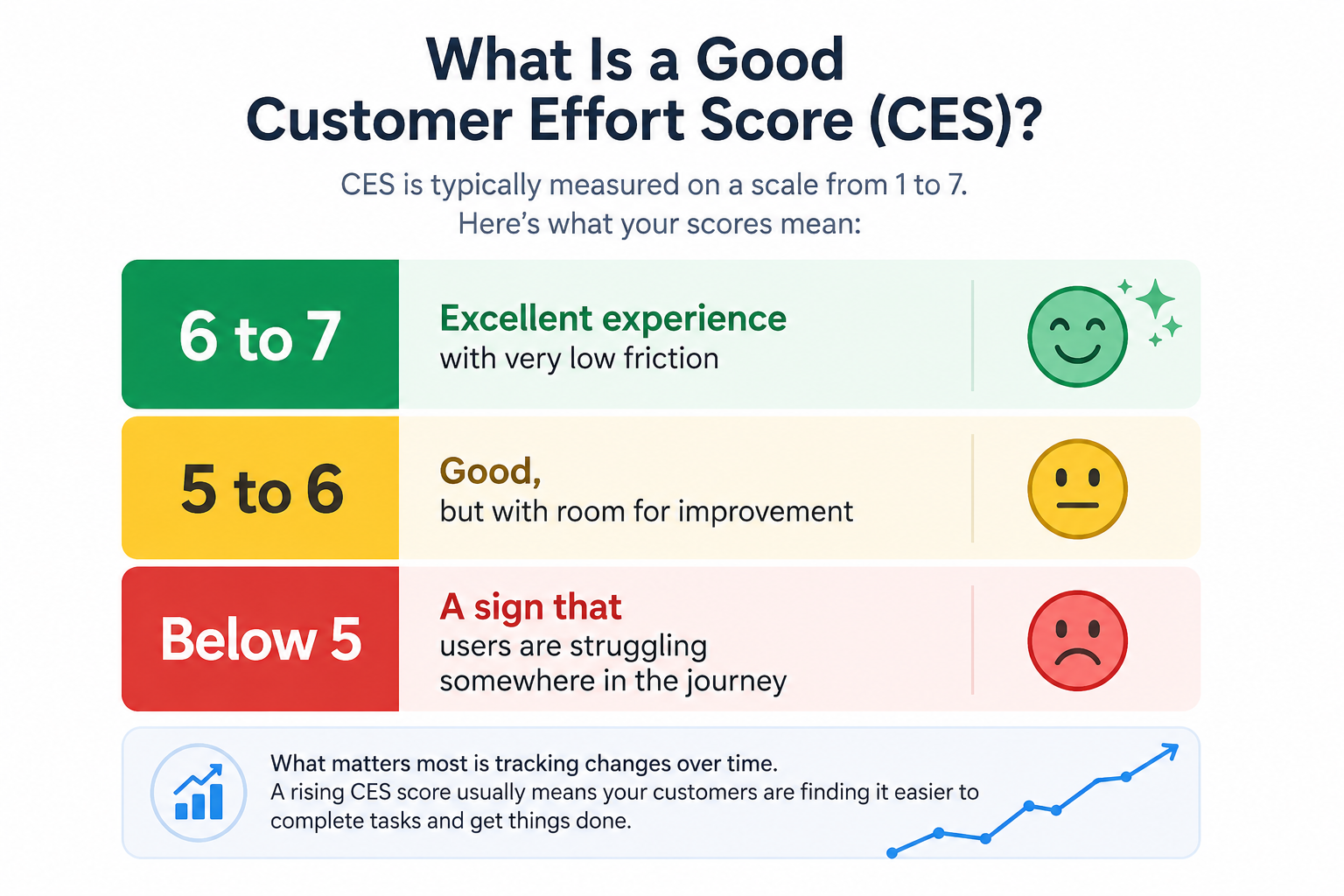
A “good” CES depends on the scale you use, but in general, higher scores indicate a smoother and less frustrating experience.
On a 1 to 7 scale, most companies consider:
- 6 to 7 = excellent experience with very low friction
- 5 to 6 = good, but with room for improvement
- below 5 = a sign that users are struggling somewhere in the journey
What matters most is not comparing your CES to someone else’s benchmark, but tracking changes over time.
For example, if your onboarding CES drops from 6.1 to 4.9 after a product update, that usually signals a usability issue worth investigating. Likewise, a rising CES score often indicates that UX improvements are successfully reducing friction.
The best way to evaluate CES is alongside behavioral data like session replay, heatmaps, and conversion funnel. That context helps explain why customers rated an experience as easy or difficult.
How to Improve Your Customer Effort Score
The most effective CES programs are simple, focused, and consistent. The goal is not to collect as much feedback as possible, but to gather actionable insights tied to specific customer interactions. A well-timed and well-structured CES survey can quickly reveal friction points that affect conversions, retention, and overall user experience.
Here are some best practices to help you collect more useful CES data:
- Keep CES surveys short. One rating question with an optional follow-up is usually enough to collect actionable feedback without overwhelming users.
- Measure one interaction at a time. Asking users to evaluate onboarding, checkout, and support resolution in the same survey makes the results difficult to interpret.
- Send CES surveys immediately after the interaction while the experience is still fresh in the customer’s mind.
- Track CES consistently over time. A sudden drop in onboarding or checkout scores can reveal UX problems immediately after a product release.
- Use open-text follow-up questions to uncover why users struggled, not just that they struggled.
- Pair CES with behavioral analytics tools like session recordings and heatmaps to understand where friction actually happens.
Mouseflow’s feedback tools help teams link CES responses to session replay, making it easier to identify root causes and improve the customer experience faster.
Final Thoughts
Customer Effort Score helps teams understand one of the most important parts of the customer experience: how easy it actually feels to use your product.
Unlike broader satisfaction metrics, CES highlights friction inside specific interactions, making it easier to identify what is slowing users down and where the experience needs improvement. Whether the issue appears during onboarding, checkout, support, or account setup, reducing effort often leads to higher conversions, better retention, and fewer frustrated customers.
The most effective teams do not treat CES as just another survey metric. They combine it with behavioral analytics, session recordings, and user feedback to understand both what users experienced and why they struggled in the first place.
Because in most digital experiences, the easier something feels, the more likely customers are to complete it, come back, and stay loyal over time.