

User feedback is one of the most valuable, and often overlooked, sources of insight for improving digital experiences.
Most teams rely heavily on analytics to understand performance. They track conversions, drop-offs, and user flows. But analytics can only tell you what users do, not why they do it.
That missing layer is where user feedback becomes essential.
For teams working with websites, ecommerce, and digital products, feedback reveals what users expect, where they struggle, and what prevents them from converting. It turns assumptions into evidence and helps prioritize what actually matters.
In practice, most teams don’t struggle to collect feedback, they struggle to turn it into actionable insight. This guide shows how to do both.

What is User Feedback?
User feedback is any information users provide about their experience with your product, website, or service.
It can be:
- explicitly shared, such as survey responses or ratings
- indirectly expressed, such as reviews or support conversations
- or inferred from behavior, such as clicks, hesitation, or drop-offs
In isolation, each type of feedback is useful. But the real value comes from combining them.
For example, a user might report frustration in a survey. Behavioral data can then show exactly where that frustration occurred. Together, they create a much clearer picture than either would alone.

Why user feedback matters
User feedback gives context to data.
Without it, teams often rely on assumptions or incomplete signals. With it, decisions can be grounded in real user experience.
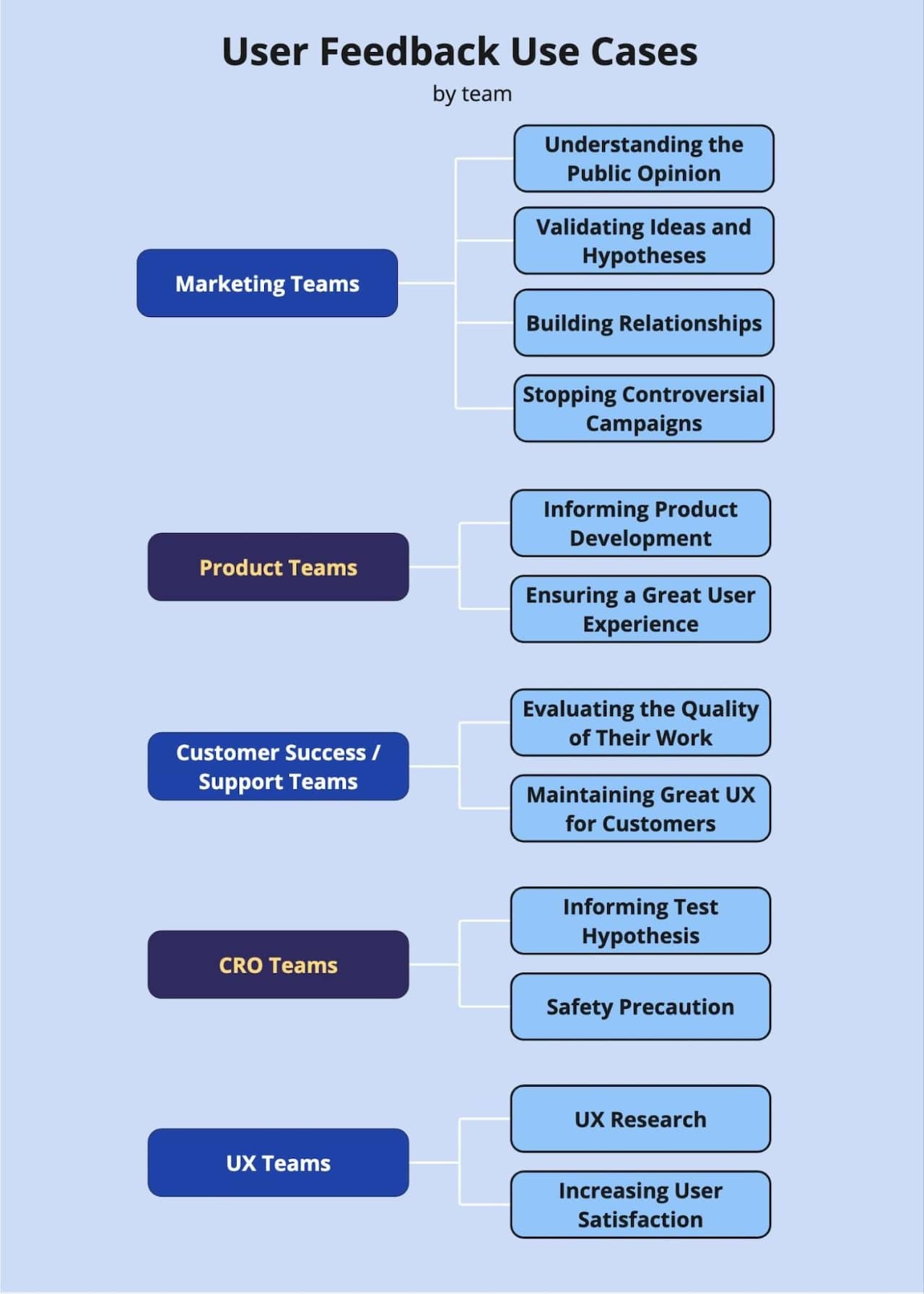
This is particularly important in areas like conversion rate optimization (CRO). Feedback often reveals friction points that are not visible in analytics alone, making it a valuable input when building a strong CRO hypothesis based on real user data.
It also plays a key role in retention. Many users do not churn because of one major issue, but because of repeated small frustrations. Understanding those frustrations is often the first step toward solving them, which is why feedback is closely linked to efforts to reduce customer churn through better UX.
Across teams – from UX to marketing to product – user feedback provides a shared understanding of what users actually experience, not what teams assume they experience.
.
Understanding the different types of user feedback
Not all feedback is created in the same way, and understanding the differences is key to using it effectively.
At a high level, user feedback can be grouped into three categories:
- Direct feedback — collected intentionally through surveys, forms, or interviews
- Indirect feedback — expressed organically through reviews, support tickets, or social channels
- Inferred feedback — derived from behavior, such as session replays, heatmaps, and interaction patterns
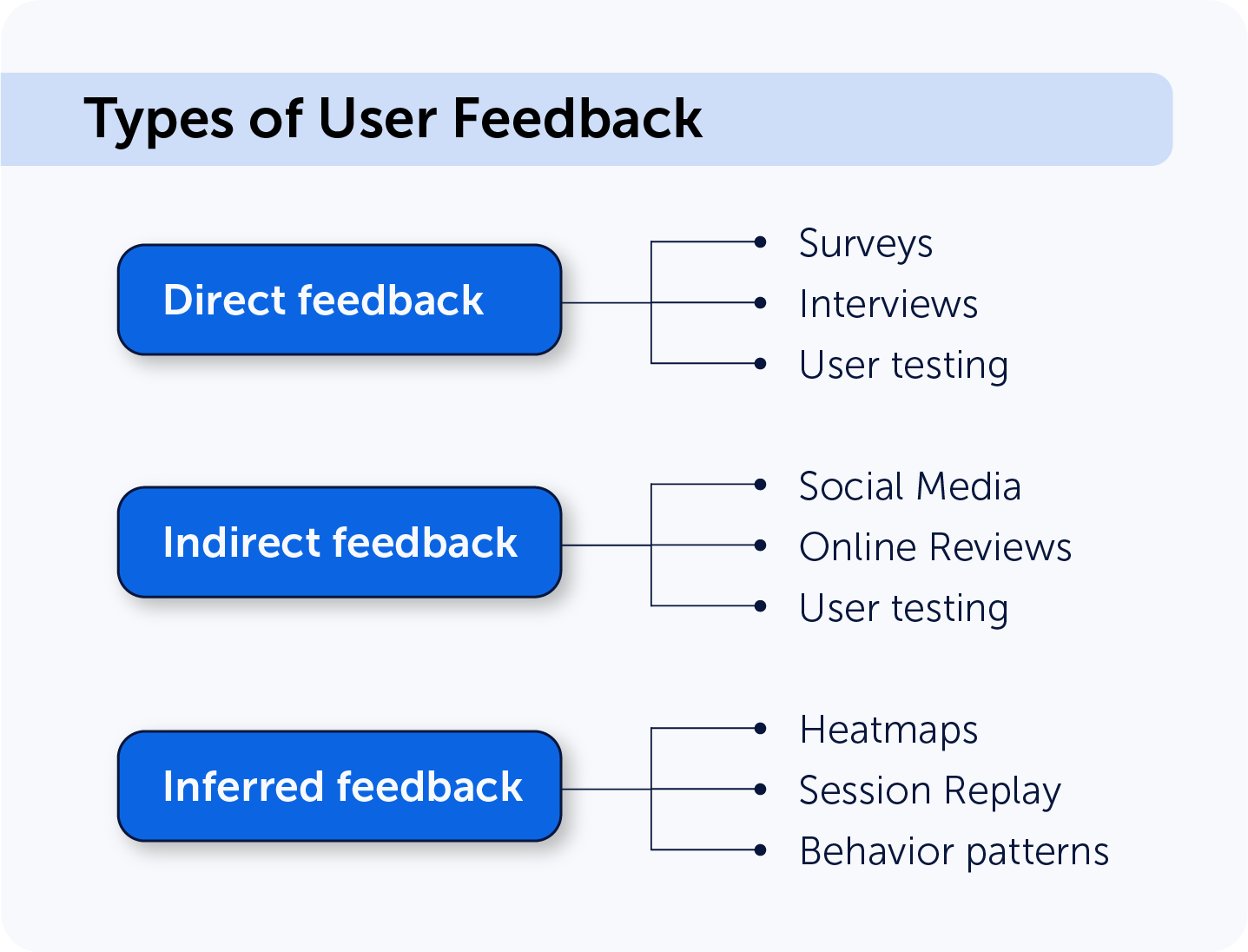
Each type plays a different role. Direct feedback gives clarity, indirect feedback reveals patterns at scale, and inferred feedback adds context where users do not explicitly explain their experience.
Another important distinction is between:
- Quantitative feedback, such as scores and ratings
- Qualitative feedback, such as open-text responses
Quantitative data helps track trends. Qualitative data explains why those trends exist.
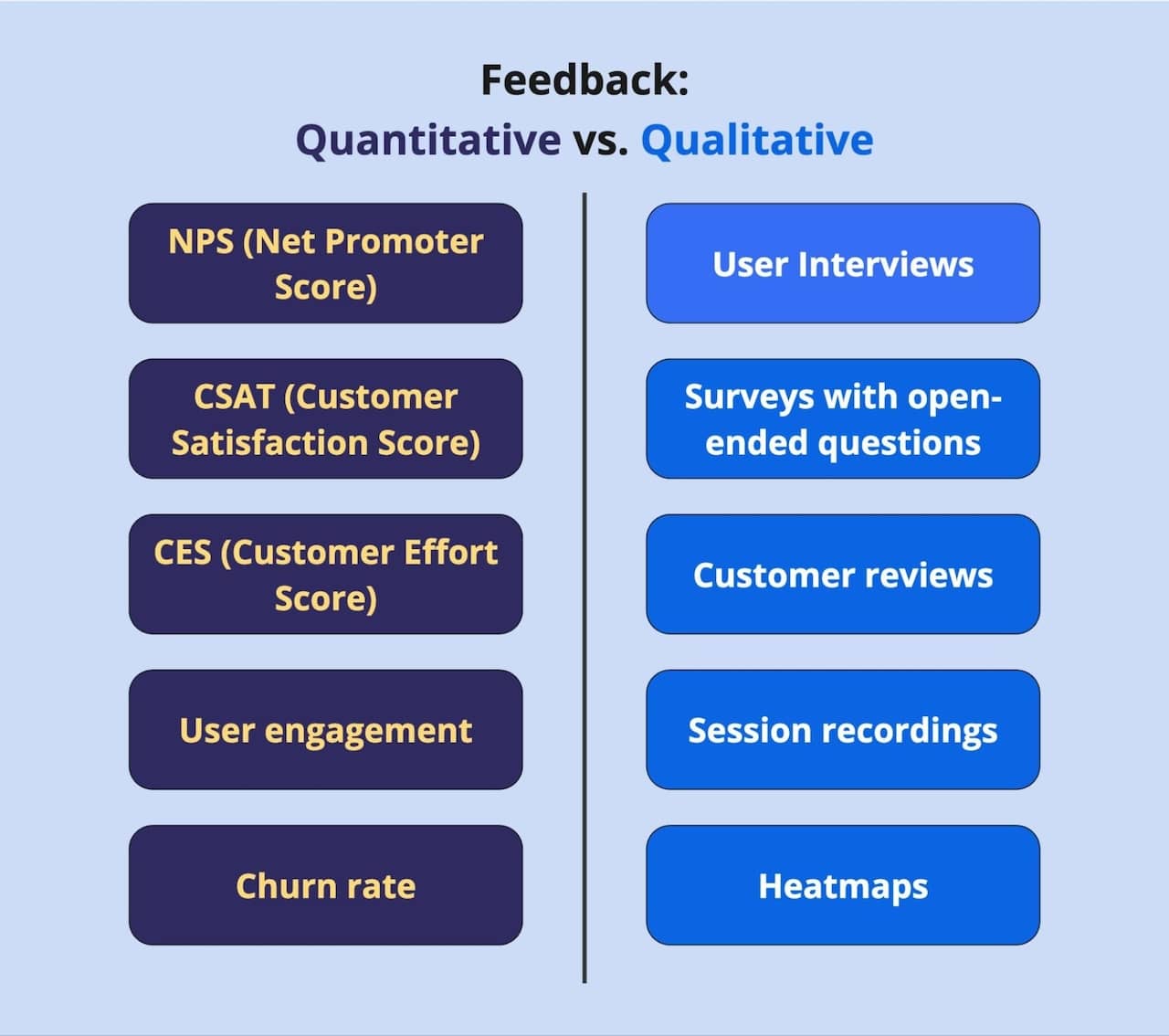
If you want to explore these categories in more detail, our guide to types of user feedback dives deeper into when and how to use each approach.
The user feedback workflow
User feedback becomes truly valuable when it is part of a structured process. Rather than treating it as a one-off activity, high-performing teams build feedback into how they continuously improve their digital experiences.
In practice, this follows a simple but powerful workflow:
Collect → Analyze → Act → Improve
Each step plays a distinct role:
- Collecting feedback creates visibility into user expectations, frustrations, and intent
- Analyzing feedback turns individual responses into patterns and insights
- Acting on feedback translates those insights into product, UX, or conversion improvements
- Improving and iterating closes the loop and ensures that changes are validated over time
This continuous process is often referred to as a user feedback loop, a system where feedback is not only collected and acted on, but consistently used to inform future improvements and validate decisions.
What makes this workflow effective is not the individual steps, but the fact that it is continuous. Feedback is collected, acted on, and then collected again, creating a cycle of ongoing learning and optimization.
The rest of this guide follows this structure, breaking down how to collect, analyze, and act on feedback in practice.
How to collect user feedback
Collecting feedback is less about volume and more about relevance.
The goal is to capture insight at the moment it matters, when users are making decisions, encountering friction, or completing key actions.
 Onsite feedback surveys
Onsite surveys are one of the most effective ways to collect feedback in context.
They allow you to ask targeted questions based on user behavior, such as: why a visitor is leaving, what prevented a conversion, whether expectations were met.
If you are building your first surveys, a good starting point is understanding what to ask and when. Our guide to feedback survey questions for website visitors provides practical examples, while this guide to using feedback surveys effectively explains how to implement them.
 Exit surveys and key journey touchpoints
Exit surveys capture feedback at critical decision points, for example when a user leaves a checkout flow or pricing page.
These moments often reveal the most actionable insights. For example, ecommerce teams frequently discover that users abandon checkout not because of price alone, but because unexpected shipping costs or unclear return policies appear too late in the process.
 Feedback widgets and continuous input
Feedback widgets allow users to share input throughout their experience, not just at predefined moments. This makes it easier to capture insights from engaged users who might not otherwise respond to surveys.
 Behavioral signals as feedback
Not all feedback is spoken. Patterns such as repeated clicks, hesitation, or drop-offs often signal underlying issues. These behavioral insights act as a form of “silent feedback”, highlighting friction that users may not explicitly describe.
 Indirect feedback sources
Reviews, support conversations, and social channels often surface recurring problems and expectations. While less structured, they can reveal patterns at scale that are worth investigating further.
How to analyze user feedback
Collecting feedback is relatively straightforward. Turning it into insight requires structure.
Most analysis starts by identifying patterns. Individual comments can be useful, but it is repeated signals that point to meaningful opportunities.
Common themes often include:
- usability issues
- unclear messaging
- missing information
- technical friction
- trust or pricing concerns
Feedback becomes significantly more actionable when combined with behavioral data. For example, if users report confusion during checkout, session replays can show exactly where that confusion occurs, whether it is a form field, payment step, or missing information.
As feedback volume grows, analysis can become time-consuming. AI can help here, particularly for summarizing responses and identifying sentiment trends. If you are exploring this approach, our guide to using ChatGPT for sentiment analysis is a useful starting point.
For a more structured approach, you can also explore our guide on how to analyze user feedback.
How to act on user feedback
Insight only becomes valuable when it leads to action.
Once patterns are identified, the next step is translating them into improvements. This might involve refining a user flow, clarifying messaging, fixing usability issues, or testing new ideas.
In many organizations, feedback feeds directly into experimentation and optimization work. It helps teams prioritize what to test and where the greatest impact is likely to be found.
Over time, this creates a feedback loop: feedback highlights problems, improvements are implemented, new feedback validates the changes.
This continuous cycle is what turns feedback into a long-term growth driver.
Key user feedback metrics
Although much of user feedback is qualitative, measurement still plays an important role.
Common metrics include:
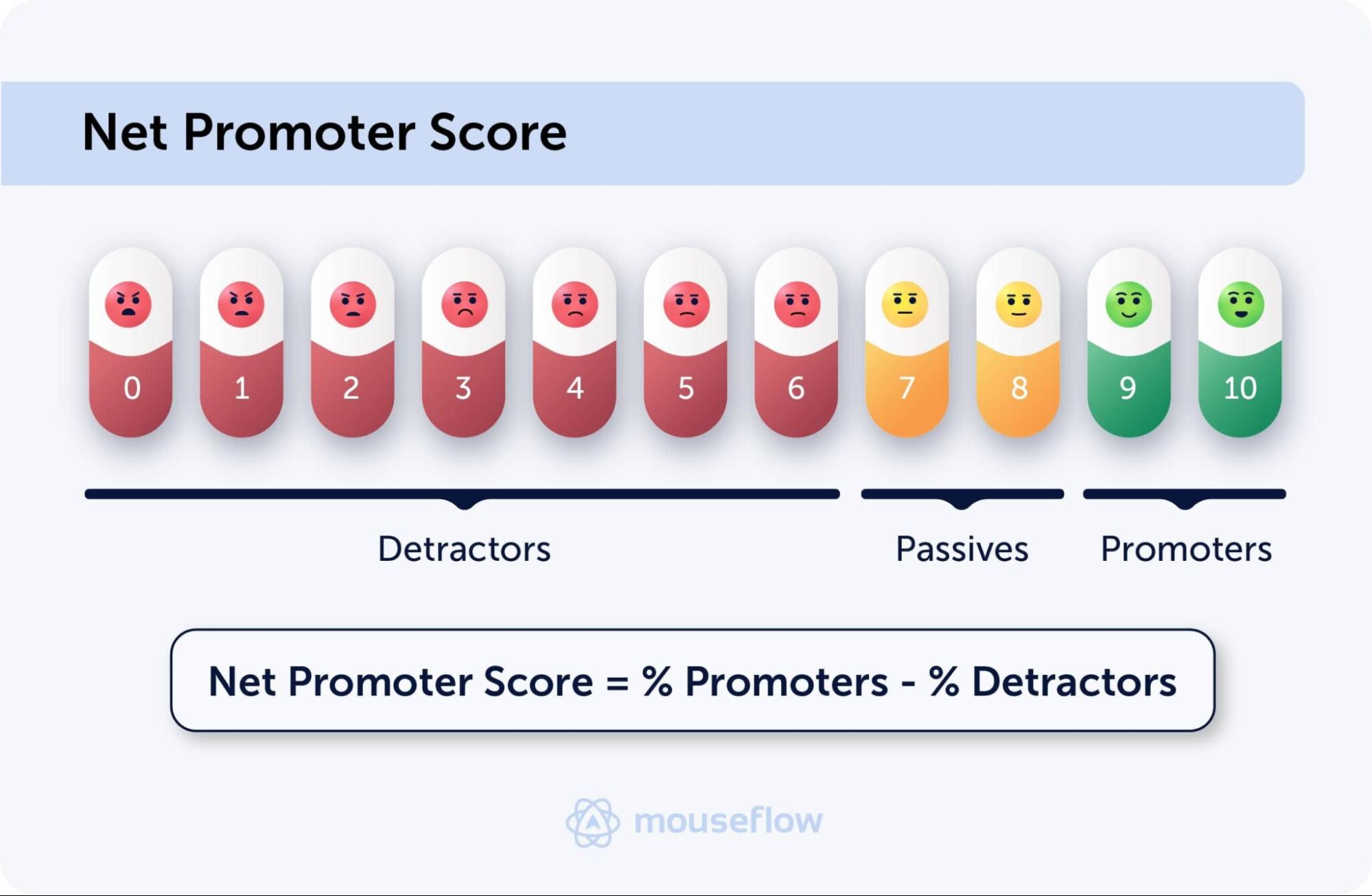
Net Promoter Score (NPS)
Net Promoter Score measures customer loyalty by asking how likely users are to recommend your product or service. Learn more about what NPS is and how it works.
Customer Satisfaction Score (CSAT)
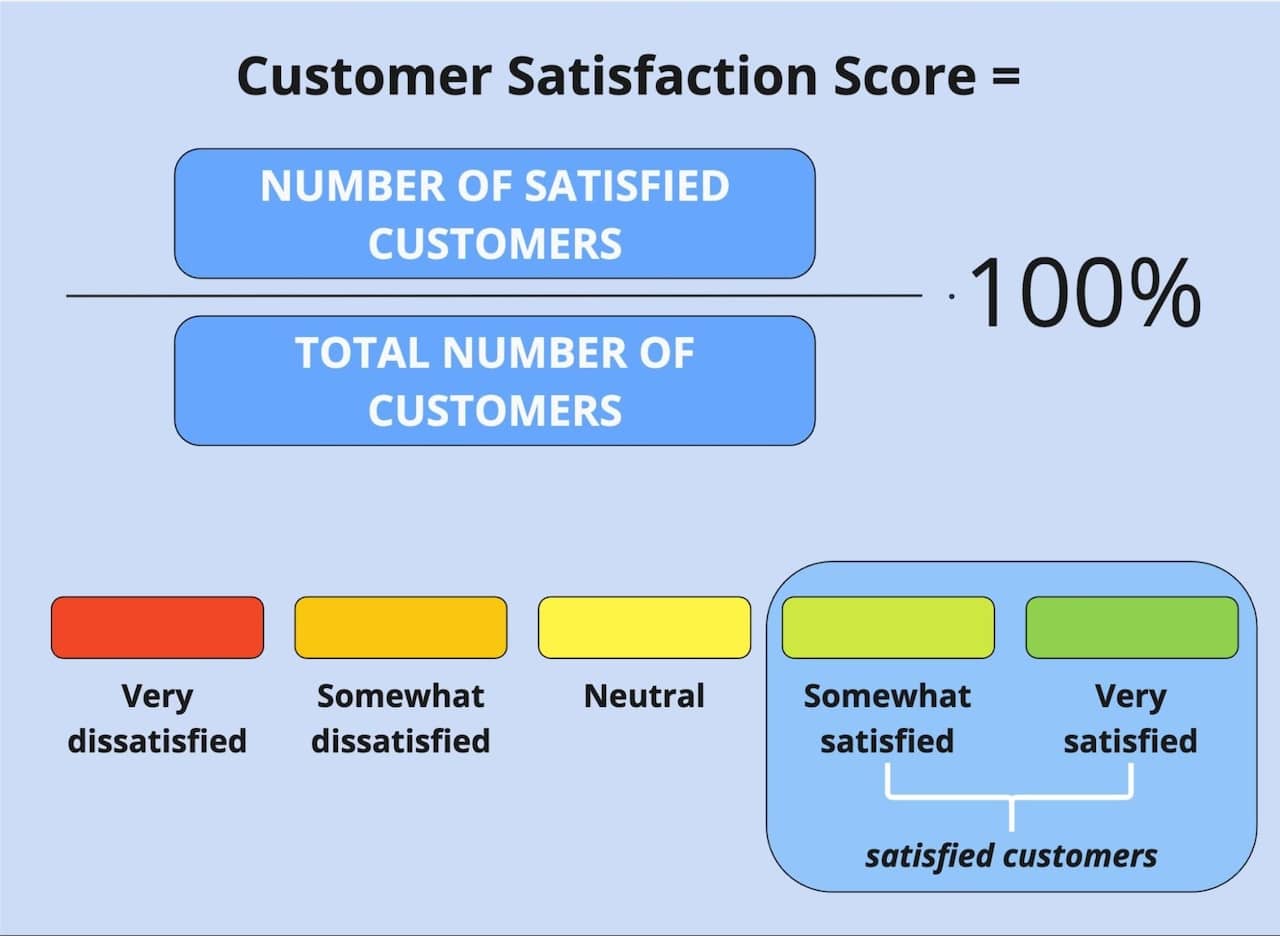
Customer Satisfaction Score (CSAT) captures how satisfied users are with a specific interaction, page, or experience. It is typically measured through short surveys that ask users to rate their experience on a scale. Learn more about how CSAT works and how to improve it.
Customer Effort Score (CES)
Customer Effort Score (CES) measures how easy it is for users to complete a task, often used to identify friction in flows like checkout or onboarding. It is typically collected by asking users how easy or difficult an experience was, making it particularly useful for improving usability and reducing friction. Learn more about how to measure and use CES effectively.
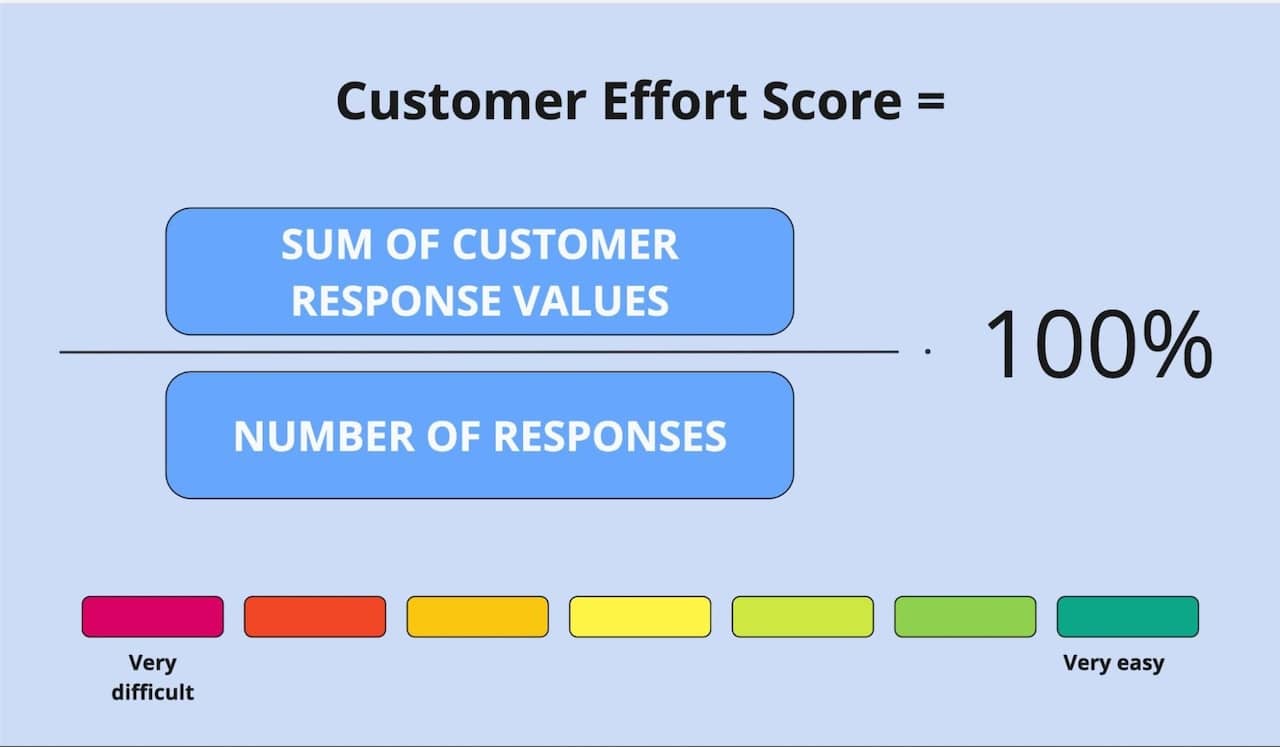
NPS, CSAT and CEF metrics are particularly useful for identifying trends and benchmarking improvements over time.
In addition, operational metrics such as response rate and survey completion rate help evaluate how effective your feedback collection setup is..
While metrics provide structure and comparability, they are most powerful when combined with qualitative feedback. Scores can tell you that something changed, but user feedback explains why.
User Feedback Use Cases: Ecommerce and SaaS
User feedback becomes significantly more valuable when applied within a specific context. While the underlying principles remain the same, how feedback is collected and used often depends on the type of product or experience you are optimizing.
 Ecommerce
In ecommerce, feedback is closely tied to conversion and revenue.
It helps teams understand why users hesitate, what creates uncertainty, and where friction appears in the buying journey. This is particularly important on high-impact pages such as product pages, checkout flows, and cart experiences, where even small issues can lead to lost revenue.
In practice, ecommerce teams often use feedback to: uncover reasons for cart abandonment, identify missing product information or trust signals or understand objections that prevent purchase decisions.
Product pages are one of the most critical touchpoints in this process. They are often where users make their final decision, or drop off due to uncertainty, missing details, or lack of trust. For a practical breakdown, see how to collect user feedback on product pages.
When combined with behavioral data, these insights become even more actionable. For example, a user comment about confusion during checkout becomes far more useful when paired with session data showing exactly where the friction occurred.
For a deeper dive, see our guide on how to turn user feedback into eCommerce revenue.
 SaaS
SaaS
In SaaS, feedback is often used to improve activation, adoption, and retention.
Rather than focusing only on conversion, SaaS teams use feedback to understand how users experience the product over time, especially during onboarding and early usage.
Common use cases include: identifying friction in onboarding flows, understanding why users fail to adopt key features,
uncovering gaps between user expectations and product experience.
These insights are particularly valuable for product and growth teams working to reduce churn and improve long-term engagement. You can explore this further in our guide to feedback for SaaS.
Choosing the right user feedback tools
A strong feedback strategy depends on having the right tools in place, but more importantly, it depends on how those tools work together.
Collecting feedback in isolation is rarely enough. The real value comes from combining user input with behavioral context, so you can understand not just what users say, but what actually happened.
The most effective setups typically bring together:
- feedback collection, such as surveys and feedback widgets
- behavioral insights, such as session replays and interaction data
- analysis capabilities that help identify patterns and prioritize issues
This combination allows teams to move from raw feedback to actionable insight much faster.
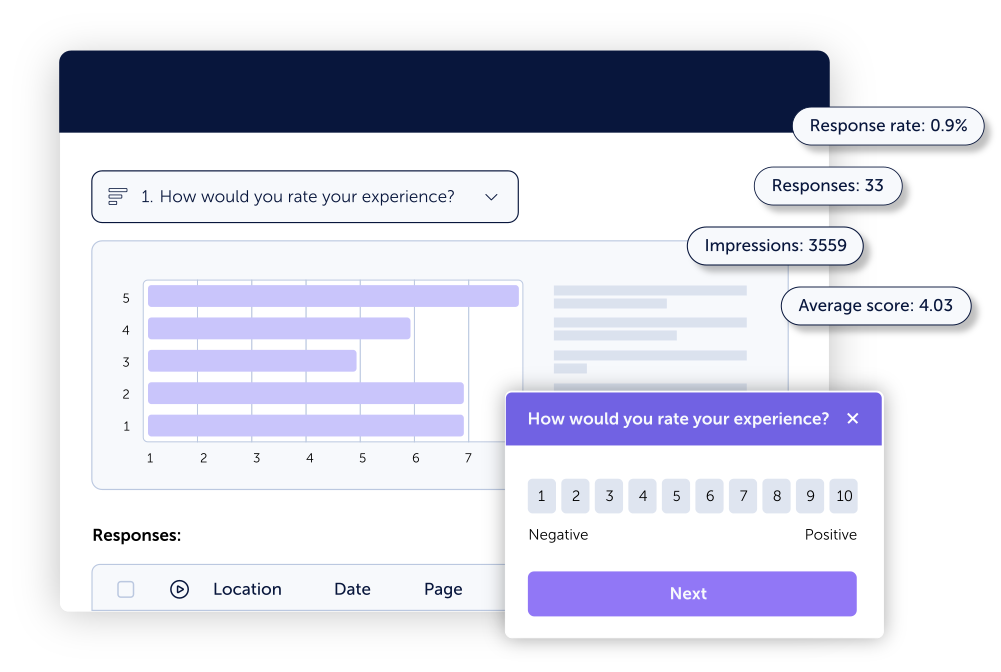
For example, when a user reports a problem through a feedback widget, being able to immediately view their session replay provides critical context. It removes guesswork and helps teams resolve issues more efficiently.
This is exactly the kind of workflow modern feedback tools aim to support. If you want to see how this works in practice, you can explore how Mouseflow’s user feedback tool combine surveys with behavioral analytics.
If you are evaluating different options, our guide to the best website feedback tools in 2026 will break down what to look for and how different tools compare.
Best practices for working with user feedback
Teams that get real value from user feedback rarely treat it as a one-off activity. Instead, they build habits around how feedback is collected, interpreted, and used across the organization.
A few principles consistently stand out:
- Collect feedback in context
Feedback is most valuable when it is tied to a specific moment in the user journey, such as during checkout, onboarding, or content consumption. - Keep surveys focused and concise
Short, targeted surveys tend to produce higher-quality responses and better completion rates than long, generic questionnaires. - Avoid biased or leading questions
The way a question is phrased can influence the answer. Neutral wording helps ensure more reliable insights. - Look for patterns, not individual opinions
Single responses can be misleading. Consistent themes across multiple users are what point to real opportunities. - Combine qualitative and quantitative data
Metrics show what is happening, while user comments explain why. The two are most powerful when used together.
These principles help ensure that feedback remains actionable, and that teams can move from raw input to meaningful improvements without getting overwhelmed.
Conclusion
User feedback is one of the most effective ways to understand and improve digital experiences.
It connects user behavior with user intent, helping teams move beyond assumptions and make better decisions. But its value does not come from collecting more feedback. It comes from building a system that connects collection, analysis, and action.
When that system is in place, feedback becomes more than a research method, it becomes a continuous source of insight that drives better experiences, higher conversions, and stronger customer relationships.
FAQ

User feedback is information users share about their experience with a product, website, or service. It can include opinions, frustrations, suggestions, or satisfaction levels, collected through surveys, reviews, or behavioral data. It helps teams understand user expectations and identify areas for improvement.
User feedback is most effectively collected in context, when users are interacting with a website or product. This is typically done through onsite surveys, exit prompts, feedback widgets, and customer interactions. Targeting specific moments in the user journey leads to more relevant and actionable insights than generic feedback requests.
User feedback is analyzed by identifying patterns across responses rather than focusing on individual comments. Teams typically group feedback into themes such as usability issues or confusion, and combine it with behavioral data to understand where and why problems occur. This makes it easier to prioritize improvements.
User feedback helps identify friction that prevents users from completing actions such as purchases or sign-ups. It can reveal issues like unclear messaging, missing information, or trust concerns. These insights can then be used to improve user experience and guide optimization efforts.
User feedback is typically collected using surveys, feedback widgets, and customer communication tools. Many teams also combine this with behavioral analytics, such as session recordings, to better understand user actions. The most effective tools connect feedback with real user behavior to provide deeper insight.
User feedback should be collected continuously, but in a targeted way. Instead of asking every user for feedback at all times, it is more effective to trigger feedback at key moments in the user journey. This ensures higher-quality responses without overwhelming users.
Users often ignore feedback surveys when they appear at the wrong time, feel irrelevant, or require too much effort. Short, well-timed, and clearly worded surveys are more likely to receive responses. Reducing friction and improving targeting can significantly increase participation rates.