
- Why you need to collect feedback on product pages
- Step 1: Map the critical moments before you ask
- Step 2: Choose the right feedback methods
- Step 3: Write questions that get useful answers
- Step 4: Connect feedback to behavioral data
- Step 5: Prioritize and act on what you learn
- How Mouseflow brings it together
To effectively collect feedback on product pages, combine behavior-triggered surveys with an always-on passive feedback widget.
Trigger surveys at key moments of hesitation such as when users are about to leave the page, scroll past your CTA without clicking, or show frustration signals like rage clicks. These well-timed prompts capture feedback while the user’s intent and friction points are still fresh.
At the same time, include a passive feedback option, like a “Give feedback” button that remains visible on the page. This allows users to share thoughts whenever they choose, without interrupting their experience.
Together, these methods provide continuous, high-quality insights, revealing user questions, missing information, and the objections that stand in the way of conversion.
To learn more about user feedback as a whole, what it is, how it’s measured, and why it matters across the entire customer journey, visit Mouseflow’s Ultimate Guide to User Feedback.

Why you need to collect feedback on product pages
To collect feedback on a product page means strategically deploying targeted, behavior-driven surveys to uncover why users interact with specific elements, what information they are missing, and what stops them from converting.
Most feedback programs treat the website as a single entity. One survey fires on any page after 30 seconds. One NPS prompt appears after a purchase. That’s a start, but product pages deserve a dedicated strategy.
Product pages are conversion pages. Every element on them, the headline, the image gallery, the feature list, the CTA, is either reducing friction or creating it. The stakes of getting this wrong are direct: higher bounce rates, abandoned carts, and lost revenue. Generic site-wide feedback doesn’t give you the page-level granularity you need to fix these problems.
By collecting feedback specifically on product pages, you answer questions like:
- What information are users looking for that they can’t find?
- What stops them from clicking “Add to cart” or “Request a demo”?
- Is the pricing clear enough, or is it creating hesitation?
- Do users understand what the product actually does?
These are questions only your users can answer.
Step 1: Map the critical moments before you ask
Before you write a single survey question, you need to understand how users actually move through your product pages. Use session recordings and scroll heatmaps to identify:
- Where users slow down: Pausing or re-reading usually signals either genuine interest or confusion.
- Where they click: Are they engaging with your CTAs, or clicking on non-interactive elements?
- Where they exit: Do users drop off before reaching the pricing section, or after?
- Where friction events occur: Rage clicks and u-turns are signs of frustration. A well-placed survey helps explain why they happen.
Mouseflow’s heatmaps and session recordings give you a behavioral map of your product pages before you collect direct feedback. This context makes your survey questions meaningful. You aren’t guessing where the problems are; you’re confirming them.
Step 2: Choose the right feedback methods
Not all feedback methods work equally well on product pages. Here are the formats that perform best.
Behavior-triggered on-page surveys
This is the most powerful method for product pages. Instead of showing a survey to everyone who lands on the page, trigger it based on what the user actually does. A few high-value trigger scenarios:
- Exit intent: When a user moves their cursor toward the browser bar, ask: “Did you find what you were looking for?” or “What stopped you from completing your purchase today?”
- Scroll depth: When a user scrolls past 75% of the page but doesn’t click the CTA, ask: “Do you have any questions about this product?”
Time on page: If a user is on the page for 90+ seconds without converting, they are evaluating. Ask: “Is there anything stopping you from moving forward?” - Friction events: If Mouseflow detects rage clicks or a u-turn, trigger a short survey to understand what just happened.
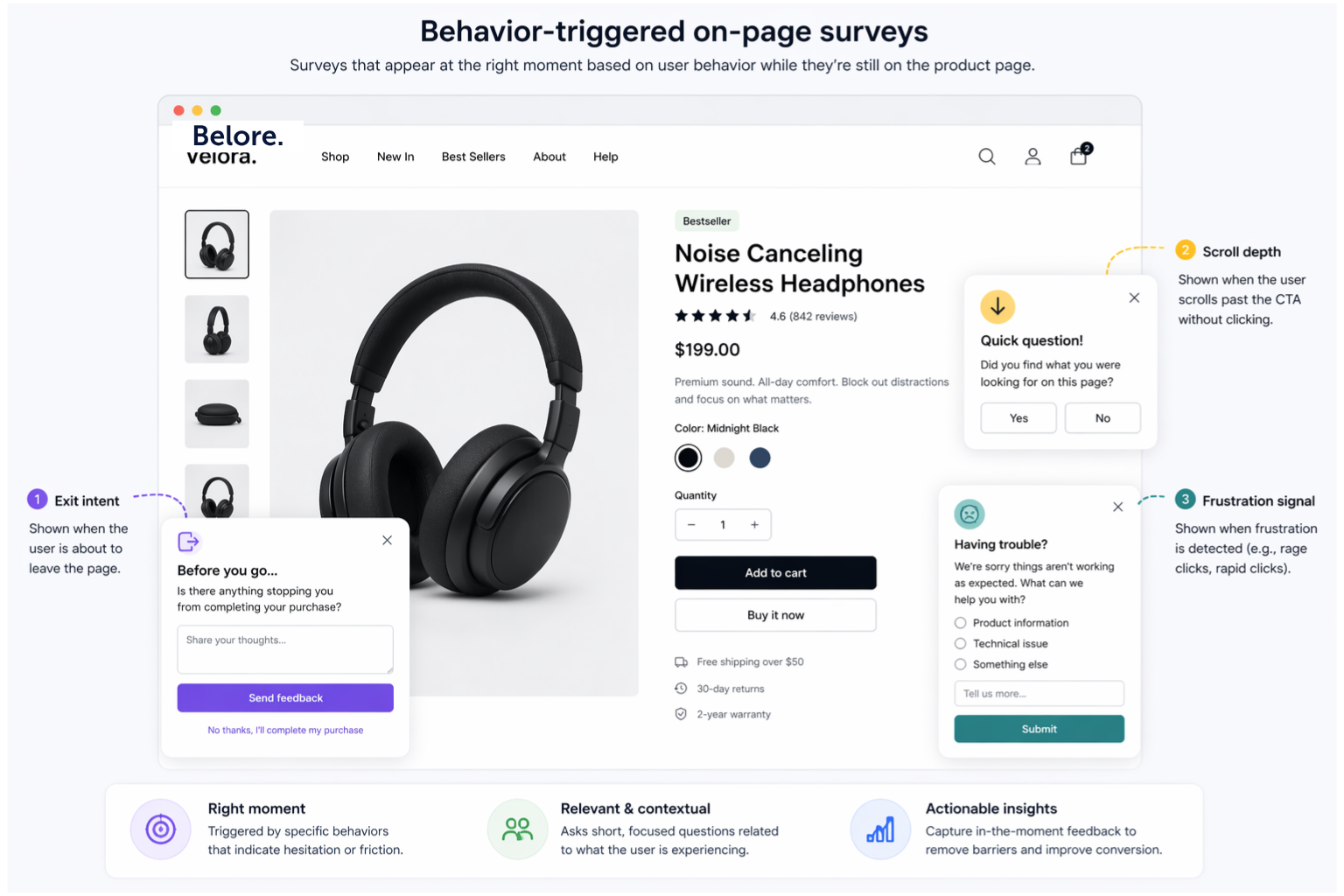
Mouseflow’s Feedback Surveys let you configure all these triggers without writing code. Every response connects to a session replay, so you watch exactly what the user did before and after answering.
Post-conversion surveys
Once a user converts, you have a brief window of high engagement. Post-conversion surveys work well for questions like:
- “What almost stopped you from completing your purchase?”
- “What information helped you make your decision?”
- “Was there anything confusing about this page?”
These responses show you what works, and what nearly didn’t, from the people who actually bought.
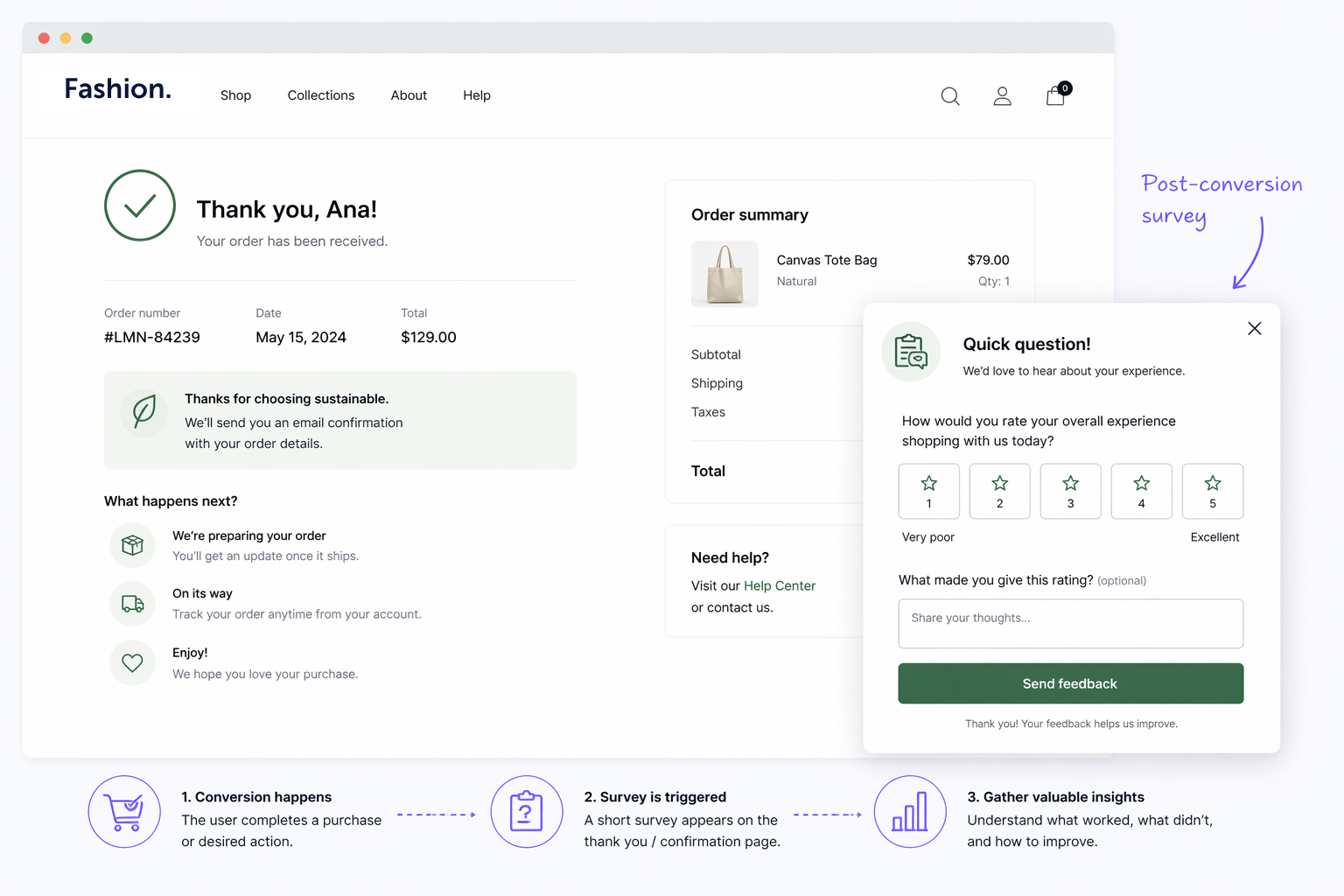
A fictional example of post Conversion Survey.
Passive feedback widgets
A small, always-visible feedback button gives users the option to leave a comment on their own terms. This captures feedback from highly motivated users who encounter specific problems. It’s a low-volume, high-quality source of insights.
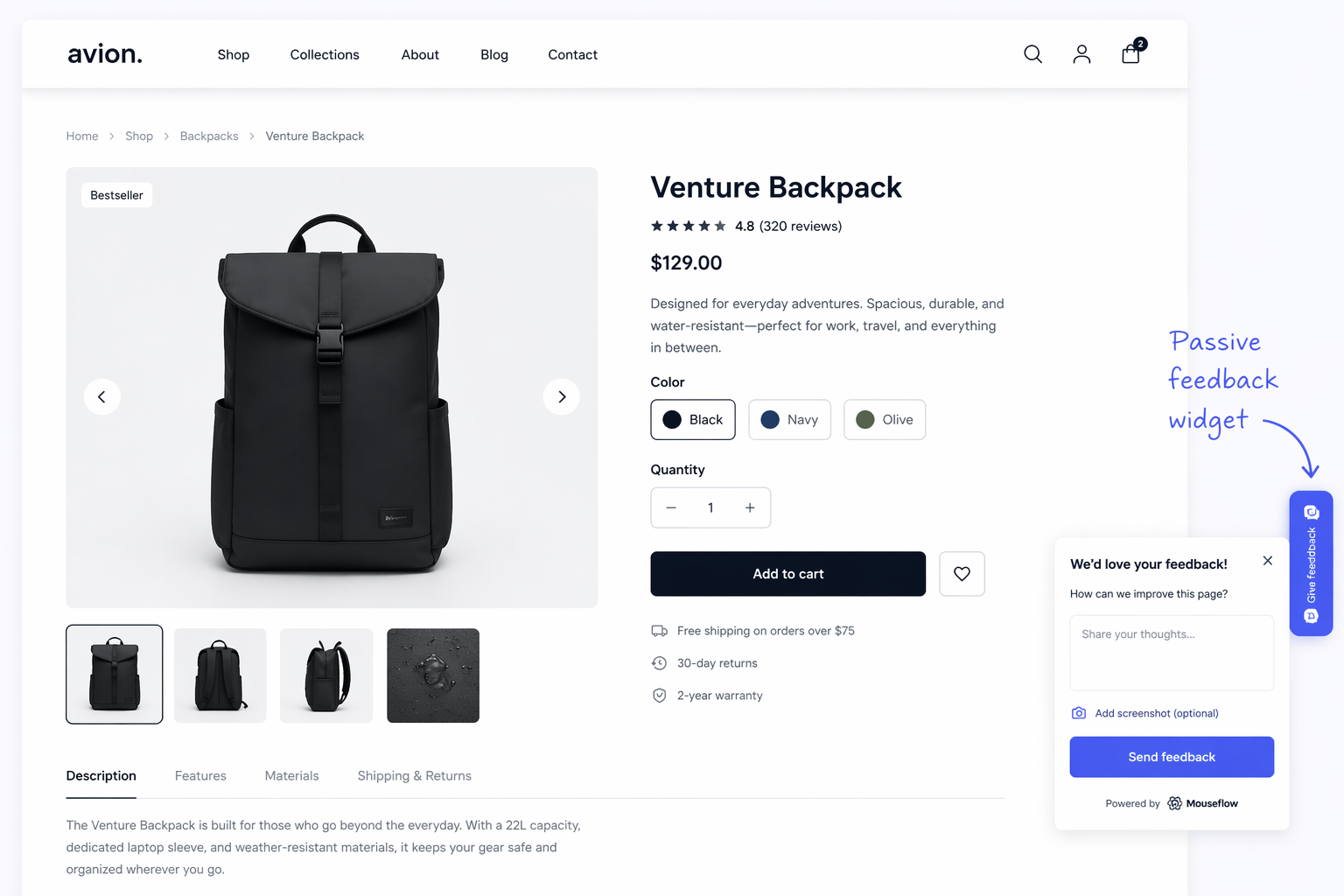
A fictional example of a Passive Feedback Widget.
Step 3: Write questions that get useful answers
The quality of your feedback depends entirely on the quality of your questions. For product pages, a few rules matter above all else:
- Ask about the page, not the product. You want page-level UX insights. “Is the information on this page enough to help you make a decision?” gives you more actionable answers than “What do you think of this product?”
- Keep it to one or two questions. Product pages are high-intent environments. Users want to evaluate a product, not fill out a form. Ask the most important thing first, and make the second question optional.
- Use open text for the ‘why’. Rating scales give you structure, but open-text answers give you language. The exact words your users use to describe their hesitation are gold for copywriting and UX diagnosis.
- Avoid leading questions. “How helpful did you find our product descriptions?” steers the respondent. “What information, if any, was missing from this page?” is neutral and surfaces real issues.
For a deeper look at question formats and survey design, see 30 Best Feedback Survey Questions to Ask Your Website Visitors.
Step 4: Connect feedback to behavioral data
Collecting feedback on your product pages is just the first step. The real power comes from combining what users say with what they do.
When a user says, “I couldn’t find the sizing guide,” and you watch their session replay to see them scrolling back and forth looking for it, you have everything you need to make a confident design change. No A/B test required.
This connection between qualitative feedback and behavioral analytics separates actionable insight from dashboard noise. In Mouseflow, every feedback response automatically links to the user’s session recording. You move from the answer to the behavior in a single click.
Look for these patterns as you combine your data sources:
- Feedback themes that match friction hotspots: If multiple users mention pricing confusion and your heatmap shows low engagement with the pricing section, that’s a clear signal.
- Feedback from users who converted vs. those who didn’t: Comparing these groups reveals what reassurance tipped the balance.
- Feedback that contradicts the data: Sometimes users say one thing and do another. That tension is always worth investigating.
Step 5: Prioritize and act on what you learn
Product page feedback generates a lot of ideas. Use a simple prioritization framework:
- Frequency: How many users mentioned this issue?
- Impact: Does this issue appear among users who abandoned, or those who converted?
- Effort: How hard is it to fix? A missing FAQ section is easier to add than a page redesign.
Start with high-frequency, high-impact, low-effort changes. These quick wins build momentum.After making a change, close the loop. Monitor your conversion metrics, run another round of feedback surveys, and compare the results.
Feedback is a continuous process, not a one-time exercise.
For a more detailed walkthrough of this iterative approach, including how to track survey performance metrics like response rate and impressions, see Learning to Use Feedback Surveys: Who, When, and What to Ask.
How Mouseflow brings it together
Mouseflow is the only platform that combines behavior-triggered feedback surveys with session replay, heatmaps, friction detection, and journey analytics in a single tool. You don’t need to stitch together multiple platforms to understand what users say and what they do.
On product pages specifically, you can:
- Trigger surveys based on real user behavior (scroll depth, exit intent, rage clicks).
- Watch the session replay linked to any feedback response.
- Compare feedback responses across user segments.
- Set up notifications so your team never misses a high-value response.