
- Introduction
- Why Running Feedback Surveys Matters
- Step 1: Define What You Want to Learn
- Step 2: Choose the Right Feedback Type
- Step 3: Set Up Your Feedback Survey
- Step 4: Choose When and Where to Trigger It
- Step 5: Collect and Organize Responses
- Step 6: Analyze the Feedback
- Step 7: Prioritize and Act
- Step 8: Share Findings Across Teams
- Putting It All Together: The Feedback Analysis Loop
- Start Collecting Better Feedback Today
- Want to go deeper? Explore more resources:

Introduction
Analyzing user feedback well starts with a clear goal and the right collection setup: choosing what type of feedback to gather, who to ask, and when to trigger it. Once responses come in, the real work is reading quantitative scores and qualitative themes together and connecting both to behavioral data to understand not just what users said, but what they actually experienced. From there, it’s about prioritizing what to fix, forming a testable hypothesis, making the change, and repeating the cycle.
This guide walks through each of those steps in detail.
For a full overview of what user feedback is, why it matters, and the metrics behind it, start with Mouseflow’s Ultimate Guide to User Feedback.
Why Running Feedback Surveys Matters
Before diving into the how, it’s worth being clear on the why.
User feedback adds a direct human voice to your behavioral data. Heatmaps show you where users click. Session recordings show you where they hesitate or drop off. A well-placed survey question “What stopped you from completing your purchase today?” gives you the user’s own words to go alongside it. Together, they build a far more complete picture than either source alone.
Here’s what feedback surveys unlock for different teams:
- Marketing can validate campaign ideas, understand audience sentiment, and catch messaging that misses the mark before it causes damage.
- Product teams use feedback to build iterative, lean development cycles, collecting input after every release to steer the next one.
- CRO and UX teams use feedback to surface friction points that quantitative data alone can’t explain, then design experiments to fix them.
- Customer success uses satisfaction scores like CSAT and NPS to monitor whether the experience is improving over time.
The bottom line: organizations that act on user feedback don’t just improve their product. They build relationships with their users and that loyalty compounds.
Step 1: Define What You Want to Learn
The most common mistake in feedback collection is starting with the tool, not the question. Before you create a single survey, get clear on what you’re trying to understand.
Ask yourself:
- Is there a specific page, flow, or feature I’m concerned about?
- Am I trying to measure sentiment broadly (NPS, CSAT), or identify a specific friction point?
- Who should I be asking: all visitors, or a specific segment?
Example: If you’ve noticed a high drop-off rate on your pricing page, the goal isn’t “collect feedback.” The goal is to understand what’s preventing visitors from moving forward. That clarity shapes everything: the question you ask, when you trigger it, and who sees it.
This step sounds obvious, but skipping it is why so many feedback programs generate data that no one acts on.
Step 2: Choose the Right Feedback Type
Not all feedback is the same. Understanding the types helps you choose the right method for your goal.
- Direct feedback is what users give you when you explicitly ask – surveys, NPS scores, CSAT ratings, and open-text questions. This is the most controllable and actionable type.
- Indirect feedback is what users volunteer without being prompted, reviews, social media posts, support tickets. It’s harder to systematize but rich with unsolicited honesty.
- Inferred feedback is drawn from behavioral data: heatmaps, session replays, scroll depth, rage clicks. Users don’t say anything, but their behavior tells a story.
The strongest analyses combine all three. A user who rage-clicks a button, submits a support ticket about the same issue, and then leaves a 2-star G2 review is giving you the same signal three times and you should be listening.
Read more about the different types of user feedback and when to use each one.
Step 3: Set Up Your Feedback Survey
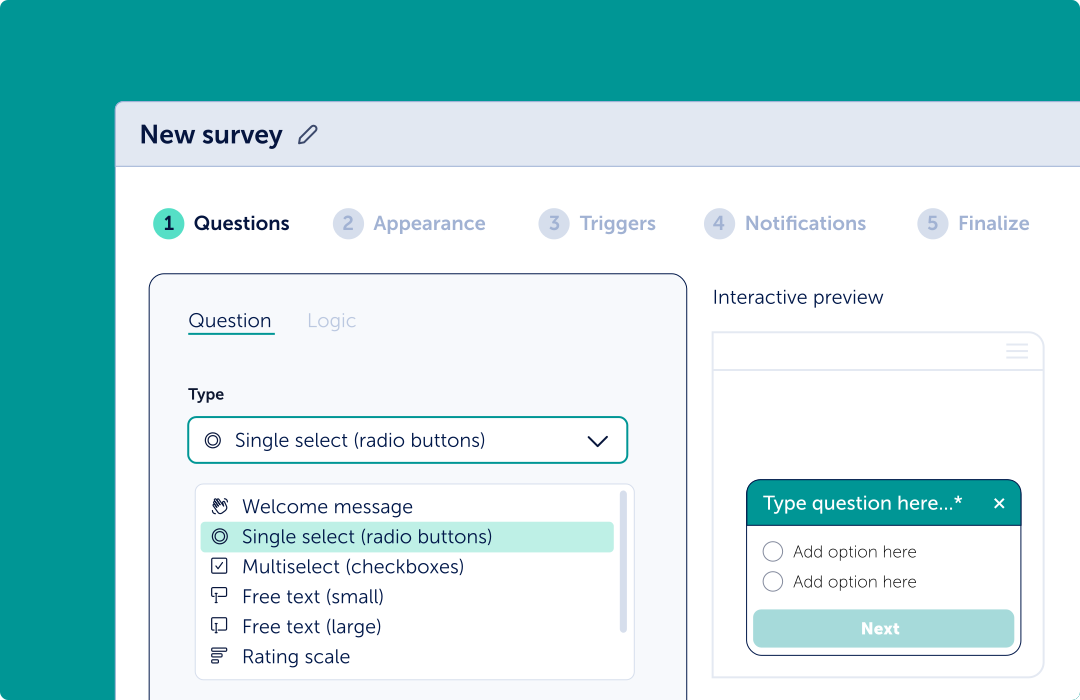
With a clear goal and the right type of feedback in mind, it’s time to build your survey. Mouseflow’s feedback survey tool supports multiple question types, welcome messages, emoji ratings, NPS, CSAT, open text, and yes/no or multiple choice, so you can match the format to what you’re actually trying to learn.
A few principles to keep front of mind as you build:
- Keep it short: Aim for 1 to 3 questions per survey. Completion rates drop sharply as length increases. If you need more depth, consider a follow-up email survey for engaged users rather than asking everything on-page.
- Ask unbiased questions: “Was your experience pleasant?” assumes it should be. “How would you rate your experience?” doesn’t. The phrasing of your questions shapes the answers you receive, so review each question for leading language before publishing. Avoid stuffing two questions into one they’ll produce unreliable answers.
- Use logic to personalize the flow: Mouseflow’s survey builder lets you add conditional logic, so a user who rates their experience poorly can be routed to a follow-up open-text question, while satisfied users see a different path. This keeps surveys relevant and reduces drop-off.
Need inspiration? Browse 30 ready-to-use feedback survey questions with suggested triggers and use cases.If you’re running feedback for a SaaS product specifically, the timing and question strategy differs from a standard website survey – check out Feedback for SaaS: What to Ask and When for a tailored approach.
Step 4: Choose When and Where to Trigger It
Timing is everything. A survey that appears the moment someone lands on your homepage is intrusive. A survey that appears after a user has spent 60 seconds reading your pricing page or just tried to exit is relevant.
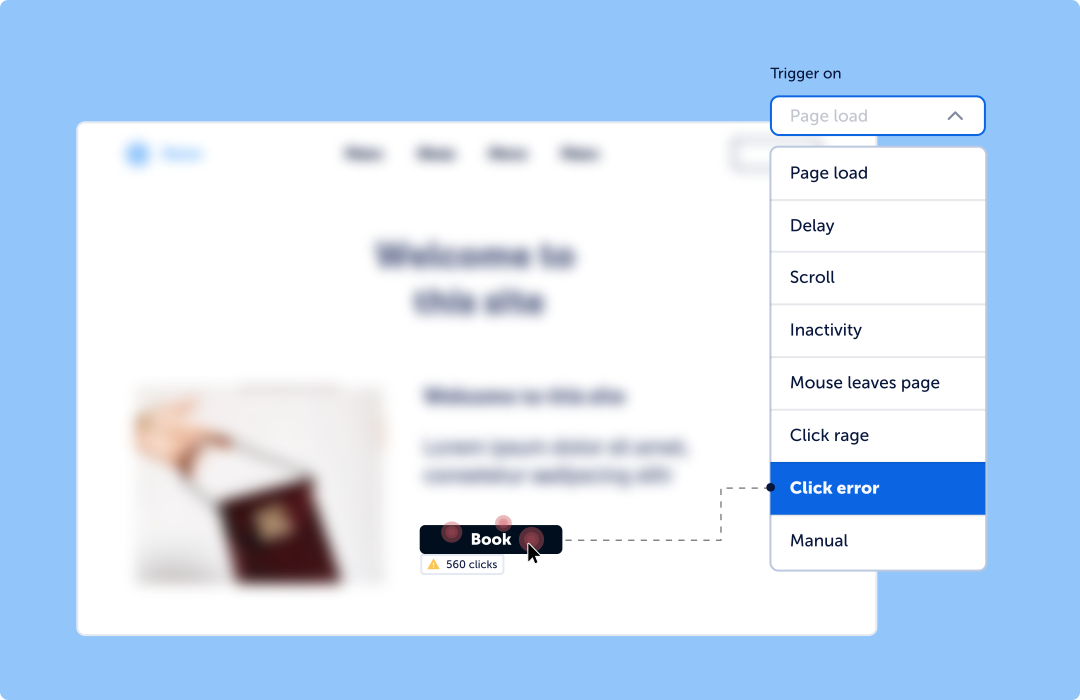
Mouseflow’s trigger options include:
- Page load: show the survey when a specific page is visited
- Exit intent: catch users as they move to leave
- Scroll depth: trigger after a user has engaged with a certain percentage of a page
- Click events: fire a survey after a user clicks a specific element
- Rage clicks or friction events: use Friction Detection as a survey trigger to catch users experiencing problems in real time
You can also control persistence (once per user vs. once per visit), the pages the survey appears on, and which visitor segments it targets. This precision is what separates useful feedback from background noise. A survey asking “Did you find what you were looking for?” only makes sense for users who didn’t convert, so segment accordingly.
For a deeper guide on who to target, when to ask, and how to sequence surveys, read Learning to Use Feedback Surveys.
Step 5: Collect and Organize Responses
Once your survey is live, responses start flowing in. Now comes the part most teams underinvest in: organizing the data so it’s actually usable.
- Centralize your feedback: If you’re collecting direct feedback via surveys, indirect feedback from reviews, and inferred feedback from session recordings, the worst outcome is having each living in a separate platform with no way to connect them.
Mouseflow solves part of this natively: every survey response is linked to the session in which it was submitted. That means you can click through from a negative CSAT score directly to the session replay that shows exactly what that user experienced. - Set up notifications: Use Mouseflow’s notification integrations (Slack, Microsoft Teams, or email) to route important feedback to the right team in real time. A low NPS score on a key funnel page shouldn’t wait until someone runs a weekly report.
- Tag and categorize open-text responses: Qualitative feedback is the hardest to analyze at scale, but it’s often the most valuable. As volume grows, consider tagging responses by theme: “pricing confusion,” “feature request,” “bug report,” “navigation issue.” This makes it possible to spot patterns and prioritize issues.
Step 6: Analyze the Feedback
Now you have data. The goal of analysis is to convert that data into hypotheses you can act on.
1 – Start with the quantitative layer: Look at your aggregate scores first: average NPS, CSAT distribution, completion rate.
These give you the headline how satisfied users are and whether that’s trending up or down.
- An NPS above 0 is generally acceptable; above 50 is excellent.
- CSAT is calculated as the percentage of respondents who gave 4 or 5 out of 5.
- If completion rate is low, your survey may be too long or showing to the wrong audience.
2 – Go deeper with qualitative responses: Once you’ve identified a pattern in the scores, open-text responses tell you why. Look for recurring themes, especially in negative responses. Negative feedback is more actionable than positive: it tells you what to fix, not just that something worked.
3 – Connect to behavioral data: This is where Mouseflow’s combined approach becomes a genuine differentiator. If you notice that CSAT scores are consistently lower among users who visited your form page, go watch session replays filtered to those users. Use Form Analytics to see which field is causing drop-offs. Check your heatmaps to see if a CTA is being ignored.
The correlation between what users say and what they do often reveals the root cause faster than either source alone.
Example: Users report confusion in open-text feedback about a form. Session replays show them skipping a required checkbox. Form analytics confirms that field has the highest abandonment rate. Three data sources, one clear problem, one obvious fix.
4 – Use AI to help at scale: When you have hundreds of open-text responses, manual analysis becomes impractical. AI tools can help you gauge sentiment, categorize themes, and generate summaries giving you a starting point for deeper review. Mouseflow’s Mina AI can surface insights from session data automatically, complementing your survey analysis.
Learn how to use sentiment analysis with AI to process qualitative feedback at scale.
Step 7: Prioritize and Act
Analysis without action is just documentation. The final and most important step is turning your findings into changes.
- Prioritize by impact and frequency: Not every piece of feedback deserves equal attention. Prioritize based on two dimensions: how often an issue appears, and how much impact it has on key metrics like conversion rate, NPS, or retention.
A bug that affects 5% of users but causes immediate checkout abandonment is higher priority than a feature request mentioned by 30% of users. - Form a hypothesis: Good feedback analysis leads directly to a testable hypothesis. Frame it as: “We believe [this change] will [have this effect] because [this feedback tells us why the current state is broken].”
This hypothesis becomes the foundation for an A/B test, a design iteration, or a development sprint.
Learn how to structure a CRO hypothesis from user feedback and behavioral data.
- Close the feedback loop: After making a change, collect feedback again on the same experience. Did scores improve? Did the open-text themes shift? This is the build-measure-learn loop in action and it’s what separates teams that improve continuously from those that make one-off fixes. A strong user feedback loop helps teams turn feedback into an ongoing optimization process rather than a one-time research activity.
Step 8: Share Findings Across Teams
User feedback is most powerful when it escapes the team that collected it.
- Product teams should hear from marketing about what audiences say in surveys.
- UX should know what customer success hears in support tickets.
- Leadership should see NPS and CSAT trends alongside revenue data.
Build a habit of sharing feedback summaries in team meetings, Slack channels, or a shared dashboard. Mouseflow’s integrations make it easy to push notifications into the tools your team already uses so feedback becomes a shared asset, not a siloed report.
Putting It All Together: The Feedback Analysis Loop
Here’s the full process in one view:
 Define what you want to learn
 Choose the right feedback type (direct, indirect, inferred)
 Set up your survey with the right questions and triggers
 Collect responses and organize them centrally
 Analyze quantitative score, qualitative theme, and behavioral data
 Prioritize based on frequency and impact
 Act with a clear hypothesis and testable change
 Repeat collect new feedback on the updated experience
This isn’t a one-time project. It’s a continuous system.
Start Collecting Better Feedback Today
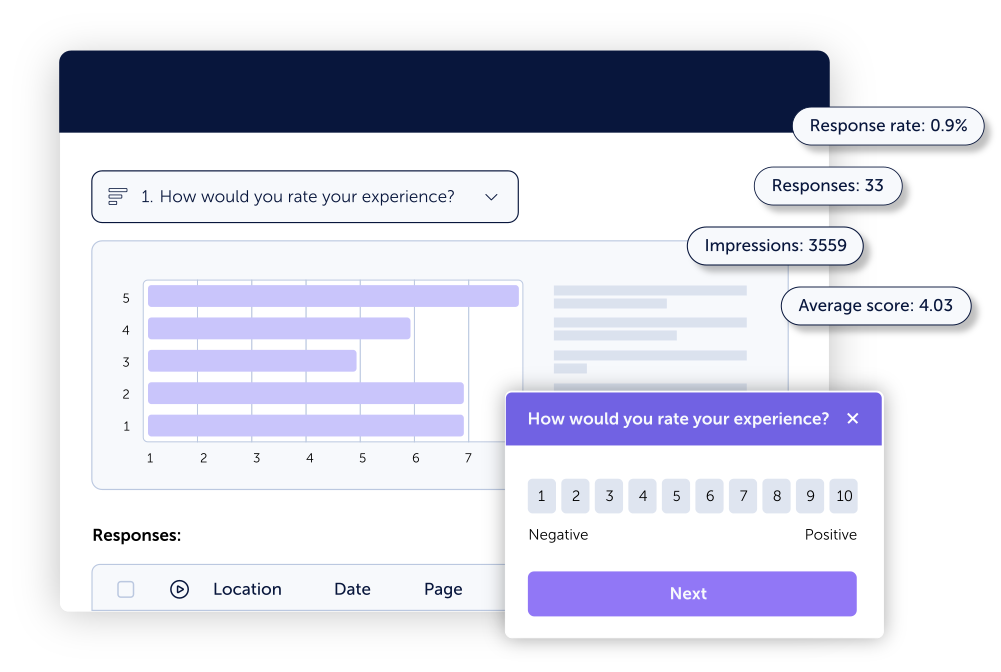
Mouseflow’s Feedback Surveys tool is built into the same platform as session replay, heatmaps, journey analytics, and friction detection so you can move seamlessly from what users say to what they actually do.
You can set up your first survey in minutes, trigger it on any user behavior, and watch responses come in alongside the full session context.
Want to go deeper? Explore more resources:
- The Ultimate Guide to User Feedback
- Types of User Feedback
- 30 Best Feedback Survey Questions
- Learning to Use Feedback Surveys: Who, When, and What to Ask
- How to Close the User Feedback Loop
- Feedback for SaaS: What to Ask and When
- How to Use Mouseflow’s Feedback Survey Tool (Video)
- Voice of the Customer Webinar
- How Cotopaxi Built a CRO Roadmap with User Feedback
- WP Engine: Improving Support with Feedback Surveys